# Stile Documentation (full)
> Complete documentation for Stile — age and identity verification API + widget. Index version: https://docs.stile.id/llms.txt
---
# Quickstart
Section: Getting Started
URL: https://docs.stile.id/getting-started/quickstart
> Publish a workflow, drop in the widget, and confirm results with a signed webhook — your first verified session in three steps.
Go from zero to your first verified session in three steps: publish a workflow, drop in the widget, confirm results with a signed webhook.
You need a Stile account, a publishable key, and a published workflow. Get all three from the
[dashboard](https://dashboard.stile.id). Prefer to delegate the whole integration to a coding
agent? Copy the starter prompt at the bottom of this page — it pins the agent to the current API
shape.
## How it fits together
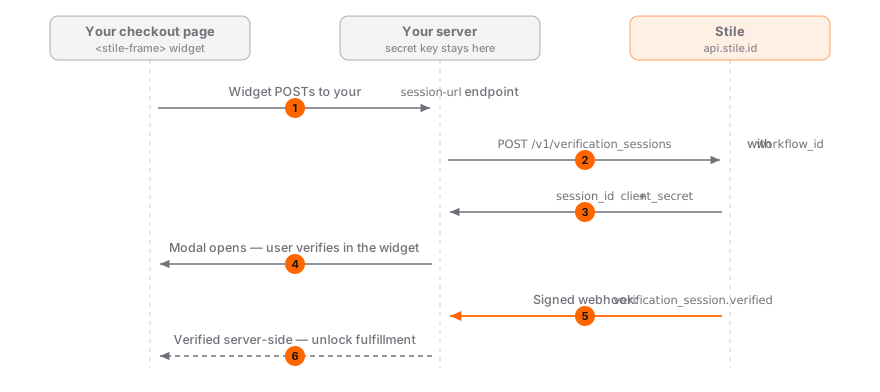
Your page never sees a secret, and fulfillment never trusts the browser — the secret key stays on your server, and the signed webhook is the source of truth:
## 1. Create a workflow
Every verification session runs inside a **workflow** — a dashboard-configured recipe that carries your use case (e.g. alcohol delivery), target jurisdictions, verification methods, and preferences. Compliance is resolved server-side from the workflow, so your frontend never decides age tiers or methods.
Go to [Workflows](https://dashboard.stile.id/workflows), create one for your use case, and **publish** it. Copy the workflow ID (`wf_...`) — you'll pass it to the widget. New to workflows? See the [Workflows concept guide](/concepts/workflows).
## 2. Add the widget
Include the Stile widget on your page. It's a standard web component — no build step required. The script registers ``, which renders a verify button (in `modal` mode) and runs the verification UI in an iframe on Stile's hosted page.
```html
```
The widget handles everything — session creation, jurisdiction detection, the verification flow, and result events.
The publishable-key snippet above creates the session straight from the browser — which works out
of the box in a [sandbox](/guides/testing) organization. In a **live** organization, browser-side
session creation with a publishable key requires a CAPTCHA, so use the backend **`session-url`**
flow for production: your server mints the session with a secret key (no CAPTCHA) and hands the
widget the `client_secret`. See the [`session-url`
contract](/sdks/widget#the-session-url-contract).
```tsx title="Checkout.tsx"
export function Checkout() {
const handleVerified = (e: CustomEvent) => {
console.log("Verified!", e.detail);
};
return (
);
}
```
```html title="checkout.html"
```
No JavaScript required. The widget blocks form submission until verified, then injects a hidden `stile_session_id` field automatically.
```html title="checkout.html"
```
Your server receives `stile_session_id` and `stile_verified` in the form body. Call `GET /v1/verification_sessions/:id` with your secret key to confirm the result.
With the npm package (`npm install @stile/widget`):
```ts title="verify.ts"
import { verify } from "@stile/widget";
const result = await verify({
publishableKey: "stile_pk_...",
workflowId: "wf_YOUR_WORKFLOW_ID",
email: "user@example.com",
});
console.log("Verified!", result.sessionId);
```
The publishable-key mode above is the fastest way to a working prototype, but it's being phased
out for production. For live traffic, point the widget at your own endpoint with
`session-url="/api/start-verification"` — your server creates the session with your secret key and
the widget opens instantly with the result. See the [Widget SDK](/sdks/widget) for the
`session-url` contract.
## 3. Confirm verification on your server (required)
The widget fires a client-side event when verification completes, but **client-side events can be spoofed**. You must set up a server-side webhook to confirm results before granting access.
**Step 1:** Go to [Webhooks](https://dashboard.stile.id/webhooks) in the dashboard and add your server's URL. Save the **webhook secret**.
**Step 2:** Create a webhook handler. The SDK handles signature parsing, the 5-minute timestamp tolerance, and timing-safe comparison — don't maintain hand-rolled crypto you can import. (On other stacks, grab a complete handler from [Webhook Verification](/guides/webhook-verification).)
```bash
npm install @stile/node
```
```ts title="app/api/webhooks/route.ts"
import Stile from "@stile/node";
const stile = new Stile(process.env.STILE_API_KEY!);
export async function POST(req: Request) {
// Verifies the signature, checks the 5-minute timestamp window,
// and parses the event — throws WebhookSignatureError on anything fishy.
const event = await stile.webhooks.fromRequest(
req,
process.env.STILE_WEBHOOK_SECRET!,
);
if (event.type === "verification_session.verified") {
// Grant access, update your database, etc.
}
return Response.json({ received: true });
}
```
Only for Node apps that can't take a dependency — otherwise use `@stile/node` and skip
maintaining this:
```ts title="app/api/webhooks/route.ts"
import { createHmac, timingSafeEqual } from "node:crypto";
const SECRET = process.env.STILE_WEBHOOK_SECRET!;
export async function POST(req: Request) {
const rawBody = await req.text();
const sig = req.headers.get("stile-signature") ?? "";
// Parse t= and v1= from the header
const parts = sig.split(",");
const ts = parts.find((p) => p.startsWith("t="))?.slice(2);
const v1 = parts.find((p) => p.startsWith("v1="))?.slice(3);
if (!ts || !v1) return new Response("Bad signature", { status: 400 });
if (Math.abs(Date.now() / 1000 - Number(ts)) > 300)
return new Response("Expired", { status: 400 });
const expected = createHmac("sha256", SECRET)
.update(`${ts}.${rawBody}`)
.digest("hex");
if (!timingSafeEqual(Buffer.from(v1, "hex"), Buffer.from(expected, "hex")))
return new Response("Invalid", { status: 400 });
const event = JSON.parse(rawBody);
if (event.type === "verification_session.verified") {
// Grant access, update your database, etc.
}
return Response.json({ received: true });
}
```
On Python? This complete handler is maintained as part of the docs and matches the current
signing scheme:
```python title="webhooks.py"
import hmac, hashlib, time, json, os
from flask import Flask, request, jsonify
app = Flask(__name__)
SECRET = os.environ["STILE_WEBHOOK_SECRET"]
@app.route("/webhooks", methods=["POST"])
def handle_webhook():
raw_body = request.get_data(as_text=True)
sig = request.headers.get("stile-signature", "")
parts = dict(p.split("=", 1) for p in sig.split(",") if "=" in p)
ts, v1 = parts.get("t"), parts.get("v1")
if not ts or not v1:
return "Bad signature", 400
if abs(time.time() - int(ts)) > 300:
return "Expired", 400
expected = hmac.new(SECRET.encode(), f"{ts}.{raw_body}".encode(), hashlib.sha256).hexdigest()
if not hmac.compare_digest(v1, expected):
return "Invalid", 400
event = json.loads(raw_body)
if event["type"] == "verification_session.verified":
pass # Grant access
return jsonify(received=True)
```
Respond `2xx` as soon as you've queued the work — do the heavy lifting (database writes, emails, fulfillment) after acknowledging, so retries don't pile up behind a slow handler.
That's it — you have age verification working. The workflow carries the compliance rules, the widget runs the verification flow, and your server confirms the result via signed webhook.
Your **publishable key** (`stile_pk_…`) goes in the frontend widget. Your **secret API key**
(`stile_sk_…`) stays on your server. See [Authentication](/getting-started/authentication) for
details.
Live (non-sandbox) organizations require at least one active webhook endpoint before sessions can
be created. Sandbox organizations are exempt and work without webhooks for development — capped at
500 sandbox sessions per calendar month. This ensures verification results are always confirmed
server-side in production. The free tier covers 100 verifications/month by default.
Prefer to delegate the whole integration to a coding agent? This starter prompt pins the agent
to the current API shape — adjust the stack to yours:
```text
You are integrating Stile age verification (docs: https://docs.stile.id/llms-full.txt).
My stack: Next.js App Router + TypeScript, deployed on Vercel.
My workflow ID: wf_YOUR_WORKFLOW_ID (already published in the Stile dashboard).
Build:
1. A POST /api/start-verification route that creates a verification session
with @stile/node using STILE_API_KEY, passing { type: "age",
workflow_id, email }, and returns { session_id, client_secret, methods,
age_tier } — this is the widget's session-url contract.
2. A checkout page that loads https://js.stile.id/v1/stile.js and renders
.
3. A POST /api/webhooks route that verifies the Stile-Signature header with
stile.webhooks.fromRequest() and STILE_WEBHOOK_SECRET, and marks the
order verified on verification_session.verified.
Rules: never trust the client-side stile:verified event for fulfillment —
only the signed webhook. Use stile_sk_ keys; test against the
500/month sandbox quota in a sandbox org. Never expose the secret key to
the browser.
```
For `llms.txt`, the full-corpus docs file, and the OpenAPI spec, see
[Build with AI](/getting-started/llms).
## Next steps
---
# Integration Guide
Section: Getting Started
URL: https://docs.stile.id/getting-started/integration-guide
> Everything you need to build a production-ready integration — session-url architecture, workflows, compliance checks, returning users, VPN detection, and webhook-gated checkout.
This is the production companion to the [Quickstart](/getting-started/quickstart): how the frontend and backend split responsibilities, how workflows and compliance decide what each user must prove, and the patterns — webhook-gated checkout, returning-user reuse, mismatch detection — that keep real traffic safe. If you haven't shipped your first verified session yet, start with the Quickstart.
## Architecture overview
Every Stile integration has two parts:
1. **Frontend** — the widget handles the user-facing verification flow (compliance checks, session creation, QR codes, modals)
2. **Backend** — your server creates sessions with your secret key and receives signed webhooks confirming verification results

The widget fires a `stile:verified` event when the user completes verification, but this can be spoofed. Always confirm verification via a signed server-side webhook before granting access, processing orders, or unlocking content.
**Live orgs enforce this** — session creation requires at least one active webhook endpoint on your organization. Sandbox orgs are exempt and work without webhooks for development.
The widget can obtain a session three ways. Pick `session-url` for production:
| Mode | How it works | Use it for |
| ----------------------------------------- | ---------------------------------------------------------------------------------------------------------------------- | ---------------------------------------------------------------- |
| `session-url` (recommended) | The widget POSTs to an endpoint on your server, which creates the session with your secret key and returns the secret. | Production. |
| Pre-minted `client-secret` + `session-id` | Your backend creates the session inside an existing request and hands the credentials to the widget. | Flows where session creation is part of your own business logic. |
| `publishable-key` + `workflow-id` | The widget creates the session directly from the browser. | Prototyping only — being phased out for production. |
### Widget + session-url (recommended)
The widget POSTs to a small endpoint on your backend, which creates the session with your secret key and returns the `client_secret`. Your server also has a webhook handler to confirm results.
The contract is small: the widget POSTs `{ workflowId?, email?, jurisdiction? }` to your endpoint and expects `{ session_id, client_secret, methods?, age_tier? }` back. Both `` (npm) and `` (CDN) support `session-url` — and `` prefetches the session in the background on mount, so the modal opens instantly on click.
```html
```
```ts
// Backend: mint the session (called by the widget)
app.post("/api/start-verification", async (req, res) => {
const session = await stile.verificationSessions.create({
type: "age",
workflow_id: req.body.workflowId,
email: req.body.email,
jurisdiction: req.body.jurisdiction,
});
res.json({
session_id: session.id,
client_secret: session.client_secret,
methods: session.methods,
age_tier: session.age_tier,
});
});
// Backend: webhook confirms verification
app.post("/webhooks", async (req, res) => {
const event = await stile.webhooks.fromRequest(req, WEBHOOK_SECRET);
if (event.type === "verification_session.verified") {
await db.orders.update({ where: { sessionId: event.data.id }, data: { ageVerified: true } });
}
res.json({ received: true });
});
```
### Server-side session creation (advanced)
For complex flows, your backend creates sessions via the API as part of an existing request and passes the `client_secret` to the frontend. This lets you run custom business logic (compliance checks, cart validation, fraud screening) before verification starts.
```ts
// Backend: check compliance, create session, return client_secret
const compliance = await stile.compliance.check({
use_cases: ["alcohol_delivery"],
});
const session = await stile.verificationSessions.create({
type: "age",
workflow_id: "wf_YOUR_WORKFLOW_ID",
});
// Pass session.client_secret + session.id to your frontend
// ( or create() picks them up)
// Still confirm via webhook — don't trust the frontend
```
## Workflows
Every session runs inside a **workflow** — `workflow_id` is required on session creation. Workflows are authored and published in the [dashboard](https://dashboard.stile.id/workflows) and are the single source of truth for:
- The **use case** (e.g. `alcohol_delivery`) that compliance rules are resolved from
- The **verification methods** and how they compose (an explicit `methods` array on the request is rejected with a validation error)
- **Target jurisdictions** and per-jurisdiction overrides
- Preferences like the returning-user OTP gate
This means changing your verification recipe is a dashboard edit, not a deploy. Create separate workflows for separate use cases (e.g. one for alcohol checkout, one for account signup).
## How compliance works
When Stile resolves the use case (from the session's workflow, or from `use_cases` on the Compliance API), it automatically:
1. **Detects the user's jurisdiction** from their IP address (Cloudflare headers, geo-IP)
2. **Looks up the regulatory rules** for your products in that jurisdiction
3. **Determines the required age tier** (e.g., 21+ for alcohol, 18+ for adult content)
4. **Filters verification methods** to only those allowed in that jurisdiction (e.g., removes mDL in states that don't recognize it)
5. **Flags prohibited products** (e.g., cannabis delivery in states where it's illegal)
You don't need to know what age is required in each state — Stile handles it.
Session creation takes a `workflow_id` — the use case lives on the workflow. The [Compliance
API](/api-reference/compliance) is the one surface that takes `use_cases` directly, because it
answers product-level questions before any session exists.
### Mixed carts
If your customer has multiple product types in their cart (e.g., alcohol + nicotine), check them together with the Compliance API:
```ts
const compliance = await stile.compliance.check({
use_cases: ["alcohol_delivery", "tobacco_nicotine"],
});
// compliance.most_restrictive gives you the merged result:
// - Highest age tier across all products
// - Intersection of allowed methods
// - Which products are prohibited
```
For widget integrations, configure the workflow with the use case that covers your catalog (or the most restrictive one you sell). If your carts mix product types dynamically, run the compliance check on your backend inside your `session-url` endpoint and pick the workflow accordingly.
The system resolves the **most restrictive** rules across all products. If alcohol requires 21+ and nicotine requires 21+, the session verifies for 21+. If one product is prohibited, the response tells you which one so you can handle it in your checkout.
### Prohibited products
Some products are illegal in certain jurisdictions (e.g., cannabis delivery in many states). The Compliance API flags these:
```ts
const compliance = await stile.compliance.check({
use_cases: ["alcohol_delivery", "cannabis_delivery"],
jurisdiction: "US-ID", // Idaho
});
if (compliance.most_restrictive.any_prohibited) {
// compliance.most_restrictive.prohibited_use_cases → ["cannabis_delivery"]
// Remove from cart or show error to user
}
```
With a widget integration, the session's workflow carries the use case — if it's prohibited in the user's jurisdiction, session creation fails with a `422 use_case_prohibited` error and the widget surfaces it. For mixed carts, check compliance on your backend first and remove prohibited items before starting verification.
## Returning users
When a user has previously verified on your site (or another site in the Stile network), they can skip re-verification. This is handled automatically:
1. **Widget flow:** Pass the user's email. If they're already verified, the widget resolves instantly — no modal, no QR code.
2. **Server-side flow:** Use `accept_existing: true` with the user's email.
```html
```
Under the hood this is a three-tier ladder: a VP token cached in the user's browser resolves instantly; failing that, an email/phone lookup plus a one-time code proves the user controls the address; only then does a full verification run. The OTP proves email ownership — never age or identity. See [Returning Users](/guides/returning-users) for the full flow.
### Credential validity
Verification credentials don't last forever. Each product type has a `credential_validity_days` set by jurisdiction rules — for example, gambling credentials may expire after 30 days, while alcohol credentials last 365 days. When a credential expires, the user must re-verify.
This is automatic — the lookup filters out expired credentials, so stale verifications are never reused.
### Age tier compatibility
Credentials are scoped to the age tier they were verified for. A credential verified for social media (16+) **cannot** be reused for alcohol (21+). A credential verified for alcohol (21+) **can** be reused for social media (16+) since 21 > 16.
## VPN and geolocation mismatch detection
If you know the user's shipping address, you can pass it to detect discrepancies between the delivery location and the user's IP address:
```ts
const session = await stile.verificationSessions.create({
type: "age",
workflow_id: "wf_YOUR_WORKFLOW_ID",
delivery_jurisdiction: "US-OR", // from shipping address
});
if (session.jurisdiction_mismatch) {
// User's IP is in US-CA but shipping to US-OR
// Flag for review, show warning, or block
console.warn(`IP: ${session.ip_jurisdiction}, Delivery: US-OR`);
}
```
```json
{
"jurisdiction": "US-CA",
"ip_jurisdiction": "US-CA",
"jurisdiction_mismatch": true
}
```
This is purely informational — Stile flags the mismatch but doesn't block the session. Your application decides how to handle it.
When `jurisdiction_mismatch` is `true`, consider:
- Showing a warning to the user asking them to disable their VPN
- Requiring a higher-assurance verification method (e.g., document capture instead of self-attestation)
- Logging the mismatch for fraud review
- Blocking the transaction if your compliance requirements demand it
`delivery_jurisdiction` is optional. If you don't pass it, the mismatch fields are omitted from
the response.
## Data retention and privacy
Stile automatically purges personal data based on jurisdiction-specific retention rules:
- **Collected PII** (names, dates of birth, addresses) — purged after `data_retention_days`
- **Document images** (ID scans) — purged after `document_image_retention_days`
- **Biometric data** (face match scores) — purged after `biometric_retention_days`
These limits are set by the compliance rules for each jurisdiction. For example, California (CCPA) may require 30-day PII retention limits, while Illinois (BIPA) sets 3-year limits for biometric data.
Verification credentials (the record that a user verified) are **not affected** by data retention — they persist until their `credential_validity_days` expires. This means returning users can still skip re-verification even after their raw PII has been purged.
## Webhook-gated checkout (recommended pattern)
For e-commerce, the recommended pattern is **webhook-gated checkout** — don't trust the client-side `stile:verified` event alone. Treat webhook delivery as the source of truth, and use the client-side event only to kick off confirmation:
### Widget fires the client-side event
When the user completes verification, the widget fires `stile:verified`. Your frontend sends the session ID to your server and starts polling for confirmation.
### Server receives the webhook
Stile sends a signed `verification_session.verified` webhook to your server. Your server verifies the signature, then marks the order as age-verified.
### Frontend polls for confirmation
Your frontend polls your server until it confirms the webhook was received. Only then does the checkout proceed.
This ensures that even if someone manipulates the client-side event, the order only proceeds after server-side webhook confirmation.
```ts title="Server webhook handler"
app.post("/api/webhooks", async (req, res) => {
const event = await stile.webhooks.fromRequest(req, WEBHOOK_SECRET);
if (event.type === "verification_session.verified") {
// Mark order as age-verified in your database
// For heavier work than a single update, queue the job and respond 2xx first
await db.orders.update({
where: { sessionId: event.data.id },
data: { ageVerified: true },
});
}
res.json({ received: true });
});
```
Your endpoint has 30 seconds to respond before a delivery counts as failed. Acknowledge first,
then do the heavy lifting (database writes, emails, fulfillment) — failed deliveries are retried
on a backoff schedule, so a slow handler turns one event into several deliveries — dedupe on the
event id. See the [Webhooks guide](/guides/webhooks) for delivery semantics and retries.
## Error handling
A handful of error codes come up specifically during integration. The full catalog, the error envelope, and retry strategies live in the [Error Handling guide](/guides/error-handling).
| Code | Status | When it happens |
| ------------------------------ | ------ | --------------------------------------------------------------------------------------------------------------------------------------------------------------------- |
| `webhook_required` | 400 | Creating a session on a live org with no active webhook endpoint on your organization. Add one at [dashboard.stile.id/webhooks](https://dashboard.stile.id/webhooks). |
| `use_case_prohibited` | 422 | The workflow's use case is prohibited in the user's resolved jurisdiction. |
| `jurisdiction_unresolvable` | 422 | The user's jurisdiction can't be determined from their IP. See below. |
| `accept_existing_rate_limited` | 429 | Too many `accept_existing` attempts for one email. See below. |
| `test_quota_exceeded` | 402 | A sandbox org has hit its 500-session cap for the calendar month. The quota resets on the 1st. |
### Jurisdiction unresolvable
If Stile can't determine the user's jurisdiction from their IP (both geolocation providers fail), the API returns a `422` with code `jurisdiction_unresolvable`. Pass `jurisdiction` explicitly to resolve this:
```ts
const session = await stile.verificationSessions.create({
type: "age",
workflow_id: "wf_YOUR_WORKFLOW_ID",
jurisdiction: "US-CA", // explicit override
});
```
This only happens for public IPs when both geolocation services are down — it's extremely rare. In local development, the system defaults to "US".
### Rate limiting on accept_existing
To prevent credential enumeration attacks, `accept_existing` is rate-limited to 5 attempts per email per 15-minute window. If exceeded, the API returns `429` with code `accept_existing_rate_limited`.
## Next steps
---
# Authentication
Section: Getting Started
URL: https://docs.stile.id/getting-started/authentication
> How Stile API keys work — publishable vs. secret, sandbox mode, rate limits, and zero-downtime key rotation.
Every request to the Stile API is authenticated with an API key. This page covers the two key types and what each is allowed to do, how sandbox mode lets you build and test, the rate limits that apply per key, and how to rotate a key without downtime.
## Key types
Stile uses two types of API keys, each with a specific purpose:
| Key type | Prefix | Where to use | Purpose |
| --------------- | -------------- | -------------------------- | ------------------------------------------------------------------------------------------------------------------------------------------------------------------------------------------------------- |
| Publishable key | `stile_pk_...` | Frontend (safe to expose) | Used by the [widget](/sdks/widget)'s legacy publishable-key mode to create sessions from the browser — deprecated; see [Publishable keys and session creation](#publishable-keys-and-session-creation). |
| Secret key | `stile_sk_...` | Server only (never expose) | Full API access — create sessions, manage webhooks, read events, and verify webhook signatures. |
Create and manage your keys in the [dashboard](https://dashboard.stile.id/api-keys).
### Anatomy of a key
Every key encodes its role in the prefix, so you can tell what a key is — and what it's allowed to touch — at a glance, in code review or in a log line:
| Segment | Meaning |
| ---------------- | -------------------------------------------------------------------------------------- |
| `stile_` | All Stile keys share this prefix — easy to grep for and to wire into secret scanners. |
| `pk` / `sk` | The role: **p**ublishable **k**ey (frontend-safe) or **s**ecret **k**ey (server-only). |
| Everything after | The secret itself. For secret keys it's shown once at creation — store it immediately. |
Secret API keys (`stile_sk_...`) grant full access to your organization. Never commit them to
source control, include them in frontend code, or log them. Store them in environment variables.
Publishable keys (`stile_pk_...`) are safe to include in your HTML.
## Sandbox mode
Every organization is **live** by default — there's no separate test key. To build and test without running real verifications, enable **sandbox mode** on a dedicated testing organization (an org-level setting; turn it on from your dashboard org settings or by contacting support).
In a sandbox organization:
- `skip_verification: true` instantly mints a verified session — no camera, ID, or liveness check — fires real webhooks, and issues a VP token. See the [testing guide](/guides/testing).
- Sessions are **unbilled**, and a [webhook endpoint](/guides/webhooks) is **not required**.
- Usage is capped at **500 verifications per calendar month**; requests over the cap return `402 test_quota_exceeded`.
A **live** (non-sandbox) organization runs real identity verification, rejects `skip_verification` (`400 parameter_invalid`), and requires at least one active [webhook endpoint](/guides/webhooks) before sessions can be created (the API returns `400 webhook_required` otherwise) — this ensures verification results are always confirmed server-side.
The first 100 verifications per calendar month are free (100/month by default, per organization).
Beyond that, usage is billed via prepaid credits. Failed verifications are never charged and don't
count against the free allotment.
## Making API requests
Pass your **secret key** in the `Authorization` header as a Bearer token. With the Node.js SDK, set the key once — it's sent automatically with every request.
```bash
curl https://api.stile.id/v1/verification_sessions \
-H "Authorization: Bearer stile_sk_YOUR_API_KEY" \
-H "Content-Type: application/json"
```
```ts
import Stile from "@stile/node";
const stile = new Stile(process.env.STILE_API_KEY!);
```
Requests with a missing, malformed, or revoked key return `401` with an `authentication_error` of code `api_key_invalid`. See the [error handling guide](/guides/error-handling) for the full error envelope.
If you're using the [widget](/sdks/widget) with a publishable key, you don't need to make API
calls yourself — the widget handles session creation automatically. The API is for advanced use
cases like server-side session management, reading events, or managing webhook endpoints
programmatically.
## Publishable keys and session creation
Publishable keys can create verification sessions directly from the browser, but this path is **deprecated** — responses carry a `Stile-Deprecation: publishable-key-session-create` header, and organizations can be migrated to backend-created sessions (after which the call returns `403 publishable_session_create_blocked`). Prefer the widget's `session-url` mode, where your server creates the session with a secret key and hands the `client_secret` to the widget.
If you do create sessions with a publishable key from the browser, a Cloudflare Turnstile `captcha_token` is required on the request — this defends the pk-only flow against stolen-key replay. Requests without it fail with `400 captcha_required`. Secret keys don't need it.
## Rate limits
Requests are rate-limited per API key on a per-minute rolling window — **1,000 requests/minute** for secret keys and **100/minute** for publishable keys (which are browser-exposed).
Every response includes rate limit headers:
```bash
X-RateLimit-Limit: 1000
X-RateLimit-Remaining: 997
X-RateLimit-Reset: 1741564920 # Unix timestamp of window reset
```
When you exceed the limit, the API returns `429 Too Many Requests` with a `Retry-After` header indicating how many seconds to wait. Retry after that interval with exponential backoff — the [error handling guide](/guides/error-handling) has a reference implementation.
## Rotating keys
Rotation is a create-then-revoke flow, so both keys stay valid while you roll over — there's no forced cutover and no downtime.
### Create a replacement key
In the [dashboard](https://dashboard.stile.id/api-keys), create a new key of the same type (publishable or secret) as the one you're replacing. The old key keeps working until you revoke it.
### Store the new secret
The secret is only shown once at creation — copy it into your secrets manager immediately.
### Deploy with the new key
Update your environment variables (e.g. `STILE_API_KEY`) and redeploy your application.
### Revoke the old key
Once all traffic is on the new key, revoke the old one in the dashboard. Any straggler requests still using it will fail with `401 api_key_invalid` — a useful signal that something wasn't redeployed.
## Next steps
---
# Build with AI
Section: Getting Started
URL: https://docs.stile.id/getting-started/llms
> Feed the Stile docs to your AI assistant or coding agent — llms.txt, a full-corpus file, and the OpenAPI spec.
Most Stile integrations are now written with an AI assistant in the loop. These docs are published in machine-friendly formats so your assistant works from the real API surface instead of guessing:
| Resource | URL | What it is |
| ---------------- | ------------------------------------------------------------------ | ----------------------------------------------------------------------------------------------- |
| `llms.txt` | [docs.stile.id/llms.txt](https://docs.stile.id/llms.txt) | Index of every docs page with descriptions, per the [llms.txt](https://llmstxt.org) convention. |
| `llms-full.txt` | [docs.stile.id/llms-full.txt](https://docs.stile.id/llms-full.txt) | The entire documentation as one markdown file — fits comfortably in modern context windows. |
| OpenAPI 3.1 spec | [docs.stile.id/openapi.yaml](https://docs.stile.id/openapi.yaml) | Machine-readable schema for every endpoint, request, and response. |
## Using them
**Coding agents (Claude Code, Codex, Cursor, Copilot Workspace)** — point the agent at `https://docs.stile.id/llms-full.txt` in your prompt, or download it into the repo so it's part of the agent's searchable context:
```bash
curl -o docs/stile-docs.md https://docs.stile.id/llms-full.txt
```
**Chat assistants (Claude, ChatGPT)** — paste the contents of `llms-full.txt` into the conversation (or attach it as a file), then describe your stack and what you're building.
**Cursor** — add `https://docs.stile.id/llms-full.txt` as a custom docs source (`Settings → Indexing & Docs`), then reference it with `@Docs` in chat.
**SDK generators and API tooling** — consume `https://docs.stile.id/openapi.yaml` directly.
## Starter prompt
A prompt that reliably produces a working integration — adjust the stack to yours:
```text
You are integrating Stile age verification (docs: https://docs.stile.id/llms-full.txt).
My stack: Next.js App Router + TypeScript, deployed on Vercel.
My workflow ID: wf_YOUR_WORKFLOW_ID (already published in the Stile dashboard).
Build:
1. A POST /api/start-verification route that creates a verification session
with @stile/node using STILE_API_KEY, passing { type: "age",
workflow_id, email }, and returns { session_id, client_secret, methods,
age_tier } — this is the widget's session-url contract.
2. A checkout page that loads https://js.stile.id/v1/stile.js and renders
.
3. A POST /api/webhooks route that verifies the Stile-Signature header with
stile.webhooks.fromRequest() and STILE_WEBHOOK_SECRET, and marks the
order verified on verification_session.verified.
Rules: never trust the client-side stile:verified event for fulfillment —
only the signed webhook. Use stile_sk_ keys and test against the
500/month test quota. Never expose the secret key to the browser.
```
The API requires `workflow_id` on every session and rejects a per-request `methods` array — models
trained on older API shapes sometimes invent `use_case` or `products` parameters. If the generated
code passes those, it predates the workflow model; re-point the assistant at the docs above.
## Next steps
---
# Workflows
Section: Concepts
URL: https://docs.stile.id/concepts/workflows
> A workflow is the dashboard-configured recipe every verification session runs inside — it decides the use case, the methods, the jurisdictions, and the outcome.
Every verification session runs inside a **workflow**. A workflow is a recipe you author and publish in the [dashboard](https://dashboard.stile.id/workflows): it carries the use case, the verification methods to offer, the jurisdictions you operate in, and the preferences that shape each check. Your server passes a `workflow_id` when it creates a session, and Stile resolves everything else from the published workflow — so compliance, method selection, and age tiers are decided server-side, never in your frontend.
Putting the verification recipe in a workflow means you change it in one place — the dashboard —
without shipping code. It's also why `POST /v1/verification_sessions` requires `workflow_id` and
**rejects** a per-request `methods` array: the published workflow is the single source of truth
for which methods run.
## What a workflow carries
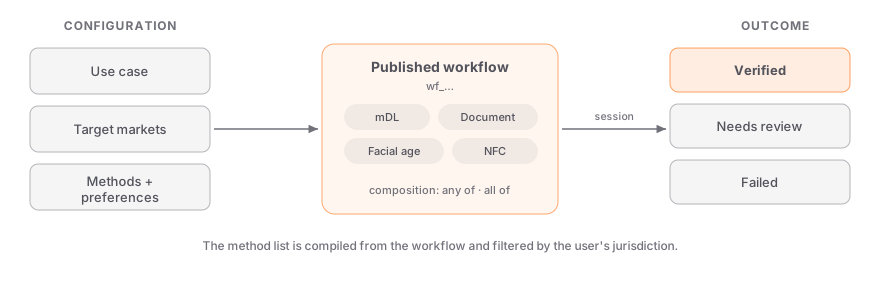
| Element | What it controls |
| ------------------------ | ----------------------------------------------------------------------------------------------------------------- |
| **Use case** | The product or context being gated (e.g. alcohol delivery). Drives the compliance rule and the required age tier. |
| **Target jurisdictions** | The markets you operate in. The method list is filtered per jurisdiction at session time. |
| **Methods** | Which [verification methods](/concepts/verification-methods) the session may offer. |
| **Composition** | Whether the user completes **one** primary method or **all** of them (see below). |
| **Preferences** | Tuning such as the liveness strategy and when a face match is required. |
| **Outcome** | The terminal state — verified, failed, or routed to manual review. |
The session's `methods` array is **compiled** from this configuration and the compliance rule for the user's detected jurisdiction — for example, mDL is dropped automatically in markets that don't recognize digital driver's licenses, even if the workflow lists it.
## Two ways to build a workflow
Workflows come in two modes. Most integrations only ever need the first.
A **simple** workflow starts from the rule-accepted baseline for your use case and target markets, then lets you curate it: add methods, remove methods, and set per-jurisdiction overrides for markets that need a different mix. It's the fastest path to a compliant flow and covers the large majority of use cases.
Per-jurisdiction overrides let one workflow serve many markets — e.g. accept mDL everywhere it's recognized, fall back to document capture where it isn't.
A **node-based** workflow is a visual graph for flows that need branching. You wire together verification steps, branch nodes that route on conditions (the previous step's result, risk level, age tier, jurisdiction, or your own session metadata), and terminal status nodes (verified, failed, or review).
Reach for this when the path through verification should change based on what happens mid-flow — for example, escalating to a stronger method when a risk signal fires.
## Method composition
In a simple workflow, **composition** decides how the primary methods relate:
- **Any of** (default) — the user picks one primary method, and passing it verifies the session. Best for choice and conversion.
- **All of** — the user must complete every primary method in the flow. Best for high-assurance use cases that stack independent checks.
Supplementary layers — liveness, face match, and signal checks like carrier lookup — always run regardless of the composition setting; they're added on top of the primary chain.
## Publishing and versioning
A workflow only takes effect once it's **published**. Sessions always run the published version, so you can edit a draft freely without affecting live traffic, then publish when you're ready. The `workflow_id` you pass at session creation always resolves to the current published version.
Create test-mode sessions against a workflow (with `skip_verification` for end-to-end webhook
testing) before pointing live traffic at it. See [Testing & Sandbox](/guides/testing).
## Using a workflow
Pass the published workflow's ID when you create a session — that's the only required field beyond `type`:
```bash
curl https://api.stile.id/v1/verification_sessions \
-H "Authorization: Bearer stile_sk_..." \
-H "Content-Type: application/json" \
-d '{ "type": "age", "workflow_id": "wf_YOUR_WORKFLOW_ID" }'
```
```ts
const session = await stile.verificationSessions.create({
type: "age",
workflow_id: "wf_YOUR_WORKFLOW_ID",
});
```
The widget takes the same `workflow-id` attribute, or resolves it through your `session-url` endpoint — see the [Widget SDK](/sdks/widget).
## Next steps
---
# Verification Methods
Section: Concepts
URL: https://docs.stile.id/concepts/verification-methods
> The full menu of verification methods a workflow can offer — from government digital credentials to age estimation — and how strong each one is.
A **method** is a single way a user can prove their age or identity. You don't choose methods per request — you curate them on a [workflow](/concepts/workflows), and Stile compiles the session's method list from that selection, filtered by the user's jurisdiction. This page is the reference for every method available, grouped by how it works.
A workflow can list a method that isn't valid everywhere. At session time, Stile removes methods
that aren't recognized in the user's detected jurisdiction — for example, mDL is dropped in
markets that don't accept digital driver's licenses.
## Government digital credentials
Wallet-held, government-issued credentials — the highest-assurance methods, presented directly from the user's phone.
| Method | Value | What it is |
| ----------------------- | ---------- | -------------------------------------------------------------------- |
| Mobile Driver's License | `mdl` | An ISO 18013-5 mDL presented from the phone's wallet via OID4VP. |
| Mobile Identity | `mid` | A government-issued mobile identity credential. |
| EUDI PID | `eudi_pid` | A European Digital Identity (Person Identification Data) credential. |
## Document and chip
Verify a physical identity document — by photo or by reading its secure chip.
| Method | Value | What it is |
| ---------------- | ------------------ | ---------------------------------------------------------------------------------------------------------------------------------------------- |
| Document Capture | `document_capture` | Photograph a physical ID; Stile extracts and validates the data (OCR + barcode cross-reference) and matches a selfie to the document portrait. |
| NFC Passport | `nfc_passport` | Read the passport's NFC chip (ICAO 9303) for a cryptographically signed identity. Requires an NFC-capable device. |
A workflow can restrict which document types `document_capture` accepts:
| Document type | Value |
| ---------------- | ------------------ |
| ID card | `ID_CARD` |
| Passport | `PASSPORT` |
| Driver's license | `DRIVERS_LICENSE` |
| Residence permit | `RESIDENCE_PERMIT` |
| Health card | `HEALTH_CARD` |
## Biometric
Use the camera to estimate age or confirm a live, matching person.
| Method | Value | What it is |
| --------------- | ----------------- | --------------------------------------------------------------------------------- |
| Facial Age | `facial_age` | AI age estimation from a selfie — no document required. Ideal for pure age gates. |
| Selfie Liveness | `selfie_liveness` | Confirms a real, physically-present person to defeat photo and replay attacks. |
| Selfie Match | `selfie_match` | Matches a live selfie against the portrait on a verified document. |
Liveness can run with one of three strategies, set as a workflow preference: `3d_action` (the user performs a movement such as a head turn), `flashing` (screen-light reflection), or `passive` (no user action).
## Signal-based
Derive an age or identity signal from an account the user already holds.
| Method | Value | What it is |
| -------------- | ---------------- | ---------------------------------------------------------- |
| Carrier Lookup | `carrier_lookup` | Uses mobile carrier records as an age and identity signal. |
| Open Banking | `open_banking` | Uses bank account data as an identity signal. |
## Declaration and consent
Lower-assurance methods for contexts where a regulation permits them, or where a guardian is involved.
| Method | Value | What it is |
| ---------------- | ------------------ | ---------------------------------------------------------- |
| Self Attestation | `self_attestation` | The user declares their age or identity. Lowest assurance. |
| Parental Consent | `parental_consent` | Collects consent from a parent or guardian. |
| Student | `student` | Verifies academic enrollment. |
## Device requirements
Some methods need specific hardware. When a user is on a device that can't run a method — say document capture on a desktop with no camera — the widget offers a [desktop → mobile handoff](/guides/device-handoff) automatically.
| Method | Needs |
| ------------------------------------------------- | ---------------------------------------------------------------- |
| `mdl`, `eudi_pid` | A digital wallet app on the user's phone (presented via OID4VP). |
| `mid` | A government mobile-identity app. |
| `nfc_passport` | An NFC-capable phone. |
| `document_capture` | A camera. |
| `facial_age`, `selfie_liveness`, `selfie_match` | A camera. |
| `carrier_lookup` | The user's mobile number / network. |
| `open_banking` | The user's online banking login. |
| `self_attestation`, `parental_consent`, `student` | No special hardware. |
## Choosing methods
You curate methods on a [workflow](/concepts/workflows); these tradeoffs help you pick:
- **Assurance vs. friction.** Government digital credentials (mDL, mID, EUDI PID) and chip-read passports are the highest assurance but require the user to have the credential or app. Document capture is broadly available but asks for a camera and a few taps. Facial age estimation is the lowest-friction age gate when identity isn't needed.
- **Offer alternatives.** With **any-of** composition, list several methods so users can pick the one they can complete — e.g. mDL for those who have it, document capture for everyone else.
- **Let jurisdiction filtering work.** Methods not recognized in the user's market are removed automatically, so you can list a superset and trust the compiled list to be valid where each user is.
- **Stack for high assurance.** With **all-of**, combine independent checks (e.g. document capture plus a liveness selfie) when the use case warrants it.
## Strength ranking
When you reuse a prior verification for a [returning user](/guides/returning-users), methods are ranked by strength. A credential at a given rank satisfies any requirement at that rank or below.
| Rank | Strength | Method |
| ---- | ------------------ | --------------------------- |
| 1 | `self_attestation` | User declaration |
| 2 | `facial_age` | AI age estimation |
| 3 | `carrier_lookup` | Mobile carrier verification |
| 4 | `open_banking` | Bank account verification |
| 5 | `document_capture` | Physical ID scan + selfie |
| 6 | `mdl` | Mobile Driver's License |
| 7 | `mid` | Mobile ID |
| 8 | `eudi_pid` | EU Digital Identity |
Selfie liveness and selfie match are counted at document-capture strength; student and parental consent at self-attestation strength.
## Next steps
---
# Glossary
Section: Concepts
URL: https://docs.stile.id/concepts/glossary
> The core Stile terms — workflow, session, client secret, VP token, age tier, and the rest — in one place.
A quick reference for the vocabulary used throughout these docs.
### Verification session
A single identity or age verification attempt, identified by a `vks_` id. Created via `POST /v1/verification_sessions`, it moves through statuses (`created` → … → `verified` / `failed` / `cancelled` / `expired`) and is the object your webhooks report on. See [Verification Sessions](/api-reference/verification-sessions).
### Workflow
The dashboard-configured recipe a session runs inside, identified by a `wf_` id. It carries the use case, target jurisdictions, methods, composition, and preferences. `workflow_id` is required on every session. See [Workflows](/concepts/workflows).
### Method
A single way to prove age or identity — mobile driver's license, document capture, facial age estimation, and so on. Methods are curated on a workflow, never passed per request. See [Verification Methods](/concepts/verification-methods).
### Use case
The product or context being gated (e.g. `alcohol_delivery`). It drives the compliance rule and the required age tier. The use case lives on the workflow; the [Compliance API](/api-reference/compliance) is the one surface that takes a `use_cases` parameter directly.
### Age tier
The minimum-age requirement a verification proves: `min_age_13`, `min_age_16`, `min_age_18`, or `min_age_21`. A higher tier satisfies any lower one, never the reverse.
### Jurisdiction
The market a user is in, as an ISO 3166 code (e.g. `US`, `US-CA`, `DE`). Detected from the request, or set explicitly. It determines which methods are valid and what age tier applies.
### Compliance rule
The regulatory ruleset for a use case in a jurisdiction — the required age tier, allowed methods, prohibitions, and retention windows. Resolved automatically at session time. See the [Compliance API](/api-reference/compliance).
### Publishable key / secret key
The two API key types. Publishable keys (`stile_pk_`) are frontend-safe and limited in scope; secret keys (`stile_sk_`) are server-only with full access. There's a single environment — keys carry no `test`/`live` segment. See [Authentication](/getting-started/authentication).
### Client secret
A short-lived JWT returned when a session is created. Your backend hands it to the widget, which uses it to run the verification flow for that one session — without exposing your secret key.
### `session-url` mode
The recommended widget integration: the widget POSTs to an endpoint on your server, which creates the session with the secret key and returns the `client_secret`. See the [Widget SDK](/sdks/widget).
### VP token
A "verified person" token — a signed proof, stored in the browser's `localStorage`, that lets a returning user skip re-verification instantly. See [Returning Users](/guides/returning-users).
### Verified person
The cross-site identity anchor a verification is linked to, identified by a `vp_` id. Lets a user who verified once be recognized again — on your site or, with consent, across operators. See the [Verified Person API](/api-reference/verified-person).
### Trust reuse
The opt-in mechanism that lets a verification a user completed at one operator be reused at another, gated by the user's consent. See [Trust Reuse](/guides/trust-reuse).
### Composition (`any_of` / `all_of`)
How a workflow's primary methods relate: `any_of` (the user completes one) or `all_of` (the user completes every one). Supplementary layers always run regardless.
### Credential strength
The assurance ranking used when reusing a prior verification — from `self_attestation` (weakest) to `eudi_pid` (strongest). A stronger credential satisfies a weaker requirement. See [Verification Methods](/concepts/verification-methods#strength-ranking).
### Sandbox mode
An organization-level setting for building and testing, capped at 500 verifications/month. In a sandbox org, sessions are unbilled, a webhook endpoint isn't required, and `skip_verification: true` instantly mints a verified session for end-to-end testing. See [Testing](/guides/testing).
### Webhook
A signed, server-to-server POST Stile sends when an event occurs — the source of truth for verification results. See [Webhooks](/guides/webhooks).
### Event
A record of something that happened in your account (`evt_` id), delivered to your webhook endpoints. See the [Events API](/api-reference/events).
## Next steps
---
# Overview
Section: HTTP API
URL: https://docs.stile.id/api-reference/overview
> Base URL, authentication, request and response conventions, pagination, the error object, idempotency, and rate limits — everything shared across the Stile HTTP API.
The Stile API is a standard REST API: predictable resource URLs, JSON request and response bodies, conventional HTTP status codes, and Bearer-token authentication. Any language that can make HTTP requests can integrate — no SDK required. This page covers the conventions shared by every endpoint; the resource pages linked at the bottom document each endpoint in detail.
Most integrations only need the [widget](/sdks/widget) (``) for the frontend and a [webhook handler](/guides/webhook-verification) on the backend. You may never need to call the API directly.
## Base URL
```
https://api.stile.id/v1/
```
All endpoint paths in this reference are relative to this base. The API version (`v1`) is part of the URL path.
## Authentication
Pass your secret key as a Bearer token in the `Authorization` header:
```bash
curl https://api.stile.id/v1/verification_sessions \
-H "Authorization: Bearer stile_sk_YOUR_SECRET_KEY" \
-H "Content-Type: application/json"
```
There are two kinds of keys:
| Key type | Format | Where it belongs |
| ----------- | -------------- | ---------------------------------- |
| Secret | `stile_sk_...` | Server-side only. Full API access. |
| Publishable | `stile_pk_...` | Frontend-safe. Limited scope. |
Keys are managed at [dashboard.stile.id/api-keys](https://dashboard.stile.id/api-keys); secret keys are shown once at creation. There's a single environment — every organization is live by default. To build and test without billing or a webhook endpoint, enable [sandbox mode](/guides/testing) on a testing organization. See [Testing](/guides/testing) for what sandbox mode covers.
Never embed a `stile_sk_` key in browser code or a mobile app. Anything client-side should use the
widget's `session-url` mode — your backend creates the session and hands the page the session's
`client_secret`. See [Security](/guides/security).
See [Authentication](/getting-started/authentication) for the full breakdown of key types and scopes.
## Making a request
Here's the same API call — creating a verification session — in every supported language:
```bash
curl -X POST https://api.stile.id/v1/verification_sessions \
-H "Authorization: Bearer stile_sk_..." \
-H "Content-Type: application/json" \
-d '{"type": "age", "workflow_id": "wf_YOUR_WORKFLOW_ID"}'
```
```python
import requests
res = requests.post(
"https://api.stile.id/v1/verification_sessions",
headers={"Authorization": "Bearer stile_sk_..."},
json={"type": "age", "workflow_id": "wf_YOUR_WORKFLOW_ID"},
)
session = res.json()
```
```go
body := strings.NewReader(`{"type":"age","workflow_id":"wf_YOUR_WORKFLOW_ID"}`)
req, _ := http.NewRequest("POST", "https://api.stile.id/v1/verification_sessions", body)
req.Header.Set("Authorization", "Bearer stile_sk_...")
req.Header.Set("Content-Type", "application/json")
res, _ := http.DefaultClient.Do(req)
```
```ts
import Stile from "@stile/node";
const stile = new Stile("stile_sk_...", { baseUrl: "https://api.stile.id" });
const session = await stile.verificationSessions.create({
type: "age",
workflow_id: "wf_YOUR_WORKFLOW_ID",
});
```
Every session runs inside a published [workflow](https://dashboard.stile.id/workflows) — `workflow_id` is required, and the workflow carries the use case, jurisdictions, and verification methods. See [Verification Sessions](/api-reference/verification-sessions) for the full parameter reference.
## Request format
- **Content-Type:** `application/json` for all POST requests
- **Query parameters:** for GET requests and filtering
```bash
# POST — JSON body
curl -X POST https://api.stile.id/v1/verification_sessions \
-H "Authorization: Bearer stile_sk_..." \
-H "Content-Type: application/json" \
-d '{"type": "age", "workflow_id": "wf_YOUR_WORKFLOW_ID"}'
# GET — query parameters
curl "https://api.stile.id/v1/verification_sessions?limit=10&status=verified" \
-H "Authorization: Bearer stile_sk_..."
```
## Response format
Responses are JSON. Every resource includes an `object` field identifying its type. Persistent objects also carry an `id` with a resource-specific prefix (`vks_` for sessions, `evt_` for events) and Unix-second timestamps (`created`, `updated`, `expires_at`, and so on):
```json
{
"id": "vks_abc123",
"object": "verification_session",
"status": "verified",
"type": "age",
"created": 1741564800
}
```
## Pagination
List endpoints use cursor-based pagination:
| Parameter | Description |
| ---------------- | --------------------------------------------------------------------------------------- |
| `limit` | Number of results (1-100; default 10 for most lists — webhook deliveries default to 20) |
| `starting_after` | Cursor: return results after this ID |
| `ending_before` | Cursor: return results before this ID. Supported on most list endpoints |
List responses share a common envelope with `object: "list"` and a `has_more` flag indicating whether more results exist:
```json
{
"object": "list",
"url": "/v1/verification_sessions",
"has_more": true,
"data": [...]
}
```
To paginate forward, pass the last item's `id` as `starting_after`:
```bash
curl "https://api.stile.id/v1/verification_sessions?limit=10&starting_after=vks_abc123" \
-H "Authorization: Bearer stile_sk_..."
```
## Expanding responses
Some endpoints support the `expand[]` parameter to include related objects inline. For example, both retrieving and listing verification sessions accept `expand[]=results` to embed each session's per-method verification results:
```bash
# Include verification results in the session response
curl "https://api.stile.id/v1/verification_sessions/vks_abc123?expand[]=results" \
-H "Authorization: Bearer stile_sk_..."
```
## The error object
All errors return a JSON body with this structure:
```json
{
"error": {
"type": "invalid_request_error",
"code": "parameter_invalid",
"message": "No such verification_session: 'vks_unknown'",
"param": "id",
"request_id": "req_abc123"
}
}
```
### Error types
| Type | Meaning |
| ----------------------- | ------------------------------------------------------------- |
| `invalid_request_error` | The request was malformed or can't be processed as sent. |
| `authentication_error` | The API key is missing, invalid, or lacks the required scope. |
| `rate_limit_error` | Too many requests — back off and retry. |
| `api_error` | Something failed on Stile's side. Safe to retry with backoff. |
### HTTP status codes
| Status | Meaning |
| ------------ | ------------------------------------------------------------------------------------------ |
| `200`, `201` | Success. |
| `400` | Bad request — malformed or missing parameters (e.g. `parameter_invalid`). |
| `401` | Authentication failed — missing or invalid API key (`api_key_invalid`). |
| `402` | Billing issue (`billing_suspended`, `test_quota_exceeded`). |
| `403` | The key isn't allowed to do this (e.g. `publishable_key_scope`). |
| `404` | Resource doesn't exist (`resource_missing`, `session_not_found`). |
| `409` | Conflict with current state (e.g. `session_terminal`, `idempotency_key_reuse`). |
| `422` | Request understood but rejected (e.g. `use_case_prohibited`, `jurisdiction_unresolvable`). |
| `429` | Rate limited (`rate_limit_exceeded`) — retry after the `Retry-After` header. |
| `500` | Server error — retry with backoff. |
Retry `429` (after `Retry-After`) and `5xx` responses with exponential backoff — `min(500ms * 2^attempt + jitter, 30s)` is a good schedule. Never auto-retry other `4xx` errors; fix the request instead. See [Error Handling](/guides/error-handling) for resource-specific codes and recovery strategies.
## Idempotency
POST requests accept an `Idempotency-Key` header to prevent duplicates:
```bash
curl -X POST https://api.stile.id/v1/verification_sessions \
-H "Authorization: Bearer stile_sk_..." \
-H "Content-Type: application/json" \
-H "Idempotency-Key: order_12345" \
-d '{"type": "age", "workflow_id": "wf_YOUR_WORKFLOW_ID"}'
```
Pick a key tied to the operation you're protecting (an order ID, a user ID plus action). The semantics:
- **Same key, same body** — the original response is replayed; no duplicate is created.
- **Same key, different body** — the request is rejected with `409` `idempotency_key_reuse`.
The [Node.js SDK](/sdks/node) accepts the same key as a per-request option: `stile.verificationSessions.create(params, { idempotencyKey: "order_12345" })`.
## Rate limiting
Requests are rate-limited per API key over a per-minute rolling window — **1,000 requests/minute** for secret keys, **100/minute** for publishable keys.
Rate limit headers are included in every response:
```
X-RateLimit-Limit: 1000
X-RateLimit-Remaining: 997
X-RateLimit-Reset: 1741564920
```
When exceeded, the API returns `429` with a `Retry-After` header. Wait the specified seconds before retrying.
## Node.js SDK
If you prefer a typed client for Node.js / TypeScript, the [`@stile/node`](/sdks/node) package wraps every endpoint documented here. Every SDK method maps 1:1 to an HTTP call — choose whichever you prefer.
## API playground
The core endpoints in this reference have interactive counterparts in the **API Playground** section of these docs, generated from Stile's OpenAPI spec ([`/openapi.yaml`](/openapi.yaml)). Use it to explore request and response schemas alongside the prose reference here.
## Explore the reference
---
# Verification Sessions
Section: HTTP API
URL: https://docs.stile.id/api-reference/verification-sessions
> Create, retrieve, cancel, and list verification sessions — the core resource of every Stile integration.
A verification session represents a single attempt to verify a user's age or identity. Your server creates one, hands the `client_secret` to the [widget](/sdks/widget), and listens for the [webhook](/guides/webhooks) that reports the outcome. Every session runs inside a published [workflow](https://dashboard.stile.id/workflows), which carries the use case, target jurisdictions, and verification methods.
This is the endpoint behind the widget's `session-url` mode — your backend creates the session and
returns the `client_secret` to the page. You'll also use it to retrieve, cancel, or list sessions
programmatically.
Examples show cURL, Python, Go, and Node.js. You can also use the [Node.js SDK](/sdks/node) as a typed convenience wrapper, or call the API from any language — see [HTTP API Overview](/api-reference/overview).
## The verification session object
Every endpoint on this page returns (or lists) this object. Timestamps are Unix seconds.
## Session statuses
| Status | Description |
| ---------------- | ------------------------------------------------------------ |
| `created` | Session created, waiting for the user to start verification. |
| `pending` | User has opened the verification UI. |
| `processing` | Verification is actively being processed by a method. |
| `requires_input` | A method requires additional user input. |
| `verified` | Verification succeeded. Terminal state. |
| `failed` | All methods were exhausted without success. Terminal state. |
| `cancelled` | Cancelled by your server or the user. Terminal state. |
| `expired` | The 24-hour expiry passed before completion. Terminal state. |
## Create a session
Creates a session and returns the full object, including the one-time `client_secret` your frontend needs.
Use a secret key on your backend. Browser-side creation with a publishable key is deprecated —
responses carry a `Stile-Deprecation: publishable-key-session-create` header and require a
`captcha_token`. The widget's `session-url` mode gives you the server-side pattern with no extra
client code.
d" (e.g. "30d" for 30 days).',
},
{
name: "required_methods",
type: "string[]",
description:
"Require ALL of these methods to be previously verified when reusing existing credentials.",
},
{
name: "credential_hash",
type: "string",
description:
"Credential hash from a prior verification, used to match and reuse an existing verified credential.",
},
{
name: "delivery_jurisdiction",
type: "string",
description:
'Optional delivery/shipping jurisdiction (e.g. "US-OR"). When provided, the response includes ip_jurisdiction and jurisdiction_mismatch to flag VPN/geolocation discrepancies.',
},
{
name: "vp_token",
type: "string",
description:
"Reusable VP token from a prior verification (the widget stores it in localStorage and passes it automatically). See Returning Users.",
},
{
name: "skip_verification",
type: "boolean",
description:
"Sandbox orgs only; rejected otherwise. Instantly creates a verified session — no document capture or liveness — so you can exercise webhooks end-to-end. Rejected with a 400 in a non-sandbox org.",
},
{
name: "captcha_token",
type: "string",
description:
"Cloudflare Turnstile token. Required only when creating sessions with a publishable key from the browser; not needed for secret keys.",
},
]}
/>
```bash
curl https://api.stile.id/v1/verification_sessions \
-H "Authorization: Bearer stile_sk_..." \
-H "Content-Type: application/json" \
-d '{
"type": "age",
"workflow_id": "wf_YOUR_WORKFLOW_ID",
"return_url": "https://yourapp.com/done",
"client_reference_id": "user_123"
}'
```
```python
import requests
res = requests.post(
"https://api.stile.id/v1/verification_sessions",
headers={"Authorization": "Bearer stile_sk_..."},
json={
"type": "age",
"workflow_id": "wf_YOUR_WORKFLOW_ID",
"return_url": "https://yourapp.com/done",
"client_reference_id": "user_123",
},
)
session = res.json()
```
```go
body := strings.NewReader(`{
"type": "age",
"workflow_id": "wf_YOUR_WORKFLOW_ID",
"return_url": "https://yourapp.com/done",
"client_reference_id": "user_123"
}`)
req, _ := http.NewRequest("POST", "https://api.stile.id/v1/verification_sessions", body)
req.Header.Set("Authorization", "Bearer stile_sk_...")
req.Header.Set("Content-Type", "application/json")
res, _ := http.DefaultClient.Do(req)
```
```ts
const session = await stile.verificationSessions.create({
type: "age",
workflow_id: "wf_YOUR_WORKFLOW_ID",
return_url: "https://yourapp.com/done",
client_reference_id: "user_123",
});
// Returns:
// {
// id: "vks_abc123",
// object: "verification_session",
// status: "created",
// type: "age",
// client_secret: "eyJ...", ← pass to frontend
// methods: ["mdl", "document_capture"], ← resolved from the workflow
// age_tier: "min_age_21", ← resolved from workflow + jurisdiction
// jurisdiction: "US-CA", ← auto-detected
// requires_email_otp: false, ← true when a returning user must prove email ownership
// expires_at: 1741651200,
// created: 1741564800,
// ip_jurisdiction: "US-CA", ← only when delivery_jurisdiction is set
// jurisdiction_mismatch: false, ← true if delivery ≠ IP jurisdiction
// }
```
POST requests also accept an `Idempotency-Key` header. The same key with the same body replays the
original response; the same key with a different body returns a 409 `idempotency_key_reuse`.
## Retrieve a session
Pass `expand[]=results` to include the full verification results array in the response.
```bash
curl "https://api.stile.id/v1/verification_sessions/vks_abc123?expand[]=results" \
-H "Authorization: Bearer stile_sk_..."
```
```python
import requests
res = requests.get(
"https://api.stile.id/v1/verification_sessions/vks_abc123",
headers={"Authorization": "Bearer stile_sk_..."},
params={"expand[]": "results"},
)
session = res.json()
```
```go
req, _ := http.NewRequest("GET", "https://api.stile.id/v1/verification_sessions/vks_abc123?expand[]=results", nil)
req.Header.Set("Authorization", "Bearer stile_sk_...")
res, _ := http.DefaultClient.Do(req)
```
```ts
const session = await stile.verificationSessions.retrieve("vks_abc123", {
expand: ["results"],
});
// session.results — array of VerificationResult objects
```
Treat [webhook delivery](/guides/webhooks) as the source of truth for status changes — poll this
endpoint only on cold start or for reconciliation.
## Cancel a session
Cancellable while the session is still open (`created`, `pending`, or `requires_input`). A session in a terminal state (`verified`, `failed`, `cancelled`, or `expired`) returns a 409 `session_terminal`.
```bash
curl -X POST https://api.stile.id/v1/verification_sessions/vks_abc123/cancel \
-H "Authorization: Bearer stile_sk_..."
```
```python
import requests
res = requests.post(
"https://api.stile.id/v1/verification_sessions/vks_abc123/cancel",
headers={"Authorization": "Bearer stile_sk_..."},
)
session = res.json()
```
```go
req, _ := http.NewRequest("POST", "https://api.stile.id/v1/verification_sessions/vks_abc123/cancel", nil)
req.Header.Set("Authorization", "Bearer stile_sk_...")
res, _ := http.DefaultClient.Do(req)
```
```ts
const session = await stile.verificationSessions.cancel("vks_abc123");
// session.status === "cancelled"
```
## List sessions
Returns a paginated list of sessions for your organization, newest first.
```bash
curl "https://api.stile.id/v1/verification_sessions?limit=20" \
-H "Authorization: Bearer stile_sk_..."
```
```python
import requests
res = requests.get(
"https://api.stile.id/v1/verification_sessions",
headers={"Authorization": "Bearer stile_sk_..."},
params={"limit": 20},
)
data = res.json()
```
```go
req, _ := http.NewRequest("GET", "https://api.stile.id/v1/verification_sessions?limit=20", nil)
req.Header.Set("Authorization", "Bearer stile_sk_...")
res, _ := http.DefaultClient.Do(req)
```
```ts
const { data, has_more } = await stile.verificationSessions.list({
limit: 20,
});
for (const session of data) {
console.log(session.id, session.status);
}
```
## Verification methods
The session's `methods` array is compiled from the published workflow — you configure methods in the workflow editor, not per request. These are the methods a workflow can use:
| Method | Value | Description |
| ----------------------- | ------------------ | ------------------------------------------------------------- |
| Mobile Driver's License | `mdl` | ISO 18013-5 mDL via OID4VP. Highest assurance. |
| Mobile Identity | `mid` | Government-issued digital identity credential. |
| EUDI PID | `eudi_pid` | European Digital Identity credential. |
| Facial Age Estimation | `facial_age` | AI age estimate from a selfie. No document required. |
| Selfie Liveness | `selfie_liveness` | Confirms a real person is present via a live selfie check. |
| Selfie Match | `selfie_match` | Matches a selfie against a previously verified photo. |
| Self Attestation | `self_attestation` | User self-declares their age or identity. Lowest assurance. |
| Document Capture | `document_capture` | Extracts and verifies data from a physical ID document photo. |
| NFC Passport | `nfc_passport` | Reads the passport chip via NFC (ICAO 9303). |
| Carrier Lookup | `carrier_lookup` | Phone carrier verification for age signals. |
| Open Banking | `open_banking` | Bank account data for identity signals. |
| Parental Consent | `parental_consent` | Collects consent from a parent or guardian. |
| Student Verification | `student` | Academic enrollment verification. |
Methods are automatically filtered by jurisdiction — for example, mDL is removed in states that
don't recognize digital driver's licenses, even if the workflow includes it.
## Compliance resolution
When you create a session, regulatory rules are resolved internally from the workflow's use case and the user's jurisdiction — the result lands in the session's `compliance` block. To inspect those rules yourself (e.g. to drop prohibited items from a cart), use the [Compliance API](/api-reference/compliance).
## Errors on this resource
All errors share the standard shape (`error.type`, `error.code`, `error.message`, `error.param`, `error.request_id`). These are the codes you'll most likely hit on session endpoints:
| Code | Status | Description |
| ------------------------------ | ------ | ----------------------------------------------------------------------------------------------------------------------------------------------------------------- |
| `captcha_required` | 400 | A Cloudflare Turnstile token is required when creating sessions from the browser with a publishable key. Pass `captcha_token`. |
| `webhook_required` | 400 | A live (non-sandbox) org requires at least one active webhook endpoint before sessions can be created. See [Webhook Endpoints](/api-reference/webhook-endpoints). |
| `email_not_verified` | 400 | The returning user must prove email ownership via OTP before their prior verification can be reused. |
| `jurisdiction_unresolvable` | 422 | No jurisdiction could be resolved for the request. Pass `jurisdiction` explicitly. |
| `use_case_prohibited` | 422 | The workflow's use case is prohibited in the resolved jurisdiction. |
| `accept_existing_rate_limited` | 429 | Too many `accept_existing` attempts — limited to 5 per email per 15 minutes. |
| `test_quota_exceeded` | 402 | The sandbox quota (500 verifications per calendar month) is used up. Resets on the 1st. |
| `billing_suspended` | 402 | Billing on your organization is suspended; requests are rejected until it is resolved. |
| `idempotency_key_reuse` | 409 | The `Idempotency-Key` was already used with a different request body. |
| `session_not_found` | 404 | No session with this ID exists for your organization. |
See [Error Handling](/guides/error-handling) for the full catalog, status codes, and retry guidance.
## Next steps
---
# Compliance
Section: HTTP API
URL: https://docs.stile.id/api-reference/compliance
> Look up regulatory rules by product type and jurisdiction — required age tiers, prohibited products, allowed verification methods, and most-restrictive resolution for mixed carts.
The Compliance API tells you what the rules are before you ask anyone to verify. Give it one or more product types and a jurisdiction, and it returns the required age tier, whether the product is prohibited, and which verification methods that jurisdiction permits. Use it to:
- **Pre-check carts** — catch prohibited products before checkout, not after the user has verified
- **Show age requirements in your UI** — display "21+ required in California" before launching verification
- **Pick between workflows** — when you run multiple published workflows, choose the one whose use case matches what the rules require
- **Resolve mixed carts** — multiple product types collapse into one `most_restrictive` summary: the highest age tier, the intersected allowed methods
When you create a verification session, compliance is resolved internally from the workflow's use
case and the user's jurisdiction — you don't need to call this API first. Use it when you want to
inspect the rules yourself: pre-checking carts for prohibited products, showing age requirements
in your UI, or picking between workflows.
## Check compliance
Returns compliance details for one or more product types in a jurisdiction, plus a `most_restrictive` summary that merges the rules across all products.
### Available product types
| Product type | Description |
| --------------------- | -------------------------------- |
| `alcohol_delivery` | Alcohol delivery (online orders) |
| `alcohol_in_person` | Alcohol retail (point-of-sale) |
| `cannabis_dispensary` | Cannabis dispensary sales |
| `cannabis_delivery` | Cannabis delivery |
| `gambling_online` | Online gambling / iGaming |
| `gambling_in_person` | In-person gambling / casinos |
| `tobacco_nicotine` | Tobacco and nicotine products |
| `adult_content` | Adult content / pornography |
| `social_media` | Social media age gates |
| `firearms` | Firearms sales |
### Example: single product
Check one product type against an explicit jurisdiction:
```bash
curl "https://api.stile.id/v1/compliance/check?use_cases=alcohol_delivery&jurisdiction=US-CA" \
-H "Authorization: Bearer stile_sk_..."
```
```python
import requests
res = requests.get(
"https://api.stile.id/v1/compliance/check",
headers={"Authorization": "Bearer stile_sk_..."},
params={"use_cases": "alcohol_delivery", "jurisdiction": "US-CA"},
)
result = res.json()
print(result["most_restrictive"]["required_age_tier"])
# "min_age_21"
```
```go
req, _ := http.NewRequest("GET", "https://api.stile.id/v1/compliance/check?use_cases=alcohol_delivery&jurisdiction=US-CA", nil)
req.Header.Set("Authorization", "Bearer stile_sk_...")
res, _ := http.DefaultClient.Do(req)
```
```ts
const result = await stile.compliance.check({
use_cases: ["alcohol_delivery"],
jurisdiction: "US-CA",
});
console.log(result.most_restrictive.required_age_tier);
// "min_age_21"
```
### Example: mixed cart
When a cart contains multiple product types, the API returns per-product details and a merged `most_restrictive` summary with the highest age tier and intersected allowed methods. If any single product is prohibited, `any_prohibited` flips to `true` and the offending product types are listed in `prohibited_use_cases`.
```bash
curl "https://api.stile.id/v1/compliance/check?use_cases=alcohol_delivery,tobacco_nicotine&jurisdiction=US-UT" \
-H "Authorization: Bearer stile_sk_..."
```
```python
import requests
res = requests.get(
"https://api.stile.id/v1/compliance/check",
headers={"Authorization": "Bearer stile_sk_..."},
params={
"use_cases": "alcohol_delivery,tobacco_nicotine",
"jurisdiction": "US-UT",
},
)
result = res.json()
if result["most_restrictive"]["any_prohibited"]:
print("Cannot sell:", result["most_restrictive"]["prohibited_use_cases"])
```
```go
req, _ := http.NewRequest("GET", "https://api.stile.id/v1/compliance/check?use_cases=alcohol_delivery,tobacco_nicotine&jurisdiction=US-UT", nil)
req.Header.Set("Authorization", "Bearer stile_sk_...")
res, _ := http.DefaultClient.Do(req)
```
```ts
const result = await stile.compliance.check({
use_cases: ["alcohol_delivery", "tobacco_nicotine"],
jurisdiction: "US-UT",
});
// Check if any products are prohibited in this jurisdiction
if (result.most_restrictive.any_prohibited) {
console.log("Cannot sell:", result.most_restrictive.prohibited_use_cases);
// Remove prohibited items from the cart
}
// Per-product details
for (const r of result.results) {
console.log(r.use_case, r.prohibited ? "PROHIBITED" : r.required_age_tier);
}
// Create a session — the workflow carries the use case, and the
// age tier is resolved internally
const session = await stile.verificationSessions.create({
type: "age",
workflow_id: "wf_YOUR_WORKFLOW_ID",
});
```
### Response
The response includes the resolved jurisdiction, a `results` array (one entry per product type), and a `most_restrictive` summary.
```json
{
"jurisdiction": "US-CA",
"jurisdiction_source": "explicit",
"results": [
{
"use_case": "alcohol_delivery",
"jurisdiction": "US-CA",
"prohibited": false,
"prohibited_reason": null,
"required_age_tier": "min_age_21",
"allowed_methods": ["mdl", "facial_age", "carrier_lookup", "document_capture"],
"mdl_acceptance_status": "supplementary",
"governing_regulator": "State Alcohol Beverage Control Boards",
"consent_required": false,
"credential_validity_days": 365,
"rule_version": "2026-04-02"
}
],
"most_restrictive": {
"required_age_tier": "min_age_21",
"allowed_methods": ["mdl", "facial_age", "carrier_lookup", "document_capture"],
"consent_required": false,
"data_retention_days": null,
"any_prohibited": false,
"prohibited_use_cases": []
}
}
```
### Top-level fields
### Per-result fields
### Most-restrictive summary fields
Age tiers are ordered: `min_age_13` < `min_age_16` < `min_age_18` < `min_age_21`. The summary returns the highest tier required by any non-prohibited product in the cart — a verification at a higher tier satisfies any lower requirement, never the reverse.
## Typical integration flow
The Compliance API is informational — it tells you the rules but doesn't enforce them. Your
application decides what to do with the results.
**Server-side flow:**
1. Call `stile.compliance.check()` with the product types in the user's cart and their jurisdiction
2. If any products are prohibited, remove them from the cart or show an error before starting verification
3. Create the session with the matching `workflow_id` — the age tier is resolved internally from the workflow's use case
**Widget flow (automatic):**
1. Point the widget at a published workflow (`workflow-id`, or let your `session-url` endpoint choose one)
2. Session creation resolves compliance from the workflow internally — no extra API call needed
## Next steps
---
# Verified Person
Section: HTTP API
URL: https://docs.stile.id/api-reference/verified-person
> Look up whether a user already holds a verified credential — on your site or across the Stile network — and skip re-verification for returning users.
The Verified Person API answers one question: **has this user already been verified?** A user who completed verification on your site — or on another site in the Stile network — holds a reusable credential. Look it up by email or phone before starting a new session, and skip the camera-and-ID flow entirely for returning users.
Two ways to use it:
- **Manual lookup** — call `POST /v1/verified_person/lookup` from your backend and branch on the result yourself.
- **Session-level reuse** — pass `accept_existing` (plus `email` or `phone`, and an optional `min_strength`) when [creating a session](/api-reference/verification-sessions) and let Stile run the lookup and reuse flow for you. See [Combine with session-level reuse](#combine-with-session-level-reuse) below.
Examples show cURL, Python, Go, and Node.js. The Node.js examples assume an initialized [`@stile/node`](/sdks/node#installation) client.
## Look up a verified person
Call this from your backend with your secret key before loading the widget. If the user is already verified at the required strength, you can skip the widget entirely.
```bash
curl -X POST https://api.stile.id/v1/verified_person/lookup \
-H "Authorization: Bearer stile_sk_..." \
-H "Content-Type: application/json" \
-d '{
"email": "user@example.com",
"min_strength": "document_capture"
}'
```
```python
import requests
res = requests.post(
"https://api.stile.id/v1/verified_person/lookup",
headers={"Authorization": "Bearer stile_sk_..."},
json={
"email": "user@example.com",
"min_strength": "document_capture",
},
)
result = res.json()
if result["verified"]:
print(result["verified_person_id"])
```
```go
body := strings.NewReader(`{"email":"user@example.com","min_strength":"document_capture"}`)
req, _ := http.NewRequest("POST", "https://api.stile.id/v1/verified_person/lookup", body)
req.Header.Set("Authorization", "Bearer stile_sk_...")
req.Header.Set("Content-Type", "application/json")
res, _ := http.DefaultClient.Do(req)
```
```ts
const result = await stile.verifiedPersons.lookup({
email: "user@example.com",
min_strength: "document_capture",
max_age: "30",
});
if (result.verified) {
console.log(result.verified_person_id);
console.log(result.credentials);
// [{ method: "MDL", strength: "MDL", verified_at: "...", expires_at: "..." }]
}
```
### Response
```json
{
"object": "verified_person_lookup",
"verified": true,
"verified_person_id": "vp_abc123",
"credentials": [
{
"method": "MDL",
"strength": "MDL",
"verified_at": "2025-03-01T12:00:00.000Z",
"expires_at": "2026-03-01T12:00:00.000Z"
}
]
}
```
| Field | Type | Description |
| -------------------- | --------- | ---------------------------------------------------------------------------- |
| `object` | `string` | Always `"verified_person_lookup"`. |
| `verified` | `boolean` | Whether a matching credential exists that satisfies your filters. |
| `verified_person_id` | `string` | Opaque identifier for the verified person (`vp_...`), or `null` if no match. |
| `credentials` | `array` | Matching credentials: `method`, `strength`, `verified_at`, `expires_at`. |
Credential `method` and `strength` values in the response are UPPERCASE (e.g. `"MDL"`), while
request parameters like `min_strength` use lowercase (e.g. `"document_capture"`). Normalize
accordingly when comparing.
### No match found
When no matching credential exists, `verified` is `false` and `credentials` is empty:
```json
{
"object": "verified_person_lookup",
"verified": false,
"verified_person_id": null,
"credentials": []
}
```
Treat this as a first-time user: create a verification session and run the normal flow.
## Credential strength
When using `min_strength`, credentials are ranked from weakest to strongest:
| Rank | Strength | Method |
| ---- | ------------------ | --------------------------- |
| 1 | `self_attestation` | User declaration |
| 2 | `facial_age` | AI age estimation |
| 3 | `carrier_lookup` | Mobile carrier verification |
| 4 | `open_banking` | Bank account verification |
| 5 | `document_capture` | Physical ID scan + OCR |
| 6 | `mdl` | Mobile Driver's License |
| 7 | `mid` | Mobile ID |
| 8 | `eudi_pid` | EU Digital Identity |
A credential at a given strength satisfies any request at that level or below. For example, a `document_capture` credential (rank 5) satisfies a `min_strength: "facial_age"` request (rank 2). The reverse is never true — a weaker credential cannot satisfy a stronger requirement, and the user must complete a step-up verification.
Methods not listed above map onto this ranking: `selfie_match` and `selfie_liveness` count at `document_capture` strength; `student` and `parental_consent` count at `self_attestation` strength.
## Combine with session-level reuse
You don't have to orchestrate reuse yourself. Pass the reuse parameters on [`POST /v1/verification_sessions`](/api-reference/verification-sessions) and Stile runs the lookup as part of the session:
| Parameter | Effect |
| ------------------ | ------------------------------------------------------------------------------------------- |
| `email` / `phone` | Identifies the user for the Verified Person lookup. |
| `accept_existing` | When `true`, accepts an existing credential instead of requiring a new verification. |
| `min_strength` | Minimum credential strength to accept, using the ranking above. |
| `max_age` | Maximum age of the existing verification. Format `"30d"` — note the `d` suffix on sessions. |
| `required_methods` | Require ALL of these methods to have been previously verified before reusing. |
The lookup endpoint takes `max_age` as a number of days (`"30"`); session creation takes a
duration string (`"30d"`). Don't swap them.
When a returning user matches, the widget skips the camera flow. If the workflow requires it, the user first proves ownership of the email with a one-time code — the session's `requires_email_otp` field tells you when this gate applies. The OTP proves control of the email address only; the age or identity proof always comes from the underlying credential.
Repeated `accept_existing` attempts for the same email are rate-limited: 5 attempts per 15-minute window, after which session creation returns 429 `accept_existing_rate_limited`. See [Error Handling](/guides/error-handling) for the full code list.
For the end-to-end returning-user model — VP tokens, email/phone lookup with OTP, and full verification as the fallback — read the [Returning Users guide](/guides/returning-users).
## Next steps
---
# Risk
Section: HTTP API
URL: https://docs.stile.id/api-reference/risk
> Score the fraud risk of an IP, email, phone, or device — standalone, before or alongside a verification session.
The Risk API scores the fraud risk of a set of signals — IP, email, phone, device — and returns a level and a recommended action. Use it to pre-screen a user before starting verification, to gate a high-value action, or to enrich your own fraud model. It's a standalone endpoint: no verification session is required, though you can attach one.
Identifiers you send (IP, email, phone) are hashed server-side before anything is persisted — the
raw values are used only to compute the score for this request.
## Score risk
At least one identifier — `ip`, `email`, `phone`, or `device_id` — is required.
```bash
curl https://api.stile.id/v1/risk/score \
-H "Authorization: Bearer stile_sk_..." \
-H "Content-Type: application/json" \
-d '{
"ip": "203.0.113.10",
"email": "user@example.com",
"claimed_country": "US-CA"
}'
```
```ts
const res = await fetch("https://api.stile.id/v1/risk/score", {
method: "POST",
headers: {
Authorization: `Bearer ${process.env.STILE_API_KEY}`,
"Content-Type": "application/json",
},
body: JSON.stringify({
ip: "203.0.113.10",
email: "user@example.com",
claimed_country: "US-CA",
}),
});
const assessment = await res.json();
```
```python
import requests, os
res = requests.post(
"https://api.stile.id/v1/risk/score",
headers={"Authorization": f"Bearer {os.environ['STILE_API_KEY']}"},
json={"ip": "203.0.113.10", "email": "user@example.com", "claimed_country": "US-CA"},
)
assessment = res.json()
```
### Response
```json
{
"id": "risk_assessment_abc123",
"object": "risk_assessment",
"risk_score": 18,
"risk_level": "low",
"recommendation": "allow",
"triggered_signals": ["geo_mismatch"],
"reasons": ["Claimed jurisdiction differs from IP-derived location"],
"signal_details": {},
"created": 1741564800
}
```
## Retrieve an assessment
Fetch a previously computed assessment by its `id`.
```bash
curl https://api.stile.id/v1/risk/risk_assessment_abc123 \
-H "Authorization: Bearer stile_sk_..."
```
You don't have to call this API to benefit from risk scoring — supplementary signals (IP analysis,
device risk, geolocation) run automatically inside a verification session when your workflow
includes them. This endpoint is for scoring outside of, or ahead of, a session.
## Next steps
---
# Webhook Endpoints
Section: HTTP API
URL: https://docs.stile.id/api-reference/webhook-endpoints
> Register, manage, and debug the HTTPS endpoints that receive Stile's signed event notifications.
A webhook endpoint is an HTTPS URL on your server where Stile delivers signed [events](/api-reference/events) — session verified, failed, expired, and more. This page covers the management API: creating endpoints, rotating secrets, and inspecting individual deliveries. For signature verification and handler patterns, see the [Webhooks guide](/guides/webhooks). You can also manage endpoints in the [dashboard](https://dashboard.stile.id/webhooks).
Examples show cURL, Python, Go, and Node.js. You can also use the [Node.js SDK](/sdks/node) as a typed convenience wrapper.
You cannot create verification sessions until at least one active webhook endpoint exists (the API
returns 400 `webhook_required`). Sandbox organizations are exempt.
## The webhook endpoint object
| Field | Type | Description |
| ---------------- | ---------- | ------------------------------------------------------------------------------------------------------------------------------------- |
| `id` | `string` | Unique identifier, prefixed `we_`. |
| `url` | `string` | The HTTPS URL events are delivered to. |
| `enabled_events` | `string[]` | Subscribed event types. `["*"]` means all events. |
| `status` | `string` | `enabled` or `disabled`. Disabled endpoints receive no deliveries. |
| `description` | `string` | Human-readable label. |
| `metadata` | `object` | Key-value string pairs you attach. |
| `secret` | `string` | The signing secret used to compute `Stile-Signature`. Returned **once** — on create and on [rotate](#rotate-the-signing-secret) only. |
## Create an endpoint
Your endpoint must be a publicly reachable HTTPS URL (plain HTTP is allowed for sandbox/local testing only) and must respond with a 2xx within 30 seconds. Return a 2xx as soon as you've queued the work — process asynchronously.
```bash
curl https://api.stile.id/v1/webhook_endpoints \
-H "Authorization: Bearer stile_sk_..." \
-H "Content-Type: application/json" \
-d '{
"url": "https://yourapp.com/api/webhooks",
"enabled_events": ["verification_session.verified", "verification_session.failed"]
}'
```
```python
import requests
res = requests.post(
"https://api.stile.id/v1/webhook_endpoints",
headers={"Authorization": "Bearer stile_sk_..."},
json={
"url": "https://yourapp.com/api/webhooks",
"enabled_events": [
"verification_session.verified",
"verification_session.failed",
],
"description": "Production webhook",
},
)
endpoint = res.json()
# IMPORTANT: save endpoint["secret"] — it's only shown once!
print("Webhook secret:", endpoint["secret"])
```
```go
body := strings.NewReader(`{
"url": "https://yourapp.com/api/webhooks",
"enabled_events": ["verification_session.verified", "verification_session.failed"],
"description": "Production webhook"
}`)
req, _ := http.NewRequest("POST", "https://api.stile.id/v1/webhook_endpoints", body)
req.Header.Set("Authorization", "Bearer stile_sk_...")
req.Header.Set("Content-Type", "application/json")
res, _ := http.DefaultClient.Do(req)
```
```ts
const endpoint = await stile.webhookEndpoints.create({
url: "https://yourapp.com/api/webhooks",
enabled_events: [
"verification_session.verified",
"verification_session.failed",
"verification_session.expired",
],
description: "Production webhook",
});
// IMPORTANT: save endpoint.secret — it's only shown once!
console.log("Webhook secret:", endpoint.secret);
```
The response includes the endpoint's signing `secret` exactly once. Store it in your secret
manager right away — you need it to verify the `Stile-Signature` header on every delivery. If you
lose it, [rotate the secret](#rotate-the-signing-secret) to get a new one.
## Retrieve an endpoint
```ts
const endpoint = await stile.webhookEndpoints.retrieve("we_abc123");
```
The `secret` is not included — it is only returned on create and rotate.
## Update an endpoint
```ts
// Subscribe to all events
await stile.webhookEndpoints.update("we_abc123", {
enabled_events: ["*"],
});
// Temporarily pause delivery
await stile.webhookEndpoints.update("we_abc123", {
status: "disabled",
});
```
## Delete an endpoint
```ts
await stile.webhookEndpoints.del("we_abc123");
```
## List endpoints
```bash
curl https://api.stile.id/v1/webhook_endpoints \
-H "Authorization: Bearer stile_sk_..."
```
```python
import requests
res = requests.get(
"https://api.stile.id/v1/webhook_endpoints",
headers={"Authorization": "Bearer stile_sk_..."},
)
data = res.json()
```
```go
req, _ := http.NewRequest("GET", "https://api.stile.id/v1/webhook_endpoints", nil)
req.Header.Set("Authorization", "Bearer stile_sk_...")
res, _ := http.DefaultClient.Do(req)
```
```ts
const { data } = await stile.webhookEndpoints.list();
```
## Rotate the signing secret
Generates a new signing secret for the endpoint and returns it once.
```bash
curl -X POST https://api.stile.id/v1/webhook_endpoints/we_abc123/rotate-secret \
-H "Authorization: Bearer stile_sk_..."
```
Update your environment variables as soon as you rotate — deliveries signed with the old secret
will stop validating.
## List deliveries
Returns a paginated list of delivery attempts for a specific endpoint, newest first. Useful for debugging failed deliveries and monitoring webhook health. Each delivery records the event type, the attempt number, and the HTTP status your endpoint returned; the delivery's id is also sent to your endpoint as the `Stile-Webhook-Id` header.
```ts
const { data } = await stile.webhookEndpoints.listDeliveries("we_abc123", {
limit: 10,
});
for (const delivery of data) {
console.log(delivery.event_type, delivery.response_status, delivery.attempt);
}
```
## Retrieve a delivery
Returns the full detail for a single delivery attempt, including the request payload and the response your endpoint returned — useful when debugging a failing handler.
## Retry a delivery
Re-queues a failed delivery immediately instead of waiting for the automatic retry schedule (5 min → 30 min → 2 h → 8 h after the initial failure, after which the delivery is marked permanently failed — see the [Webhooks guide](/guides/webhooks)).
```bash
curl -X POST https://api.stile.id/v1/webhook_endpoints/we_abc123/deliveries/whd_xyz789/retry \
-H "Authorization: Bearer stile_sk_..."
```
Retries reuse the original event `id` but get a new delivery id — deduplicate your handler on the event `id`.
## Event types
See the full catalog in the [Events API reference](/api-reference/events#event-types) — verification session lifecycle (`verification_session.*`), manual review outcomes (`session_review.*`), and trust-reuse grants (`trust_reuse_grant.*`, `trust_reuse_consent.*`). Use `["*"]` in `enabled_events` to subscribe to everything.
## Next steps
---
# Events
Section: HTTP API
URL: https://docs.stile.id/api-reference/events
> Events record every significant change in your Stile account — the same objects delivered to your webhook endpoints.
Every time something significant happens — a session is verified, a review is resolved, a trust-reuse grant changes — Stile creates an event. Webhook deliveries POST these same event objects to your endpoints; the Events API lets you retrieve and list them on demand. Treat webhook delivery as the source of truth — poll this API on cold start or for reconciliation.
Examples show cURL, Python, Go, and Node.js. You can also use the [Node.js SDK](/sdks/node) as a typed convenience wrapper.
## The event object
```json
{
"id": "evt_abc123",
"object": "event",
"type": "verification_session.verified",
"created": 1741564800,
"pending_webhooks": 0,
"data": {
"id": "vks_xyz789",
"object": "verification_session",
"status": "verified",
"type": "identity",
"client_reference_id": "user_123",
"expires_at": 1741651200,
"completed_at": 1741564800,
"created": 1741561200
}
}
```
The `data` payload reflects the session as it was when the event fired. If you need the current
state — for example after processing a backlog — retrieve the session via the [Verification
Sessions API](/api-reference/verification-sessions#retrieve-a-session).
## Retrieve an event
```bash
curl https://api.stile.id/v1/events/evt_abc123 \
-H "Authorization: Bearer stile_sk_..."
```
```python
import requests
res = requests.get(
"https://api.stile.id/v1/events/evt_abc123",
headers={"Authorization": "Bearer stile_sk_..."},
)
event = res.json()
print(event["type"]) # "verification_session.verified"
```
```go
req, _ := http.NewRequest("GET", "https://api.stile.id/v1/events/evt_abc123", nil)
req.Header.Set("Authorization", "Bearer stile_sk_...")
res, _ := http.DefaultClient.Do(req)
```
```ts
const event = await stile.events.retrieve("evt_abc123");
console.log(event.type); // "verification_session.verified"
console.log(event.data); // The verification session object
```
## List events
Returns a paginated list of events. Filter by type, time window, or session to reconcile your records against what Stile recorded.
```bash
curl "https://api.stile.id/v1/events?limit=50" \
-H "Authorization: Bearer stile_sk_..."
```
```python
import requests
res = requests.get(
"https://api.stile.id/v1/events",
headers={"Authorization": "Bearer stile_sk_..."},
params={"limit": 50},
)
data = res.json()
```
```go
req, _ := http.NewRequest("GET", "https://api.stile.id/v1/events?limit=50", nil)
req.Header.Set("Authorization", "Bearer stile_sk_...")
res, _ := http.DefaultClient.Do(req)
```
```ts
const { data } = await stile.events.list({ limit: 50 });
for (const event of data) {
console.log(event.type, event.created);
}
```
## Event types
The complete catalog. Events cover three areas: the verification session lifecycle (`verification_session.*`), manual review outcomes (`session_review.*`), and trust-reuse grants (`trust_reuse_grant.*`, `trust_reuse_consent.*`). Subscribe per endpoint via `enabled_events` — or use `["*"]` to receive everything (see [Webhook Endpoints](/api-reference/webhook-endpoints)).
| Event type | Trigger |
| ------------------------------------- | ------------------------------------------------------------------------ |
| `verification_session.created` | A new verification session was created. |
| `verification_session.verified` | The session completed successfully. |
| `verification_session.failed` | All verification methods were exhausted. |
| `verification_session.cancelled` | The session was cancelled. |
| `verification_session.expired` | The session expired without completion. |
| `session_review.flagged` | A verified session was flagged for manual review by fraud signals. |
| `session_review.approved` | A reviewer approved a flagged session. |
| `session_review.rejected` | A reviewer rejected a flagged session — treat it as not verified. |
| `session_review.escalated` | A flagged session was escalated for senior review. |
| `trust_reuse_grant.created` | A returning user reused a verification at another Stile operator. |
| `trust_reuse_grant.revoked` | A trust-reuse grant was revoked. See [Trust Reuse](/guides/trust-reuse). |
| `trust_reuse_consent.revoked_by_user` | A user withdrew their trust-reuse consent. |
## Pending webhooks
The `pending_webhooks` field indicates how many webhook deliveries are still queued for this event. Once all subscribed endpoints have acknowledged the delivery (HTTP 2xx), it drops to 0. Endpoints with delivery failures continue retrying on the automatic schedule — see [retry behavior](/guides/webhooks#retry-behavior) in the Webhooks guide.
A non-zero `pending_webhooks` on an older event is a useful health signal: it means at least one of your endpoints hasn't accepted the delivery yet. Inspect the failing deliveries via the [deliveries API](/api-reference/webhook-endpoints#list-deliveries).
## Deduplication
One event can produce multiple webhook deliveries — one per subscribed endpoint, plus retries after failures. The event `id` is the stable identity across all of them.
Retries reuse the same event `id` but arrive with a **new** delivery ID in the `Stile-Webhook-Id`
header. Record processed event IDs and skip events you've already handled — see [handling
duplicates](/guides/webhooks#handling-duplicates) for a worked example.
## Next steps
---
# Webhooks
Section: Guides
URL: https://docs.stile.id/guides/webhooks
> Receive real-time notifications when verification events occur — endpoint setup, signature verification, retries, deduplication, and local testing.
Webhooks are how Stile tells your server that something happened — a session verified, a manual review resolved, a trust-reuse grant revoked — without you polling for it. This guide is the canonical reference for receiving webhooks: registering an endpoint, verifying signatures, handling retries and duplicates, and testing locally.
## How delivery works
When an event occurs, Stile sends an HTTP `POST` with a signed JSON payload to every endpoint subscribed to that event type. Your endpoint acknowledges with a `2xx` response; anything else (or a timeout) triggers the [retry schedule](#retry-behavior).
Your endpoint must meet three requirements:
- **Publicly accessible HTTPS URL.** Plain HTTP is allowed in sandbox / local testing only.
- **Respond with `2xx` within 30 seconds.** Slower responses count as failures.
- **Live orgs require at least one active webhook endpoint** before sessions can be created — `POST /v1/verification_sessions` returns `400 webhook_required` otherwise. Sandbox orgs are exempt.
Beyond the session lifecycle (`verification_session.*`), events also fire for manual review outcomes (`session_review.*`) and trust-reuse grants and consent revocations (`trust_reuse_grant.*`, `trust_reuse_consent.*`) — see the [full event-type catalog](/api-reference/events#event-types).
## Setup
### Register an endpoint
Register a webhook endpoint in the [dashboard](https://dashboard.stile.id/webhooks) or via the API. Subscribe to the event types you handle, or use `["*"]` to receive everything.
```bash
curl -X POST https://api.stile.id/v1/webhook_endpoints \
-H "Authorization: Bearer stile_sk_..." \
-H "Content-Type: application/json" \
-d '{
"url": "https://yourapp.com/api/webhooks",
"enabled_events": ["verification_session.verified", "verification_session.failed"]
}'
```
```ts
const endpoint = await stile.webhookEndpoints.create({
url: "https://yourapp.com/api/webhooks",
enabled_events: ["verification_session.verified", "verification_session.failed"],
});
```
### Store the signing secret
The create response includes a `secret` — it's only shown once. Save it to your environment variables (e.g. `WEBHOOK_SECRET`); you'll need it to verify every delivery. If a secret is ever exposed, [rotate it](/api-reference/webhook-endpoints#rotate-the-signing-secret) — the new secret is likewise returned exactly once.
### Implement your handler
Verify the signature, deduplicate on the event `id`, queue the work, and return `2xx`. With `@stile/node`, `fromRequest()` does the verification in one call — it works with any framework that uses the standard Web API `Request` object (Next.js, Hono, Cloudflare Workers, Bun, Deno, etc.):
```ts title="app/api/webhooks/route.ts"
import Stile from "@stile/node";
const stile = new Stile(process.env.STILE_API_KEY!);
export async function POST(req: Request) {
let event;
try {
event = await stile.webhooks.fromRequest(req, process.env.WEBHOOK_SECRET!);
} catch (err) {
console.error("Webhook signature verification failed:", err);
return new Response("Invalid signature", { status: 400 });
}
switch (event.type) {
case "verification_session.verified":
await handleVerified(event.data);
break;
case "verification_session.failed":
await handleFailed(event.data);
break;
case "verification_session.expired":
await handleExpired(event.data);
break;
}
return Response.json({ received: true });
}
```
### Watch deliveries
Every delivery is recorded. View delivery history in the dashboard under **Webhooks > Deliveries**, retrieve it via the [deliveries API](/api-reference/webhook-endpoints#list-deliveries), or [retry a failed delivery](/api-reference/webhook-endpoints#retry-a-delivery) manually. Log the `Stile-Webhook-Id` header from each request to correlate what your server received with the delivery record.
## Payload and headers
Every delivery is an HTTP `POST` carrying a JSON event object and these headers (HTTP header names are case-insensitive; most frameworks expose them lowercase, e.g. `stile-signature`):
| Header | Example | Description |
| ------------------ | --------------------------- | ----------------------------------------------------------------- |
| `Stile-Signature` | `t=1741564800,v1=abc123...` | Timestamp + HMAC-SHA256 signature. Verify before processing. |
| `Stile-Webhook-Id` | `whd_abc123` | The delivery ID — unique per delivery attempt, including retries. |
| `User-Agent` | `Stile/1.0` | Identifies Stile's webhook dispatcher. |
| `Content-Type` | `application/json` | The body is always a JSON event object. |
The body is an event object whose `data` is a snapshot of the verification session at the moment the event fired:
```json
{
"id": "evt_abc123",
"object": "event",
"type": "verification_session.verified",
"created": 1741564800,
"data": {
"id": "vks_xyz789",
"object": "verification_session",
"status": "verified",
"type": "identity",
"client_reference_id": "user_123",
"expires_at": 1741651200,
"completed_at": 1741564800,
"created": 1741561200
}
}
```
Retries of the same event arrive with the **same event `id` but a new delivery ID** — deduplicate on `event.id`, not on `Stile-Webhook-Id`.
## Signature verification
The `Stile-Signature` header has the format `t={timestamp},v1={signature}`, where the signature is an HMAC-SHA256 over `{timestamp}.{raw_body}` keyed with your endpoint secret. Always verify it before processing the event; signatures with a timestamp older than 5 minutes are rejected to prevent replay.
### Using `fromRequest()` (recommended)
The handler in [Setup](#setup) above shows the full pattern: pass the Web API `Request` plus your secret, and `fromRequest()` reads the raw body, checks the timestamp, and verifies the HMAC in one call.
### Using `constructEvent()` (low-level)
If your framework doesn't use the standard `Request` object, use `constructEvent()` directly with the raw body and signature header:
```ts
const event = stile.webhooks.constructEvent(
rawBody, // string or Buffer — the unmodified request body
signatureHeader, // the stile-signature header value
webhookSecret, // your endpoint's signing secret
);
```
Both methods throw `WebhookSignatureError` on failure — respond `400` in every case:
| `code` | Meaning |
| -------------------- | ----------------------------------------------------- |
| `missing_header` | No `Stile-Signature` header on the request. |
| `invalid_header` | Header doesn't match the `t=...,v1=...` format. |
| `timestamp_expired` | Timestamp is older than the 5-minute tolerance. |
| `signature_mismatch` | HMAC doesn't match — wrong secret or a modified body. |
JSON body parsers transform the request body before signature verification, which will always
fail. Make sure you pass the raw, unmodified request body to either `fromRequest()` or
`constructEvent()`.
You don't need an SDK to verify webhooks. See the [Webhook Signature
Verification](/guides/webhook-verification) guide for the raw algorithm and copy-paste handlers in
Python, Go, Ruby, and PHP.
## Best practices
Verify the signature, enqueue, acknowledge. Database writes, emails, and fulfillment belong after
the acknowledgment (or on a job queue) — a handler that does heavy work inline will hit the
30-second timeout under load and turn healthy events into retries.
Webhooks are your primary integration path for verification outcomes. Poll `GET
/v1/verification_sessions/:id` only on cold start or for reconciliation — not as your main way of
learning that a session finished.
## Retry behavior
If your endpoint returns a non-`2xx` response or doesn't respond within 30 seconds, Stile retries the delivery with exponential backoff:
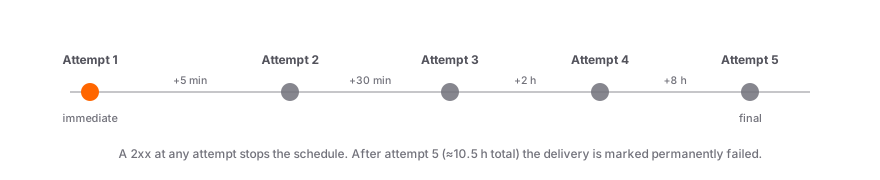
| Attempt | Delay after previous failure |
| ----------- | ---------------------------- |
| 1 (initial) | Immediate |
| 2 | 5 minutes |
| 3 | 30 minutes |
| 4 | 2 hours |
| 5 (final) | 8 hours |
After the final attempt (roughly 10.5 hours from the initial delivery), the delivery is marked as permanently failed. Failed deliveries stay visible in the dashboard and the [deliveries API](/api-reference/webhook-endpoints#list-deliveries), and can be [retried manually](/api-reference/webhook-endpoints#retry-a-delivery) once your endpoint is healthy again.
## Handling duplicates
Due to retries, your endpoint may receive the same event more than once. Use the event `id` to deduplicate:
```ts
const alreadyProcessed = await db.processedEvents.findUnique({
where: { eventId: event.id },
});
if (alreadyProcessed) {
return Response.json({ received: true }); // Acknowledge but skip
}
await handleEvent(event);
await db.processedEvents.create({ data: { eventId: event.id } });
```
## Local testing
Use a tunnel tool to expose your local server during development:
```bash
# Using ngrok
ngrok http 3000
# Your webhook URL becomes something like:
# https://abc123.ngrok-free.app/api/webhooks
```
```bash
# Using Cloudflare Tunnel (quick tunnel, no account required)
cloudflared tunnel --url http://localhost:3000
# Your webhook URL becomes something like:
# https://.trycloudflare.com/api/webhooks
```
Register the tunnel URL as a webhook endpoint in the dashboard, then trigger test events by creating verification sessions with your `stile_sk_` key. In a sandbox org, `skip_verification: true` produces an instantly verified session that fires real webhooks — see the [Testing guide](/guides/testing).
## Next steps
---
# Webhook Signature Verification
Section: Guides
URL: https://docs.stile.id/guides/webhook-verification
> Verify the Stile-Signature header — three lines on Node.js with @stile/node, complete copy-paste handlers for every other stack.
Every webhook delivery is signed with an HMAC-SHA256 signature in the `Stile-Signature` header. Verify it before processing any event — an unverified endpoint will accept spoofed payloads from anyone who knows your URL. (HTTP header names are case-insensitive — the examples below read it as `stile-signature`, which is how most frameworks normalize it.)
## On Node.js? Three lines
Don't implement verification yourself — `@stile/node` ships the verifier:
```ts
const stile = new Stile(process.env.STILE_API_KEY!);
const event = await stile.webhooks.fromRequest(req, process.env.STILE_WEBHOOK_SECRET!);
```
`fromRequest()` parses the header, enforces the timestamp window, and compares in constant time — and it stays correct as the signing scheme evolves. It works with any framework built on the Web API `Request` object (Next.js, Hono, Cloudflare Workers, Bun, Deno); if yours isn't, `stile.webhooks.constructEvent(rawBody, signatureHeader, secret)` takes the raw body directly. On failure it throws `WebhookSignatureError` with a `code` of `missing_header`, `invalid_header`, `timestamp_expired`, or `signature_mismatch` — catch it and respond `400`. See the [Node SDK reference](/sdks/node) for details.
**The rest of this page is for every other stack.** The complete handlers below — Python, Go, Ruby, PHP, and framework-agnostic Node.js — are maintained as part of the docs.
## Algorithm
The verification algorithm is the same in every language:
1. Extract the `stile-signature` header from the request
2. Parse the header to get the timestamp (`t`) and signature (`v1`)
3. Build the signed payload: `"{timestamp}.{raw_body}"`
4. Compute `HMAC-SHA256(webhook_secret, signed_payload)` as a hex string
5. Compare the computed signature with `v1` using a timing-safe comparison
6. Reject if the timestamp is more than 5 minutes old (replay protection)
### Header format
```
stile-signature: t=1741564800,v1=5257a869e7ecebeda32affa62cdca3fa51cad7e77a0e56ff536d0ce8e108d8bd
```
- `t` — Unix timestamp (seconds) when the webhook was sent
- `v1` — HMAC-SHA256 signature as lowercase hex
## Complete handlers
Each example below is a complete, copy-paste-ready webhook handler. Pick your language:
```ts title="app/api/webhooks/route.ts"
import { createHmac, timingSafeEqual } from "node:crypto";
const WEBHOOK_SECRET = process.env.STILE_WEBHOOK_SECRET!;
const TOLERANCE = 300; // 5 minutes
export async function POST(req: Request) {
const rawBody = await req.text();
const sig = req.headers.get("stile-signature");
if (!sig) {
return new Response("Missing signature", { status: 400 });
}
// Parse header
const parts = sig.split(",");
const timestamp = parts.find((p) => p.startsWith("t="))?.slice(2);
const signature = parts.find((p) => p.startsWith("v1="))?.slice(3);
if (!timestamp || !signature) {
return new Response("Malformed signature", { status: 400 });
}
// Check timestamp (replay protection)
const age = Math.abs(Math.floor(Date.now() / 1000) - parseInt(timestamp));
if (age > TOLERANCE) {
return new Response("Timestamp expired", { status: 400 });
}
// Compute expected signature
const expected = createHmac("sha256", WEBHOOK_SECRET)
.update(`${timestamp}.${rawBody}`)
.digest("hex");
// Timing-safe comparison
const valid = timingSafeEqual(
Buffer.from(signature, "hex"),
Buffer.from(expected, "hex"),
);
if (!valid) {
return new Response("Invalid signature", { status: 400 });
}
// Signature verified — process the event
const event = JSON.parse(rawBody);
if (event.type === "verification_session.verified") {
// Grant access, update your database, etc.
}
return Response.json({ received: true });
}
```
```python title="webhooks.py"
import hmac, hashlib, time, json, os
from flask import Flask, request, jsonify
app = Flask(__name__)
WEBHOOK_SECRET = os.environ["STILE_WEBHOOK_SECRET"]
TOLERANCE = 300 # 5 minutes
@app.route("/webhooks", methods=["POST"])
def handle_webhook():
raw_body = request.get_data(as_text=True)
sig_header = request.headers.get("stile-signature", "")
# Parse header
parts = dict(p.split("=", 1) for p in sig_header.split(",") if "=" in p)
timestamp = parts.get("t")
signature = parts.get("v1")
if not timestamp or not signature:
return "Missing signature", 400
# Check timestamp (replay protection)
if abs(time.time() - int(timestamp)) > TOLERANCE:
return "Timestamp expired", 400
# Compute expected signature
payload = f"{timestamp}.{raw_body}"
expected = hmac.new(
WEBHOOK_SECRET.encode(),
payload.encode(),
hashlib.sha256,
).hexdigest()
# Timing-safe comparison
if not hmac.compare_digest(signature, expected):
return "Invalid signature", 400
# Signature verified — process the event
event = json.loads(raw_body)
if event["type"] == "verification_session.verified":
# Grant access, update your database, etc.
pass
return jsonify(received=True)
```
```go title="webhooks.go"
package main
import (
"crypto/hmac"
"crypto/sha256"
"encoding/hex"
"encoding/json"
"fmt"
"io"
"math"
"net/http"
"os"
"strconv"
"strings"
"time"
)
var webhookSecret = os.Getenv("STILE_WEBHOOK_SECRET")
func webhookHandler(w http.ResponseWriter, r *http.Request) {
body, _ := io.ReadAll(r.Body)
sigHeader := r.Header.Get("stile-signature")
// Parse header
var timestamp, signature string
for _, part := range strings.Split(sigHeader, ",") {
if strings.HasPrefix(part, "t=") {
timestamp = part[2:]
} else if strings.HasPrefix(part, "v1=") {
signature = part[3:]
}
}
if timestamp == "" || signature == "" {
http.Error(w, "Missing signature", 400)
return
}
// Check timestamp (replay protection)
ts, _ := strconv.ParseInt(timestamp, 10, 64)
if math.Abs(float64(time.Now().Unix()-ts)) > 300 {
http.Error(w, "Timestamp expired", 400)
return
}
// Compute expected signature
mac := hmac.New(sha256.New, []byte(webhookSecret))
mac.Write([]byte(fmt.Sprintf("%s.%s", timestamp, body)))
expected := hex.EncodeToString(mac.Sum(nil))
// Timing-safe comparison
if !hmac.Equal([]byte(signature), []byte(expected)) {
http.Error(w, "Invalid signature", 400)
return
}
// Signature verified — process the event
var event map[string]interface{}
if err := json.Unmarshal(body, &event); err != nil {
http.Error(w, "Invalid JSON", 400)
return
}
if event["type"] == "verification_session.verified" {
// Grant access, update your database, etc.
}
w.Header().Set("Content-Type", "application/json")
w.Write([]byte(`{"received":true}`))
}
```
```ruby title="webhooks.rb"
require "sinatra"
require "openssl"
require "json"
WEBHOOK_SECRET = ENV["STILE_WEBHOOK_SECRET"]
TOLERANCE = 300 # 5 minutes
post "/webhooks" do
raw_body = request.body.read
sig_header = request.env["HTTP_STILE_SIGNATURE"] || ""
# Parse header
parts = sig_header.split(",").map { |p| p.split("=", 2) }.to_h
timestamp = parts["t"]
signature = parts["v1"]
halt 400, "Missing signature" unless timestamp && signature
# Check timestamp (replay protection)
halt 400, "Timestamp expired" if (Time.now.to_i - timestamp.to_i).abs > TOLERANCE
# Compute expected signature
payload = "#{timestamp}.#{raw_body}"
expected = OpenSSL::HMAC.hexdigest("sha256", WEBHOOK_SECRET, payload)
# Timing-safe comparison
halt 400, "Invalid signature" unless OpenSSL.secure_compare(signature, expected)
# Signature verified — process the event
event = JSON.parse(raw_body)
if event["type"] == "verification_session.verified"
# Grant access, update your database, etc.
end
content_type :json
{ received: true }.to_json
end
```
```php title="webhooks.php"
$tolerance) {
http_response_code(400);
exit("Timestamp expired");
}
// Compute expected signature
$payload = "{$timestamp}.{$rawBody}";
$expected = hash_hmac("sha256", $payload, $webhookSecret);
// Timing-safe comparison
if (!hash_equals($signature, $expected)) {
http_response_code(400);
exit("Invalid signature");
}
// Signature verified — process the event
$event = json_decode($rawBody, true);
if ($event["type"] === "verification_session.verified") {
// Grant access, update your database, etc.
}
header("Content-Type: application/json");
echo json_encode(["received" => true]);
```
If you're using Node.js, the `@stile/node` SDK provides a convenience method:
```bash
npm install @stile/node
```
```ts title="app/api/webhooks/route.ts"
import Stile from "@stile/node";
const stile = new Stile(process.env.STILE_API_KEY!);
export async function POST(req: Request) {
const event = await stile.webhooks.fromRequest(
req,
process.env.STILE_WEBHOOK_SECRET!,
);
if (event.type === "verification_session.verified") {
// Grant access, update your database, etc.
}
return Response.json({ received: true });
}
```
## Verification checklist
Whether you use the SDK or one of the handlers above, a correct webhook handler does all five of these:
| Check | Why it matters |
| ---------------------------------- | ---------------------------------------------------------------------------------------------------------------------- |
| Verify against the **raw body** | Body parsers re-serialize JSON; even an equivalent payload produces a different signature |
| Use a **timing-safe comparison** | Plain string equality (`===`, `==`) leaks information through response timing |
| Enforce the **5-minute tolerance** | Rejecting stale timestamps blocks replay of captured deliveries |
| Respond **400** on any failure | Never return `2xx` for — or process — a payload you couldn't verify |
| **Dedupe on the event `id`** | Retries reuse the event `id` (with new delivery IDs) — see [handling duplicates](/guides/webhooks#handling-duplicates) |
The endpoint secret is shown once at creation — store it in your environment, never in client
code. If it leaks, rotate it via the [rotate-secret
endpoint](/api-reference/webhook-endpoints#rotate-the-signing-secret), which returns the new
secret once.
## Common pitfalls
### Body parsers modify the raw body
Many frameworks (Express, Django, Rails) parse the JSON body before your handler runs. Signature verification requires the **raw, unmodified** request body.
| Framework | How to access raw body |
| ------------------ | ---------------------------------------------------------------------- |
| Next.js App Router | `request.text()` (built-in) |
| Express | Use a raw body middleware on the webhook route (skip `express.json()`) |
| Flask | `request.get_data(as_text=True)` |
| Django | `request.body.decode()` |
| Sinatra | `request.body.read` |
| Go `net/http` | `io.ReadAll(r.Body)` |
| PHP | `file_get_contents("php://input")` |
### Clock skew
The timestamp check rejects events older than 5 minutes. If your server's clock is significantly off, legitimate webhooks will be rejected. Use NTP to keep your server clock synchronized.
### Timing-safe comparison
Always use a constant-time comparison function (`timingSafeEqual`, `hmac.compare_digest`, `hash_equals`, etc.) to prevent timing attacks that could reveal the signature byte-by-byte.
## Next steps
---
# Error Handling
Section: Guides
URL: https://docs.stile.id/guides/error-handling
> Parse Stile's error envelope, branch on stable error codes, and retry safely with exponential backoff and idempotency keys — in any language, no SDK required.
Stile errors are designed to be handled programmatically. Every failure returns the same JSON envelope, a stable machine-readable `code`, and an HTTP status that tells you whether a retry can succeed. This page catalogs every status and error code, shows handler patterns in five languages, and covers safe retries with backoff and idempotency keys.
## Anatomy of an error
Every non-`2xx` response carries a single top-level `error` object:
```json
{
"error": {
"type": "invalid_request_error",
"code": "parameter_invalid",
"message": "Missing required parameter: workflow_id",
"param": "workflow_id",
"request_id": "req_abc123"
}
}
```
Include the `request_id` when contacting support — it lets us trace the exact request in our logs.
## HTTP status codes
| Code | Meaning |
| ---- | ---------------------------------------------------------------------------------------- |
| 200 | OK — request succeeded. |
| 201 | Created — resource was created successfully. |
| 400 | Bad Request — missing or invalid parameters. |
| 401 | Unauthorized — invalid, missing, or revoked API key. |
| 402 | Payment Required — billing is suspended or the sandbox monthly quota is exhausted. |
| 403 | Forbidden — the key is valid but not allowed to perform this operation. |
| 404 | Not Found — the requested resource doesn't exist. |
| 409 | Conflict — idempotency key collision or state conflict. |
| 422 | Unprocessable Entity — the request is valid but can't be fulfilled. |
| 429 | Too Many Requests — rate limit exceeded. Retry after the `Retry-After` header value. |
| 500 | Internal Server Error — something went wrong on our end. Retry with exponential backoff. |
## Error types
`type` groups failures into four coarse categories — useful when you want one handler per failure class rather than per code.
| Type | When it occurs |
| ----------------------- | ------------------------------------------------------------------------------------- |
| `invalid_request_error` | A parameter is missing, invalid, or the operation isn't allowed in the current state. |
| `authentication_error` | The API key is missing, malformed, revoked, or expired. |
| `rate_limit_error` | Too many requests were sent in the current window. |
| `api_error` | An unexpected server error occurred. Safe to retry. |
## Error codes
`code` identifies the exact failure and is the value to branch on programmatically:
| Code | Status | Description |
| ------------------------------------ | ------ | -------------------------------------------------------------------------------------------------- |
| `parameter_invalid` | 400 | A required parameter is missing or has an invalid value. |
| `resource_missing` | 404 | The requested session, event, or endpoint doesn't exist. |
| `billing_suspended` | 402 | Your organization's billing is suspended — requests are blocked until billing is resolved. |
| `test_quota_exceeded` | 402 | Sandbox mode is capped at 500 verifications per calendar month. Resets on the 1st. |
| `use_case_prohibited` | 422 | The workflow's use case is not permitted in the detected jurisdiction. |
| `jurisdiction_unresolvable` | 422 | Could not determine the user's jurisdiction from their IP. Pass `jurisdiction` explicitly. |
| `accept_existing_rate_limited` | 429 | Too many `accept_existing` attempts for the same email (5 per 15-minute window). |
| `rate_limit_exceeded` | 429 | Too many requests in the current window. Retry after the `Retry-After` header value. |
| `publishable_key_scope` | 403 | A publishable key was used on an endpoint that requires a secret key. |
| `publishable_session_create_blocked` | 403 | Your organization has migrated to backend-created sessions — create them with a secret key. |
| `captcha_required` | 400 | Publishable-key session creation from the browser requires a Cloudflare Turnstile `captcha_token`. |
| `email_not_verified` | 400 | Email verification (OTP) is required before creating a session for a returning user. |
| `webhook_required` | 400 | Live (non-sandbox) organizations require at least one active webhook endpoint. |
| `session_not_found` | 404 | The verification session does not exist or belongs to a different organization. |
| `session_terminal` | 409 | The session is in a terminal state (verified, failed, cancelled, expired) and cannot be modified. |
| `session_not_redeemable` | 409 | The session is not in a state where a VP token or OTP can be redeemed against it. |
| `session_locked_to_other_device` | 409 | The session is being completed on another device (desktop→mobile handoff lock). |
| `vp_token_invalid` | 400 | The supplied VP token is malformed, expired, or revoked. Fall back to full verification. |
| `no_matching_vp` | 400 | `accept_existing` found no reusable verification for this email/phone at the required strength. |
| `otp_not_proven` | 400 | The returning user hasn't completed the email OTP challenge yet. |
| `idempotency_key_reuse` | 409 | A different request body was sent with the same idempotency key. |
| `api_key_invalid` | 401 | The API key is missing, malformed, revoked, or expired. |
## Handling errors
Parse the JSON error body and branch on `type` or `status` to handle different failures:
```ts
async function stileRequest(method, path, body) {
const res = await fetch(`https://api.stile.id/v1${path}`, {
method,
headers: {
Authorization: `Bearer ${process.env.STILE_API_KEY}`,
"Content-Type": "application/json",
},
body: body ? JSON.stringify(body) : undefined,
});
const data = await res.json();
if (!res.ok) {
const err = data.error;
switch (err.type) {
case "authentication_error":
throw new Error(`Auth failed: ${err.message}`);
case "rate_limit_error":
throw new Error(`Rate limited. Retry after ${res.headers.get("Retry-After")}s`);
case "invalid_request_error":
throw new Error(`Bad request [${err.code}]: ${err.message}`);
default:
throw new Error(`API error: ${err.message} (${err.request_id})`);
}
}
return data;
}
```
```python
import requests, os
def stile_request(method, path, json=None):
res = requests.request(
method,
f"https://api.stile.id/v1{path}",
headers={"Authorization": f"Bearer {os.environ['STILE_API_KEY']}"},
json=json,
)
data = res.json()
if not res.ok:
err = data["error"]
if err["type"] == "authentication_error":
raise Exception(f"Auth failed: {err['message']}")
elif err["type"] == "rate_limit_error":
raise Exception(f"Rate limited. Retry after {res.headers.get('Retry-After')}s")
elif err["type"] == "invalid_request_error":
raise Exception(f"Bad request [{err['code']}]: {err['message']}")
else:
raise Exception(f"API error: {err['message']} ({err['request_id']})")
return data
```
```go
type StileError struct {
Type string `json:"type"`
Code string `json:"code"`
Message string `json:"message"`
Param string `json:"param"`
RequestID string `json:"request_id"`
Status int
}
func (e *StileError) Error() string {
return fmt.Sprintf("[%s] %s: %s (request_id: %s)",
e.Type, e.Code, e.Message, e.RequestID)
}
func stileRequest(method, path string, body io.Reader) ([]byte, error) {
req, _ := http.NewRequest(method, "https://api.stile.id/v1"+path, body)
req.Header.Set("Authorization", "Bearer "+os.Getenv("STILE_API_KEY"))
req.Header.Set("Content-Type", "application/json")
res, err := http.DefaultClient.Do(req)
if err != nil {
return nil, err
}
defer res.Body.Close()
data, _ := io.ReadAll(res.Body)
if res.StatusCode >= 400 {
var errResp struct{ Error StileError `json:"error"` }
json.Unmarshal(data, &errResp)
errResp.Error.Status = res.StatusCode
return nil, &errResp.Error
}
return data, nil
}
```
```ruby
require "net/http"
require "json"
class StileError < StandardError
attr_reader :type, :code, :param, :request_id, :status
def initialize(err, status)
@type = err["type"]
@code = err["code"]
@param = err["param"]
@request_id = err["request_id"]
@status = status
super(err["message"])
end
end
def stile_request(method, path, body = nil)
uri = URI("https://api.stile.id/v1#{path}")
req = Net::HTTP.const_get(method.capitalize).new(uri)
req["Authorization"] = "Bearer #{ENV['STILE_API_KEY']}"
req["Content-Type"] = "application/json"
req.body = body.to_json if body
res = Net::HTTP.start(uri.hostname, uri.port, use_ssl: true) { |http| http.request(req) }
data = JSON.parse(res.body)
raise StileError.new(data["error"], res.code.to_i) unless res.is_a?(Net::HTTPSuccess)
data
end
```
```php
class StileError extends Exception {
public string $type;
public string $code;
public ?string $param;
public string $requestId;
public int $status;
public function __construct(array $err, int $status) {
$this->type = $err["type"];
$this->code = $err["code"];
$this->param = $err["param"] ?? null;
$this->requestId = $err["request_id"];
$this->status = $status;
parent::__construct($err["message"]);
}
}
function stileRequest(string $method, string $path, ?array $body = null): array {
$ch = curl_init("https://api.stile.id/v1{$path}");
curl_setopt($ch, CURLOPT_CUSTOMREQUEST, $method);
curl_setopt($ch, CURLOPT_RETURNTRANSFER, true);
curl_setopt($ch, CURLOPT_HTTPHEADER, [
"Authorization: Bearer " . getenv("STILE_API_KEY"),
"Content-Type: application/json",
]);
if ($body) curl_setopt($ch, CURLOPT_POSTFIELDS, json_encode($body));
$response = curl_exec($ch);
$status = curl_getinfo($ch, CURLINFO_HTTP_CODE);
curl_close($ch);
$data = json_decode($response, true);
if ($status >= 400) {
throw new StileError($data["error"], $status);
}
return $data;
}
```
## Retry with exponential backoff
Retry on `429` (rate limit) and `5xx` (server error). Never retry `4xx` client errors — fix the request first.
The retry formula: `delay = min(500ms * 2^attempt + random(0-500ms), 30s)`
```ts
async function stileRequestWithRetry(method, path, body, maxRetries = 2) {
for (let attempt = 0; attempt <= maxRetries; attempt++) {
const res = await fetch(`https://api.stile.id/v1${path}`, {
method,
headers: {
Authorization: `Bearer ${process.env.STILE_API_KEY}`,
"Content-Type": "application/json",
},
body: body ? JSON.stringify(body) : undefined,
});
if (res.status === 429 || res.status >= 500) {
if (attempt < maxRetries) {
const delay = Math.min(500 * 2 ** attempt + Math.random() * 500, 30000);
await new Promise((r) => setTimeout(r, delay));
continue;
}
}
const data = await res.json();
if (!res.ok) throw new Error(data.error.message);
return data;
}
}
```
```python
import time, random
def stile_request_with_retry(method, path, json=None, max_retries=2):
for attempt in range(max_retries + 1):
res = requests.request(
method,
f"https://api.stile.id/v1{path}",
headers={"Authorization": f"Bearer {os.environ['STILE_API_KEY']}"},
json=json,
)
if res.status_code in (429, 500, 502, 503, 504):
if attempt < max_retries:
delay = min(0.5 * 2**attempt + random.random() * 0.5, 30)
time.sleep(delay)
continue
data = res.json()
if not res.ok:
raise Exception(data["error"]["message"])
return data
```
```go
func stileRequestWithRetry(method, path string, body io.Reader, maxRetries int) ([]byte, error) {
for attempt := 0; attempt <= maxRetries; attempt++ {
data, err := stileRequest(method, path, body)
if stileErr, ok := err.(*StileError); ok {
if stileErr.Status == 429 || stileErr.Status >= 500 {
if attempt < maxRetries {
delay := math.Min(500*math.Pow(2, float64(attempt))+rand.Float64()*500, 30000)
time.Sleep(time.Duration(delay) * time.Millisecond)
continue
}
}
}
return data, err
}
return nil, fmt.Errorf("max retries exceeded")
}
```
```ruby
def stile_request_with_retry(method, path, body = nil, max_retries: 2)
(0..max_retries).each do |attempt|
begin
return stile_request(method, path, body)
rescue StileError => e
raise unless [429, 500, 502, 503, 504].include?(e.status)
raise if attempt >= max_retries
delay = [0.5 * 2**attempt + rand * 0.5, 30].min
sleep(delay)
end
end
end
```
```php
function stileRequestWithRetry(string $method, string $path, ?array $body = null, int $maxRetries = 2): array {
for ($attempt = 0; $attempt <= $maxRetries; $attempt++) {
try {
return stileRequest($method, $path, $body);
} catch (StileError $e) {
if (!in_array($e->status, [429, 500, 502, 503, 504]) || $attempt >= $maxRetries) {
throw $e;
}
$delay = min(0.5 * pow(2, $attempt) + lcg_value() * 0.5, 30);
usleep((int)($delay * 1_000_000));
}
}
}
```
Client errors (400, 401, 404) indicate a problem with the request itself. Retrying them won't help
— fix the underlying issue first. Only retry `429` (rate limit) and `5xx` (server errors).
The [Node SDK](/sdks/node) retries `429`, `5xx`, and network failures automatically (`maxRetries`
defaults to `2`) — you don't need to implement backoff yourself.
## Retryable vs permanent errors
| Status | Retryable? | Action |
| ------------------ | ---------- | ------------------------------------------------------------------------ |
| 429 | Yes | Wait for `Retry-After` header duration, then retry |
| 500, 502, 503, 504 | Yes | Retry with exponential backoff |
| 400 | No | Fix the request parameters |
| 401 | No | Check your API key |
| 402 | No | Resolve billing in the dashboard, or wait for the sandbox quota to reset |
| 403 | No | Use the right key type (secret vs publishable) for the endpoint |
| 404 | No | The resource doesn't exist |
| 409 | No | Use a different idempotency key |
| 422 | No | The operation is not allowed in the current state |
## Rate limits
Limits are applied per API key over a rolling one-minute window: 1,000 requests/min for secret keys, 100/min for publishable keys. Every response includes `X-RateLimit-Limit`, `X-RateLimit-Remaining`, and `X-RateLimit-Reset` headers; a `429` additionally carries `Retry-After`. See [Rate limiting](/api-reference/overview#rate-limiting) in the API reference.
## Idempotency
A network timeout leaves you not knowing whether your request landed. Send an `Idempotency-Key` header on session creation so a retry can never create a duplicate:
```bash
curl -X POST https://api.stile.id/v1/verification_sessions \
-H "Authorization: Bearer stile_sk_..." \
-H "Content-Type: application/json" \
-H "Idempotency-Key: order_12345" \
-d '{"type": "age", "workflow_id": "wf_YOUR_WORKFLOW_ID"}'
```
```ts
const session = await stile.verificationSessions.create(
{ type: "age", workflow_id: "wf_YOUR_WORKFLOW_ID" },
{ idempotencyKey: "order_12345" },
);
```
If a request with the same key was already processed, the original response is returned without creating a duplicate. Reusing a key with a **different** request body returns `409 idempotency_key_reuse` — derive the key from the logical operation (one per order, not one per attempt).
## Next steps
---
# Rate Limits
Section: Guides
URL: https://docs.stile.id/guides/rate-limits
> Per-key request limits, the rate-limit headers on every response, and how to back off cleanly.
Stile rate-limits API requests per key on a rolling per-minute window. The limits are generous for normal traffic and exist to bound the blast radius of a leaked key or a runaway retry loop.
## Limits
Limits are per key, by key type:
| Key type | Limit |
| ------------------------- | -------------------- |
| Secret (`stile_sk_`) | 1,000 requests / min |
| Publishable (`stile_pk_`) | 100 requests / min |
Publishable keys get a tighter budget because they're exposed in the browser. Limits are per key, not per organization — a separate key for each service gets its own budget.
## Rate-limit headers
Every response includes the current state of your window, so you can throttle proactively instead of waiting for a `429`:
```
X-RateLimit-Limit: 1000
X-RateLimit-Remaining: 997
X-RateLimit-Reset: 1741564920
```
| Header | Meaning |
| ----------------------- | ------------------------------------------------ |
| `X-RateLimit-Limit` | Your ceiling for the current window. |
| `X-RateLimit-Remaining` | Requests left before you're limited. |
| `X-RateLimit-Reset` | Unix timestamp (seconds) when the window resets. |
## When you're limited
Exceeding the limit returns `429 Too Many Requests` with code `rate_limit_exceeded` and a `Retry-After` header (seconds to wait). Honor it:
```ts
if (res.status === 429) {
const retryAfter = parseInt(res.headers.get("Retry-After") || "1", 10);
await new Promise((r) => setTimeout(r, retryAfter * 1000));
// retry the request
}
```
`@stile/node` automatically retries `429` and `5xx` responses with exponential backoff (up to
`maxRetries`, default 2). You only need to handle rate limits manually when calling the API
directly.
`accept_existing` is additionally rate-limited to 5 attempts per email per 15-minute window (`429
accept_existing_rate_limited`) to prevent credential enumeration. See [Returning
Users](/guides/returning-users).
## Next steps
---
# Testing & Sandbox
Section: Guides
URL: https://docs.stile.id/guides/testing
> Build against sandbox mode, simulate verified sessions with skip_verification, test webhooks through a tunnel, and run the going-live checklist.
Sandbox mode lets you exercise your entire integration — session creation, webhooks, VP tokens, returning-user flows — without verifying a real user. This page covers sandbox mode, the `skip_verification` flag, local webhook testing, CI suites, and the checklist for moving an integration onto a live organization.
## Sandbox mode
Stile runs a single environment: every organization is live by default. For building and testing, enable **sandbox mode** on a dedicated testing organization — an org-level setting you turn on through your dashboard org settings or by contacting support. The same `stile_sk_…` / `stile_pk_…` keys work everywhere; what changes is the organization they belong to.
| | Sandbox org | Live org |
| ------------------ | -------------------------------------------------------------------- | -------------------------------------------------------------------------- |
| Verifications | Real or simulated — `skip_verification` completes sessions instantly | Real verifications only |
| Webhook endpoint | Optional | **Required** — at least one active endpoint before sessions can be created |
| Webhook URL scheme | HTTPS or HTTP | HTTPS only |
| Billing | Free, capped at 500 verifications/month | Billed beyond the free tier (100 verifications/month by default) |
Both follow the same per-key rate limit — **1,000 requests/min** for secret keys, **100/min** for publishable keys. Use a sandbox org for development, CI pipelines, and staging environments. Point your integration at a live org when you're ready to verify real users — and follow the [going-live checklist](#going-live-checklist) below when you do.
### Sandbox quota
Sandbox mode is capped at **500 verifications per calendar month** per organization. When you hit the cap, session creation returns `402` with code `test_quota_exceeded`; the quota resets on the 1st of the next month. Sandbox verifications are unbilled, so this cap keeps a runaway CI or load test in check — if you need more volume, run those against a live org.
Creating a verification session in a live (non-sandbox) organization will fail with
`webhook_required` if the org has no active webhook endpoints. Register one in the
[dashboard](https://dashboard.stile.id/webhooks) or via the [Webhook Endpoints
API](/api-reference/webhook-endpoints) before going live. Sandbox orgs are exempt.
## The `skip_verification` flag
In a sandbox org, pass `skip_verification: true` when creating a session to skip the entire camera/ID scanning flow. The session transitions straight to `verified`, fires webhooks, and issues a VP token — all without user interaction.
This is useful for:
- Testing webhook handlers end-to-end
- Validating VP token flows and returning-user logic
- Exercising checkout integrations in CI
- Verifying email binding and OTP behavior
```bash
curl -X POST https://api.stile.id/v1/verification_sessions \
-H "Authorization: Bearer stile_sk_..." \
-H "Content-Type: application/json" \
-d '{
"type": "age",
"workflow_id": "wf_YOUR_WORKFLOW_ID",
"email": "test@example.com",
"skip_verification": true
}'
```
```ts
import Stile from "@stile/node";
const stile = new Stile(process.env.STILE_API_KEY!); // stile_sk_...
const session = await stile.verificationSessions.create({
type: "age",
workflow_id: "wf_YOUR_WORKFLOW_ID",
email: "test@example.com",
skip_verification: true,
});
```
The response is identical to a real verified session — same shape, same webhook events, same VP token issuance. Whatever you build against it works unchanged against real verifications.
The `skip_verification` flag is rejected in a live org — creating a session with
`skip_verification: true` against a non-sandbox organization returns a `400` with code
`parameter_invalid`. This is deliberate: there is no way to mint a verified session in a live org
without a real verification.
## Local webhook testing
During development your server runs on `localhost`, which isn't reachable by Stile's webhook infrastructure. Use a tunnel to expose it.
```bash
# 1. Start your local server
npm run dev # listening on port 3000
# 2. In a separate terminal, start ngrok
ngrok http 3000
# 3. Copy the forwarding URL (e.g. https://abc123.ngrok-free.app)
# 4. Register it as a webhook endpoint:
curl -X POST https://api.stile.id/v1/webhook_endpoints \
-H "Authorization: Bearer stile_sk_..." \
-H "Content-Type: application/json" \
-d '{
"url": "https://abc123.ngrok-free.app/api/webhooks",
"enabled_events": ["verification_session.verified"]
}'
```
```bash
# 1. Start your local server
npm run dev # listening on port 3000
# 2. Start the tunnel
cloudflared tunnel --url http://localhost:3000
# 3. Use the generated *.trycloudflare.com URL as your webhook endpoint
```
Once the endpoint is registered, create a session with `skip_verification: true` to trigger a real, signed `verification_session.verified` delivery against your local handler — including the `Stile-Signature` header, so you can test [signature verification](/guides/webhook-verification) exactly as it runs in production.
You can also register webhook endpoints directly in the
[dashboard](https://dashboard.stile.id/webhooks) instead of using the API.
## E2E testing in CI
`skip_verification: true` is designed for end-to-end suites — it lets you exercise the full integration without camera interactions:
- Session creation and status transitions
- Webhook delivery and signature verification against your real handler
- VP token issuance and returning-user reuse
- Email binding and OTP flows
A typical Playwright/Cypress flow:
1. Create a session with `skip_verification: true` via your backend.
2. Assert your webhook handler marked the order verified.
3. Assert your UI unlocked.
Keep an eye on the 500/month sandbox quota if your suite runs on every commit.
## Sandbox data hygiene
A few best practices to keep your sandbox organization clean:
- **Use unique emails per test run** — append a timestamp or UUID (e.g. `test+1712345678@example.com`) to avoid collisions with previous runs.
- **Sandbox sessions expire after 24 hours** — unverified sandbox sessions are automatically cleaned up, so you don't need to delete them manually.
- **Isolate testing in a sandbox org** — keep your CI and manual testing in a dedicated sandbox organization, separate from the live org that serves real users.
## Going live checklist
When your integration works end-to-end in a sandbox org, work through these steps before pointing it at a live organization.
### Point at a live org
Use the `stile_sk_…` key for your live organization on the server and its `stile_pk_…` key in the widget. Keys are managed at [dashboard.stile.id/api-keys](https://dashboard.stile.id/api-keys) — secret keys are shown once at creation, so store them in your environment, never in code. A live org is billed beyond the free tier (100 verifications/month by default).
### Register a webhook endpoint (required)
A live org requires at least one active webhook endpoint **before** you can create sessions — without one, `POST /v1/verification_sessions` returns `400` with code `webhook_required`. Register a public HTTPS URL in the [dashboard](https://dashboard.stile.id/webhooks) or via the [Webhook Endpoints API](/api-reference/webhook-endpoints), and save the signing secret. See the [Webhooks guide](/guides/webhooks) for setup and retry behavior.
### Verify webhook signatures
Treat the signed webhook — not client-side events — as the source of truth for granting access. Your handler must verify the `Stile-Signature` header against the raw request body before processing any event. Use `stile.webhooks.fromRequest()` from `@stile/node`, or grab a copy-paste handler for your stack from [Webhook Verification](/guides/webhook-verification).
### Remove `skip_verification`
Audit your session-creation code paths for `skip_verification: true`. In a live org the flag is rejected with `400` `parameter_invalid`, so any leftover sandbox shortcut becomes a hard failure on your first production session. Gate it behind an environment check if your test suite still needs it.
### Handle `402` and `429` responses
Make sure your error handling covers the billing and rate-limit cases: `402` means `test_quota_exceeded` in a sandbox org or `billing_suspended` in a live org — surface these rather than retrying. `429` (`rate_limit_exceeded`) is retryable: respect the `Retry-After` header and back off exponentially. The rate limit is the same everywhere (1,000 requests/min for secret keys, 100/min for publishable keys), so a load pattern that throttles in staging will throttle the same way in production — but the handling should be in place either way. See [Error Handling](/guides/error-handling) for the full retry policy.
## Next steps
---
# Dashboard
Section: Guides
URL: https://docs.stile.id/guides/dashboard
> A tour of the Stile dashboard — where you build workflows, manage keys, watch sessions, configure webhooks, and handle billing.
The [dashboard](https://dashboard.stile.id) is the operational home for your integration. It's where you build and publish workflows, mint API keys, watch verifications come in, configure webhooks, and manage billing and team access. This page orients you to the main areas; the linked guides go deeper on each.
## Overview
Your landing view: a real-time read on API usage, geographic distribution, method health, and success rates. Use it to spot anomalies — a drop in success rate or a spike in a particular jurisdiction — at a glance.
## Workflows
Where you build the recipe every verification runs inside. Create a [workflow](/concepts/workflows), pick its use case and target markets, choose methods and composition, set preferences, and **publish** it. Two builders are available — a simple use-case-driven editor and a node-based visual graph for branching flows. Sessions always run the published version, so you can edit a draft without touching live traffic.
A `workflow_id` only resolves once the workflow is published. Copy it from the workflow's page to
pass to the API or widget.
## Sessions
A searchable log of every verification session, with its status, method, jurisdiction, and result. Drill into a session to see its timeline and — where your plan includes it — a compliance evidence trail. This is the first place to look when debugging a specific verification.
## API keys
Create and revoke [publishable (`stile_pk_…`) and secret (`stile_sk_…`) keys](/getting-started/authentication), and review per-key usage. Secret keys are shown once at creation — store them immediately. You can also see which keys are driving traffic and revoke a leaked one here.
## Webhooks
Register the [webhook endpoints](/api-reference/webhook-endpoints) that receive verification events, choose which event types each subscribes to, and inspect delivery history. The deliveries view shows each attempt, the response your endpoint returned, and lets you retry a failed delivery once your endpoint is healthy. Rotate an endpoint's signing secret here if it may have leaked.
## Compliance
Inspect the regulatory rules that apply to your use cases by jurisdiction — required age tiers, allowed methods, prohibitions, and retention windows — the same data the [Compliance API](/api-reference/compliance) returns. Useful for understanding why a session resolved the way it did.
## Billing
Manage your plan, view usage, and top up prepaid credits. The free tier (100 verifications/month by default) covers your first verifications each calendar month; usage beyond that is billed via prepaid credits. Sandbox mode — an org-level setting you enable for a testing organization — is unbilled (capped at 500 sessions/month). See [Testing](/guides/testing) for how to build against sandbox mode.
## Team & roles
Invite teammates and assign roles to control who can manage keys, edit workflows, or view sessions. Organizations and applications let larger setups separate teams and products.
## Settings
Org-level configuration, including:
- **Trust Reuse** — opt in to cross-operator [verification reuse](/guides/trust-reuse), set the max credential age, jurisdiction lock, and accepted methods.
- **Biometric & consent** — configure biometric collection and the consent templates shown to users where required.
- **API inspector** — optionally log recent API requests/responses for debugging.
- **Data & erasure** — action data-subject and [erasure requests](/guides/data-retention).
## Next steps
---
# Security Best Practices
Section: Guides
URL: https://docs.stile.id/guides/security
> Webhook-first access control, signature verification, key management, rate limits, and anti-fraud measures for production integrations.
A verification result is only as trustworthy as the channel that delivers it. This guide covers the practices that keep your integration secure in production — webhook-first access control, signature verification, API key hygiene, and rate-limit handling — plus how Stile's design minimizes the PII you ever touch.
## Webhooks are the source of truth
The client-side `stile:verified` event is a convenience signal for updating your UI. It fires in the user's browser, which means anyone with dev tools open can fake it. Never grant access, unlock content, or fulfill orders based on client events alone.
Always wait for the signed `verification_session.verified` webhook before granting access. The
webhook is sent server-to-server over HTTPS and includes an HMAC-SHA256 signature that proves it
came from Stile.
Live organizations enforce this pattern at the API level: you can't create sessions until at least one active webhook endpoint is registered (the API returns `400 webhook_required`). Sandbox organizations are exempt, so you can prototype first and wire up webhooks before going live.
## Webhook signature verification
Every delivery includes a `Stile-Signature` header. Verify it before processing the event — an unverified webhook endpoint is equivalent to no verification at all, because anyone can POST a fake payload to your URL.
| Rule | Detail |
| ----------------- | --------------------------------------------------------------------------------------------- |
| Header format | `Stile-Signature: t={timestamp},v1={signature}` |
| Algorithm | HMAC-SHA256 over `{timestamp}.{raw_body}`, keyed with your endpoint secret |
| Comparison | Timing-safe — never use plain string equality |
| Replay protection | Reject timestamps older than 5 minutes (300 seconds) |
| Body | Always verify against the **raw** request body — parsing and re-serializing changes the bytes |
With `@stile/node` this is one call — `await stile.webhooks.fromRequest(req, secret)` verifies the signature and parses the event in a single step, throwing `WebhookSignatureError` on any failure (respond with `400`).
See the [Webhook Signature Verification](/guides/webhook-verification) guide for the raw algorithm and copy-paste handlers in Node.js, Python, Go, Ruby, and PHP.
If an endpoint's signing secret may have leaked, rotate it with `POST /v1/webhook_endpoints/:id/rotate-secret` — the new secret is returned once in the response.
## Key management
Stile uses two types of API keys:
| Key type | Prefix | Where to use |
| --------------- | ------------ | ----------------------------------------------------------------------------------------------- |
| Secret key | `stile_sk_…` | Server-side only. Creates sessions, reads results, manages webhooks. |
| Publishable key | `stile_pk_…` | Safe for frontend code. Opens the verification widget. Cannot read results or manage resources. |
Secret keys are displayed once at creation — store them immediately in your secrets manager or environment configuration, never in source control.
Secret keys (`stile_sk_`) must never appear in frontend code, client-side bundles, mobile apps, or
public repositories. If a secret key is compromised, rotate it immediately in the
[dashboard](https://dashboard.stile.id/api-keys).
**Key rotation** — You can rotate keys in the dashboard without downtime. Both the old and new key remain valid during a configurable grace period, giving you time to update your servers.
**Prefer backend session creation** — Creating sessions with a publishable key from the browser is deprecated (responses carry a `Stile-Deprecation: publishable-key-session-create` header). Create sessions server-side with your secret key and hand the `client_secret` to the widget instead.
## Rate limiting
Rate limits bound the blast radius of a leaked key or a runaway retry loop. API requests are rate-limited per key, per minute, on a rolling window: **1,000 requests/minute** for secret keys, **100/minute** for the browser-exposed publishable keys.
Every response includes `X-RateLimit-Limit`, `X-RateLimit-Remaining`, and `X-RateLimit-Reset` headers so you can throttle proactively. When you exceed the limit, the API returns `429 Too Many Requests` with a `Retry-After` header indicating how many seconds to wait before retrying.
```ts
if (res.status === 429) {
const retryAfter = parseInt(res.headers.get("Retry-After") || "1", 10);
await new Promise((r) => setTimeout(r, retryAfter * 1000));
// retry the request
}
```
See [Error Handling](/guides/error-handling) for full retry-with-backoff examples in multiple languages.
## PII handling
Stile is designed to minimize your PII exposure:
- **Raw identity data is purged after verification** — images, full names, dates of birth, and document numbers are not stored long-term.
- **Only hashed anchors persist** — email hashes, phone hashes, and document fingerprints are retained for deduplication and returning-user lookup.
- **Verification outcomes persist** — the age tier result (e.g. `min_age_21`), credential method, and expiry are stored so returning users can skip re-verification.
This means you never need to store or handle raw identity documents yourself. The verification result tells you what you need to know (age tier, pass/fail) without exposing the underlying PII.
## Anti-spoofing measures
Stile employs multiple layers to prevent identity fraud:
| Measure | What it catches |
| -------------------------------- | ------------------------------------------------------------------------------------------------------------------ |
| **Barcode cross-reference** | Printed photos of IDs — the barcode data must match the visual fields. |
| **Head-turn liveness challenge** | Flat images and photos held up to the camera — the user must turn their head to prove they are physically present. |
| **Server-side frame analysis** | SDK spoofing and injected video feeds — frames are analyzed server-side, not just on the client. |
| **Face match** | Stolen or borrowed IDs — the selfie must match the photo on the document. |
| **Document expiry check** | Expired documents are rejected. |
## VPN and geolocation detection
If your use case involves physical delivery (e.g. alcohol, cannabis), pass the `delivery_jurisdiction` parameter when creating a session:
```bash
curl -X POST https://api.stile.id/v1/verification_sessions \
-H "Authorization: Bearer stile_sk_..." \
-H "Content-Type: application/json" \
-d '{
"type": "age",
"workflow_id": "wf_YOUR_WORKFLOW_ID",
"delivery_jurisdiction": "US-CA"
}'
```
Stile compares the user's IP-based geolocation against the delivery jurisdiction. If there is a significant mismatch (e.g. the user's IP is in a different country), the session is flagged for review. When you pass `delivery_jurisdiction`, the create response also includes `ip_jurisdiction` and `jurisdiction_mismatch` fields so your backend can act on the comparison directly.
A geolocation mismatch does not automatically fail the session. It adds a flag to the verification
result that your backend can use to apply additional checks or manual review.
## Email OTP as ownership proof
When a returning user is looked up by email, they must complete an OTP challenge to prove they control that email address. This is an important distinction:
- **OTP proves**: "This person controls this email address."
- **OTP does not prove**: Age, identity, or any other verification claim.
The actual proof of age or identity comes from the underlying verification credential that was previously issued. The OTP simply gates access to that credential so a different person can't reuse it.
See [Returning Users](/guides/returning-users) for the full reverification flow.
## Security checklist
A summary of the do/don't items from this page:
| Area | Do | Don't |
| ---------------- | -------------------------------------------------------------------------------------------- | -------------------------------------------------------------------------- |
| Access control | Wait for the signed `verification_session.verified` webhook before granting access | Unlock content or fulfill orders on the client-side `stile:verified` event |
| Webhook handler | Verify `Stile-Signature` on every delivery, against the raw body, with a timing-safe compare | Process unverified payloads or verify against a re-serialized body |
| Replay defense | Reject signatures whose timestamp is older than 5 minutes | Accept old deliveries without checking the timestamp |
| API keys | Keep `stile_sk_` keys server-side; rotate immediately if exposed | Ship secret keys in frontend bundles, mobile apps, or repositories |
| Session creation | Create sessions server-side and pass the `client_secret` to the widget | Rely on deprecated publishable-key session creation in production |
| Rate limits | Honor `Retry-After` on `429` and back off | Hammer the API in a tight retry loop |
| PII | Rely on the verification result (age tier, pass/fail) | Store raw identity documents yourself |
| Geolocation | Pass `delivery_jurisdiction` for physical delivery and review mismatch flags | Auto-fail sessions on a geolocation mismatch — it's advisory |
| Returning users | Treat OTP as proof of email control only | Treat OTP success as proof of age or identity |
## Next steps
---
# Data Retention & Privacy
Section: Guides
URL: https://docs.stile.id/guides/data-retention
> What Stile stores, what gets purged and when, and how the platform minimizes the PII you ever touch.
Stile is built to minimize the personal data you handle. Raw identity material is collected only to run a verification, then purged — what persists is the verification outcome and a set of hashed anchors that let returning users skip re-verification. This page covers what's stored, what's discarded, and how long things live.
## What persists vs. what's purged
| Data | Retention |
| ----------------------------------------------------------------- | ---------------------------------------------------------------------------------- |
| **Raw identity data** (ID images, name, DOB, document numbers) | Purged after verification completes. Not stored long-term. |
| **Hashed anchors** (email hash, phone hash, document fingerprint) | Retained for deduplication and returning-user lookup. Not reversible to PII. |
| **Verification outcome** (age tier, method, expiry) | Retained — so returning users can skip re-verification even after raw PII is gone. |
The raw image bytes for document capture and NFC passport reads are purged as soon as the verification result is computed — the capture record keeps only the extracted, validated fields and is then stripped of PII.
Because raw documents are purged server-side, you never receive or store ID images yourself. The
verification result tells you what you need (age tier, pass/fail, method) without exposing the
underlying PII.
## Jurisdiction-specific retention
Retention windows aren't one-size-fits-all — they're set by the compliance rule for the jurisdiction the verification ran in. Each rule carries three independent limits:
| Limit | Governs |
| ------------------------------- | ------------------------------------------------- |
| `data_retention_days` | Collected PII (names, dates of birth, addresses). |
| `document_image_retention_days` | Captured ID document images. |
| `biometric_retention_days` | Biometric data such as face-match templates. |
For example, a jurisdiction with strict biometric law (e.g. Illinois BIPA) sets a shorter biometric window than a jurisdiction without one. Stile applies the correct limit automatically based on where the verification was performed — you don't configure it per request.
Verification credentials (the record that a user verified) are governed by their
`credential_validity_days`, not by these retention limits. A returning user can still skip
re-verification after their raw PII has been purged — until the credential itself expires.
## Biometric consent
Where biometric processing requires explicit consent (e.g. BIPA §15), the widget collects it inside the flow before any biometric step runs, and the consent is recorded against the session. Retention of biometric templates then follows the jurisdiction's `biometric_retention_days`.
## Erasure and data-subject requests
Stile supports deleting a user's biometric and verification data on request, so you can satisfy right-to-be-forgotten obligations (GDPR, CCPA, BIPA). Reach out through your account's support channel or the dashboard to action an erasure; the underlying biometric template for a session can be deleted independently of the verification outcome.
Retention windows and consent requirements are driven by jurisdiction rules in the platform, but
your own compliance obligations depend on your use case. Confirm the specifics with your
compliance team.
## Next steps
---
# Returning User Verification
Section: Guides
URL: https://docs.stile.id/guides/returning-users
> Verify once, reuse many times — VP tokens, credential lookup with OTP, and the strength, age-tier, and expiry rules that decide when a user must re-verify.
Most verification systems force users through the full camera + ID flow on every visit. Stile verifies once, then issues a reusable signed proof — a **VP token** — so returning users pass instantly with the same security guarantees. This guide covers the three-tier reverification model, how credentials travel across sites, and the rules (strength, age tier, expiry) that decide when a user must verify again.
## The three-tier model
When a user arrives, the system checks three tiers in order. The first tier that succeeds is used — no unnecessary steps.
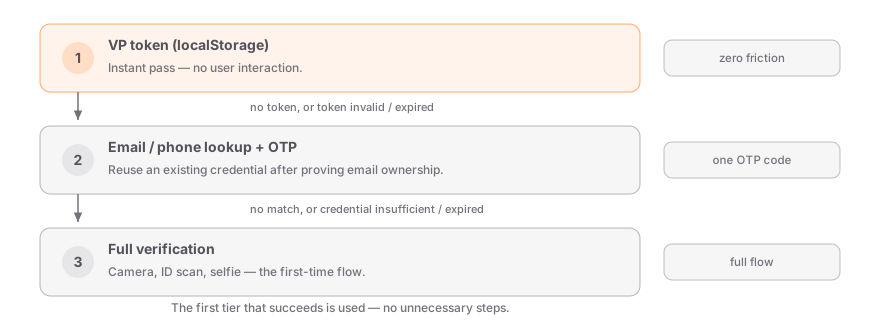
| Tier | User experience | When it's used |
| ---------- | ----------------------------- | ---------------------------------------------------------------------------------- |
| **Tier 1** | Instant — no user interaction | User has a valid VP token in `localStorage` for this origin. |
| **Tier 2** | Email + OTP code | User has verified before (on this or another site) but doesn't have a local token. |
| **Tier 3** | Full camera + ID flow | First-time user, or existing credentials are expired or insufficient. |
## Tier 1: VP tokens
A VP token is a signed JWT stored in the browser's `localStorage`, scoped to the current origin. It is issued automatically after a successful verification and contains:
- A verified person ID (opaque identifier)
- The credential method and age tier
- An expiry timestamp
- A signature from Stile's servers
The lifecycle:
1. User completes a full verification (Tier 3) or the OTP reuse flow (Tier 2).
2. Stile issues a VP token and the widget stores it in `localStorage`.
3. On the next visit, the widget finds the token and sends it to Stile for validation.
4. If valid, the user passes instantly — no camera, no OTP, no friction.
If you orchestrate this yourself, pass the token as `vp_token` when [creating a session](/api-reference/verification-sessions). A malformed, expired, or revoked token returns `400 vp_token_invalid` — treat that as "no token" and fall through to Tier 2.
The VP token is a convenience for fast client-side checks, but your server must always validate
the token by checking the actual credentials in the database — not just the JWT claims. A tampered
token will fail server-side validation.
## Tier 2: Cross-site credential reuse
`localStorage` is scoped per origin: a VP token from `shop-a.com` is not accessible on `shop-b.com`. Cross-site reuse instead works through **email/phone lookup + OTP**:
### User arrives without a token
A user visits `shop-b.com` for the first time. There's no VP token in `localStorage` for this origin, so Tier 1 fails silently.
### User enters their email
The widget collects the address (or your backend passes `email` on session creation).
### Stile finds an existing credential
The credential was created when the user verified on `shop-a.com` and is linked to that email.
### User completes an OTP challenge
A one-time code proves they own the email address — and nothing more (see [OTP is not proof of age](#otp-is-not-proof-of-age)).
### A new VP token is issued for `shop-b.com`
No camera, no ID scan. The next visit passes at Tier 1.
Cross-site credential reuse requires `networkDedup` to be enabled for the receiving organization.
Contact support or enable it in the dashboard.
### Check for an existing credential server-side
Before loading the widget at all, your backend can ask whether the user already holds a credential that meets your bar:
```bash
curl -X POST https://api.stile.id/v1/verified_person/lookup \
-H "Authorization: Bearer stile_sk_..." \
-H "Content-Type: application/json" \
-d '{
"email": "user@example.com",
"min_strength": "document_capture"
}'
```
```ts
const result = await stile.verifiedPersons.lookup({
email: "user@example.com",
min_strength: "document_capture",
max_age: "30",
});
if (result.verified) {
console.log(result.verified_person_id);
console.log(result.credentials);
// [{ method: "MDL", strength: "MDL", verified_at: "...", expires_at: "..." }]
}
```
See the [Verified Person API](/api-reference/verified-person) for the full parameter and response reference.
### Reuse at session creation
You don't have to orchestrate the lookup yourself. Pass the reuse parameters on [`POST /v1/verification_sessions`](/api-reference/verification-sessions) and Stile runs the flow as part of the session:
| Parameter | Effect |
| ------------------ | ---------------------------------------------------------------------------------------- |
| `email` / `phone` | Identifies the user for the credential lookup. |
| `accept_existing` | When `true`, accepts an existing credential instead of requiring a new verification. |
| `min_strength` | Minimum credential strength to accept (see [the ranking](#credential-strength-ranking)). |
| `max_age` | Maximum age of the existing verification, as a duration string — e.g. `"30d"`. |
| `required_methods` | Require ALL of these methods to have been previously verified before reusing. |
If the workflow requires an ownership proof, the session's `requires_email_otp` field is `true` and the user must complete the OTP gate before reuse — otherwise requests fail with `400 email_not_verified` or `400 otp_not_proven`. When no reusable credential matches your filters, session creation returns `400 no_matching_vp`. Repeated `accept_existing` attempts for the same email are rate-limited to 5 per 15-minute window (`429 accept_existing_rate_limited`).
## Email binding
VP tokens are bound to the email address used during verification. This prevents token sharing:
- If user A verifies with `alice@example.com`, their VP token is bound to that email.
- If user B tries to use the same device, a different email triggers re-verification.
- Changing the email on an existing session forces a full Tier 3 verification.
## Credential strength ranking
Not all verification methods carry the same weight. Stile ranks credential methods by strength:
| Rank | Method | Description |
| ---- | ------------------ | -------------------------------------------------- |
| 1 | `self_attestation` | User self-declares their age (weakest). |
| 2 | `facial_age` | AI-based age estimation from a selfie. |
| 3 | `carrier_lookup` | Mobile carrier age check. |
| 4 | `open_banking` | Age derived from bank account data. |
| 5 | `document_capture` | Government-issued ID scan + selfie match. |
| 6 | `mdl` | Mobile driver's license (ISO 18013-5). |
| 7 | `mid` | Mobile identity document. |
| 8 | `eudi_pid` | EU Digital Identity wallet credential (strongest). |
Methods not listed map onto this ranking: `selfie_match` and `selfie_liveness` count at `document_capture` strength; `student` and `parental_consent` count at `self_attestation` strength.
A stronger credential always satisfies a weaker requirement: a user verified with `document_capture` (rank 5) satisfies a request for `self_attestation` (rank 1) without re-verifying. The reverse is never true — a `self_attestation` credential cannot satisfy a `document_capture` requirement, and the user must complete a [step-up verification](#step-up-verification).
## Age tier compatibility
Age tiers follow a strict hierarchy:
```
min_age_21 --> satisfies min_age_18, min_age_16, and min_age_13
min_age_18 --> satisfies min_age_16 and min_age_13
min_age_16 --> satisfies min_age_13
min_age_13 --> satisfies min_age_13 only
```
A credential proving `min_age_21` automatically satisfies any lower requirement. A weaker tier (e.g. `min_age_16`) can never satisfy a stronger one (e.g. `min_age_21`) — that, too, routes the user to a step-up verification.
## Credential expiry
Credentials expire based on jurisdiction compliance rules. The default expiry is **365 days** from the date of verification. When a credential expires:
- Tier 1 (VP token) stops working — the token is rejected during validation.
- Tier 2 (email lookup) finds the credential but sees it's expired.
- The user is routed to Tier 3 for a full re-verification.
Some jurisdictions require shorter credential lifetimes. Stile automatically applies the correct
expiry based on the jurisdiction where the verification was performed.
You can also enforce a stricter recency bar than the credential's own expiry — pass `max_age` at lookup or session creation to refuse credentials older than your policy allows.
## Step-up verification
A valid, non-expired credential can still be insufficient if the new request requires a stronger method or a higher age tier.
**Example**: A user verified with `self_attestation` (rank 1) visits a site that requires `document_capture` (rank 5). Their existing credential doesn't meet the requirement, so they complete a new verification with the stronger method.
After the step-up, the new (stronger) credential replaces the old one. The user now holds a `document_capture` credential that satisfies both `document_capture` and `self_attestation` requirements going forward.
## OTP is not proof of age
A common misconception: completing an OTP challenge does not prove anything about the user's age or identity.
- **OTP proves**: "This person controls this email address."
- **OTP enables**: Reuse of an existing, previously-verified credential.
- **OTP does not prove**: Age, identity, or anything else.
The actual proof always comes from the underlying verification credential (ID scan, facial age estimation, etc.). The OTP is a gate that ensures only the rightful owner of the email can access the credential linked to it.
## Next steps
---
# Desktop → Mobile Handoff
Section: Guides
URL: https://docs.stile.id/guides/device-handoff
> How the widget moves a verification from a desktop to the user's phone when a step needs hardware the desktop doesn't have — automatically.
Some verification steps need hardware a laptop doesn't have — a camera for document capture, NFC for an ePassport, or a wallet app for a mobile driver's license. When that happens, the widget offers a **desktop → mobile handoff**: it shows a QR code, the user continues on their phone, and the desktop picks the result back up. This is built into the widget — you don't implement it — but it surfaces on the session object, so this page explains what's happening and how to observe it.
## How it works
The widget decides when a handoff is needed based on the workflow's methods and the current
device. You don't trigger it; you just see the session move between devices.
1. The user starts verification on their desktop.
2. A step requires mobile hardware (camera, NFC, or a wallet). The widget renders a QR code and a countdown.
3. The user scans it and continues on their phone — the hosted verification page takes over there.
4. While the phone holds the flow, the session is **locked** to that device.
5. On completion, the lock releases and the desktop's poll sees the terminal result.
## Observing it on the session
The session object reflects the handoff state, so a desktop client (or your backend) can render a "continue on your phone" state while the phone is active:
| Field | Meaning |
| ------------------ | --------------------------------------------------------------- |
| `active_device` | `"mobile"` while the phone holds the lock; `null` otherwise. |
| `device_locked_at` | Unix timestamp (seconds) when the current device took the lock. |
The lock clears automatically after a terminal status, an explicit release, or a short idle timeout — so a desktop poll never gets stuck waiting on an abandoned phone session.
The widget polls a lightweight session-status endpoint (authenticated with the session's
`client_secret`) to track the handoff without exposing full session data to the page. If you build
a custom desktop UI, retrieve the session from your backend and read `active_device` the same way.
## Customizing the hosted page
The QR code points at Stile's hosted verification page. If you run the widget through the [Widget SDK](/sdks/widget), the `verify-url` attribute (or `verifyUrl` option) sets which hosted page the QR targets — useful for local development against a non-production verify URL.
The phone-side widget never offers a second handoff (there's nothing to hand off to), so the experience is a single hop: desktop → phone → done.
## Next steps
---
# Trust Reuse
Section: Guides
URL: https://docs.stile.id/guides/trust-reuse
> Accept verifications a user already completed at other Stile operators — verify once, recognized everywhere.
Trust Reuse lets a returning user who already verified at another Stile operator — and explicitly consented to share — pass verification at your application instantly: no camera, no ID upload. This page covers how to enable it, how reused sessions show up in your existing integration, the webhook events involved, and the privacy model behind it.
## What it is
When a user verifies with Stile at one operator, they can opt in to share that verification with other operators on the platform. If that user later shows up at your application, the shared credential satisfies your verification session in place of a fresh verification flow.
This is **opt-in on both sides**:
- The **user** explicitly consents on the success screen of their first verification ("Save my verification for use at other Stile operators")
- The **operator** explicitly opts in in their Trust Reuse settings to _accept_ reused verifications
If either side hasn't opted in, the user goes through the normal verification flow at your application — exactly as they would today.
Trust Reuse is the cross-operator layer. For reuse of a user's own prior verification via VP
tokens or email + OTP lookup, see [Returning User Verification](/guides/returning-users).
## Why use it
- **Lower abandonment** — returning users skip a 60–120 second camera + ID flow
- **Same trust level** — you only accept verifications that match your method, jurisdiction, and recency policy
- **You're not on the hook for someone else's bad data** — you set the acceptance bar (max age, allowed methods, jurisdiction lock); credentials that don't meet your bar fall through to fresh verification automatically
- **Full audit trail** — every accepted grant has its source operator, source credential, method, and timestamps recorded against your org
## Enabling Trust Reuse for your application
In the dashboard, go to **Settings → Trust Reuse**. You'll see:
| Setting | Purpose |
| --------------------------------- | ----------------------------------------------------------------------------------------------------------- |
| **Accept reused verifications** | Master toggle. Off by default — flipping it on requires explicit liability acknowledgement (see below) |
| **Maximum credential age (days)** | Refuse to reuse credentials verified more than this many days ago. Common values: 30, 90, 365. |
| **Same jurisdiction only** | Strongly recommended on. Only accept credentials issued in the same jurisdiction as the requesting session. |
| **Accepted methods** | Leave empty to accept all methods your application is configured for, or pick a specific subset. |
By enabling Trust Reuse, you accept verifications performed by other platform operators as
equivalent to your own. Your organization retains ultimate liability for accepted verifications.
Flipping the master toggle from off → on requires you to explicitly acknowledge this each time.
## How it shows up in your flow
You don't need to change any code to participate. After enabling Trust Reuse:
1. Your existing `POST /v1/verification_sessions` calls work exactly the same — same request, same response shape
2. When the user happens to qualify for reuse, the session is created with `status: "verified"` immediately, instead of `status: "created"` (which would normally wait for the camera flow)
3. The standard `verification_session.verified` webhook fires
4. Optionally, you also receive a `trust_reuse_grant.created` webhook — see below
Look at `session.verification_path` on the retrieved session — it'll be `"trust_reuse"` for reused
sessions vs. the method name (e.g. `"document_capture"`) for fresh verifications.
## Webhook events
Subscribe to these in **Settings → Webhooks** to receive structured signals about Trust Reuse activity affecting your application. They're delivered through your standard [webhook endpoints](/guides/webhooks) and signed like every other event — verify them the same way (see [Webhook verification](/guides/webhook-verification)).
### `trust_reuse_grant.created`
Fires when a reuse grant is created for your application. The `data.object` contains:
```json
{
"object": "trust_reuse_grant",
"id": "trg_...",
"source_org_id": "org_...",
"target_org_id": "org_yours",
"session_id": "vks_...",
"verified_person_id": "vp_...",
"method": "DOCUMENT_CAPTURE",
"age_tier": "MIN_AGE_21",
"strength": "DOCUMENT_CAPTURE",
"granted_at": "2026-05-12T10:00:00Z",
"expires_at": "2027-05-12T10:00:00Z",
"revoked_at": null,
"revoked_reason": null
}
```
You'd typically log this for compliance audit and treat it as equivalent to a fresh `verification_session.verified` event.
### `trust_reuse_grant.revoked`
Fires when an accepted grant is revoked. Common reasons:
- `USER_REVOKED` — the user clicked the revoke link in our notification email
- `USER_REVOKED_CONSENT` — the user pulled all sharing across all operators, which includes your grant
- `ERASURE_REQUEST` — the user was erased from the platform; their verification is gone everywhere
- `TARGET_OPERATOR_REVOKED` — you yourself revoked this grant via the dashboard or API
- `SOURCE_CREDENTIAL_REVOKED` — the source operator removed the underlying credential
You should treat the user as no-longer-verified for future actions. Past sessions are not retroactively invalidated.
### `trust_reuse_consent.revoked_by_user`
Fires when the user revokes their sharing consent platform-wide. Sent to every operator currently holding a derived grant. If your downstream system caches "this user is verified," this is your cue to clear it.
## Revoking access from your side
In **Settings → Trust Reuse → Accepted grants**, you can revoke any individual grant. Revoking does:
- Marks the grant as revoked in our ledger
- Fires `trust_reuse_grant.revoked` to your webhook endpoint (closes the loop with your downstream systems)
- Does **not** invalidate any verification sessions already marked verified — those are historical facts; future reuse with this person won't fire
## What the user sees
After a successful first verification (at any Stile operator), the user sees a single optional checkbox on the success screen:
> Save my verification so other operators don't have to re-verify me.
Default is **unchecked** — they have to actively opt in.
If they do opt in, every time a future operator accepts a reuse grant from their consent, the user gets a transactional email from us:
> Acme Carrier just used your existing Stile verification. If you didn't expect this, click here to revoke their access.
The link in the email is a one-shot signed URL — one click revokes the specific grant, with no login, no password, no account page. They can also "revoke all sharing" from the same email to pull consent platform-wide.
## Operator-to-operator privacy
Trust Reuse is designed so that you can never learn anything about which other operators a user has been verified with **unless the user explicitly tells you** (by getting reused at your application). Specifically:
- You cannot enumerate which users have been verified elsewhere
- A failed reuse attempt (any decline reason) is internally indistinguishable from a user who has never been on the platform — both fall through to fresh verification with identical observable behavior
- The cross-operator anchor table (`verified_persons`) is accessible only via narrow SECURITY DEFINER functions that return existence booleans, not row metadata
## Frequently asked questions
Every grant your application accepts is recorded in your org's audit log — you have full
visibility into who accepted what and when. Each grant also emits `trust_reuse_grant.created`
and `trust_reuse_grant.revoked` webhooks, so you can mirror the activity into your own systems.
Reuse runs entirely within Stile's existing platform compliance model; it doesn't change how
verification data is handled.
You see the method, age tier, strength, source operator id, and timestamps — same as any other
verified session. You don't see the user's name, ID document, or face image — those stay with
the source operator and aren't part of the reuse.
The source operator revokes the credential → we cascade-revoke all derived grants → you receive
`trust_reuse_grant.revoked` with reason `SOURCE_CREDENTIAL_REVOKED`. You should prompt the user
to re-verify on their next action.
Yes. Trust Reuse only applies at session creation time. If your business logic decides this
particular session is high-risk (large transaction, new device, suspicious IP), you can
explicitly create a session with `accept_existing: false` to force fresh verification regardless
of any active grants.
Yes. A `DOCUMENT_CAPTURE` credential satisfies a request for `SELF_ATTESTATION` (because
document capture is strictly stronger), but not vice versa. A `MIN_AGE_21` credential satisfies
a `MIN_AGE_18` request. Recency is independent — a 10-day-old DOCUMENT_CAPTURE won't satisfy
your policy if you set max-age to 7 days.
## Next steps
---
# SDKs
Section: SDKs
URL: https://docs.stile.id/sdks/overview
> Two official SDKs — a frontend widget and a server-side Node.js client — plus a language-agnostic HTTP API for everything else.
Stile ships two official SDKs that split cleanly by where your code runs. A typical integration uses **both**: the widget on the frontend to run the verification flow, and the Node.js client on the backend to create sessions and verify webhooks.
| SDK | Package | Runs | Use it to |
| --------------- | --------------- | ----------- | --------------------------------------------------------------------- |
| **Widget SDK** | `@stile/widget` | The browser | Embed the verification UI — web components plus a JavaScript API. |
| **Node.js SDK** | `@stile/node` | Your server | Call the API with types — create sessions, verify webhook signatures. |
Both SDKs wrap the same [HTTP API](/api-reference/overview). If you work in Python, Ruby, Go, PHP,
or any other language, call the API directly — every endpoint is documented, and webhook
signatures can be verified in any language.
## Widget SDK — `@stile/widget`
The frontend half of an integration. Load `` from the CDN with a single script tag, or install the npm package for the full kit (``, the `` iframe embed, and the `verify()` / `create()` JavaScript APIs). The widget handles the camera, document capture, and the entire verification UI — your page just listens for the result.
```html
```
## Node.js SDK — `@stile/node`
The backend half. A typed, server-only client where every method maps 1:1 to an HTTP endpoint — create sessions, manage webhook endpoints, read events, and verify webhook signatures in one line.
```bash
npm install @stile/node
```
```ts
const stile = new Stile(process.env.STILE_API_KEY!);
```
## Which do I need?
- **Just gating a checkout or signup?** The Widget SDK on the frontend plus a webhook handler on the backend is the whole integration. Start with the [Quickstart](/getting-started/quickstart).
- **Creating sessions from your backend (recommended for production)?** Use the Node.js SDK to mint sessions and hand the `client_secret` to the widget via its `session-url` mode.
- **Not on Node, or building a custom UI?** Use the [HTTP API](/api-reference/overview) directly.
## Next steps
---
# Widget SDK
Section: SDKs
URL: https://docs.stile.id/sdks/widget
> Framework-agnostic web components and JavaScript API for embedding verification in any frontend.
The Stile widget is a drop-in verification UI for any frontend: two framework-agnostic web components plus a programmatic JavaScript API. Load `` from the CDN with a single script tag, or install `@stile/widget` from npm for the full kit — both speak the same auth modes and emit the same events.
## At a glance
| Surface | Distribution | Isolation | Best for |
| ---------------- | --------------------------- | ---------------------------------------------------- | ------------------------------------------------------------ |
| `` | CDN (~7 KB launcher) or npm | iframe — verification UI runs on Stile's hosted page | Tight JS budgets, cross-origin isolation, no build step |
| `` | npm (`@stile/widget`) | In-page Shadow DOM modal — no iframe | Bundler-based apps; instant-open modal via session prefetch |
| `verify()` | npm (`@stile/widget`) | Shadow DOM modal | Promise-based control — open the flow from your own code |
| `create()` | npm (`@stile/widget`) | Shadow DOM, mounts into your container | Fully custom UIs that manage the widget lifecycle themselves |
## Installation
```html
```
The CDN script is a ~7 KB (gzipped) launcher that registers the `` web component. The verification UI itself runs inside an iframe on Stile's hosted page, so the heavy dependencies (camera, barcode scanning, face detection) never load in your page.
```bash
npm install @stile/widget
```
The npm package is the full kit for bundler-based apps: `` (in-page Shadow DOM verification), ``, and the `verify()` / `create()` JavaScript APIs.
## Choose an auth mode
Both components support the same three auth modes. Pick one:
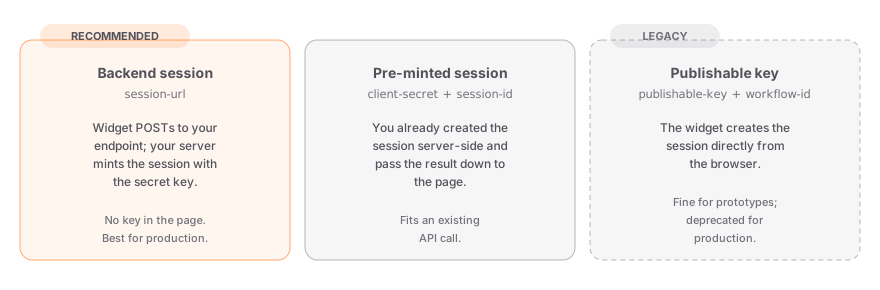
| Mode | Attributes | When to use |
| --------------------------------- | --------------------------------- | ---------------------------------------------------------------------------------------------------------------------------------------------------------------------------------- |
| **Backend session (recommended)** | `session-url` | Your backend mints the session with your secret key. The widget POSTs to your endpoint and opens the modal with the result. No publishable key needed in the page. |
| **Pre-minted session** | `client-secret` + `session-id` | You already created the session server-side (e.g. as part of an existing API call) and pass the result down to the page. |
| **Publishable key (legacy)** | `publishable-key` + `workflow-id` | The widget creates the session directly from the browser. Fine for prototypes and sandbox testing; being phased out for production — responses carry a `Stile-Deprecation` header. |
Every mode needs a **workflow**. [Workflows](/concepts/workflows) are authored and published in the [dashboard](https://dashboard.stile.id/workflows) and carry the use case, target jurisdictions, verification methods, and preferences — compliance is resolved server-side from the workflow, so you never pass products or age tiers from the client.
### The `session-url` contract
In backend-session mode, the widget sends your endpoint a POST with a JSON body and expects the fields from `POST /v1/verification_sessions` back:
```ts title="app/api/start-verification/route.ts"
const stile = new Stile(process.env.STILE_API_KEY!);
export async function POST(req: Request) {
// Widget sends: { workflowId?, email?, jurisdiction? }
const { workflowId, email, jurisdiction } = await req.json();
const session = await stile.verificationSessions.create({
type: "age",
workflow_id: workflowId ?? "wf_YOUR_WORKFLOW_ID",
email,
jurisdiction,
});
// Widget expects: session_id + client_secret (methods / age_tier
// let it render the full step rail instead of a generic fallback)
return Response.json({
session_id: session.id,
client_secret: session.client_secret,
methods: session.methods,
age_tier: session.age_tier,
});
}
```
`` POSTs to `session-url` on mount in the background, so the session is usually ready before the user clicks — the modal opens instantly. If the email or workflow changes after prefetch, the stale session is discarded and re-minted at click time.
## `` — iframe embed
Available via the CDN script or npm. The verification UI runs on Stile's hosted page inside an iframe — your page only loads the ~7 KB launcher. Choose this when your JS budget is tight, your infosec team requires cross-origin isolation for third-party code, or you want camera permissions granted once to Stile's origin instead of per merchant.
```html
```
### Attributes
, blocks form submission until verified.",
},
{
name: "form-field-name",
type: "string",
default: '"stile_session_id"',
description: "Name of the hidden input injected into the parent form after verification.",
},
{
name: "confirmation-url",
type: "string",
description:
"Your endpoint to poll for server-side confirmation. When set, stile:server-confirmed fires once your webhook has confirmed the session.",
},
]}
/>
### Events
| Event | Detail | Description |
| ------------------------ | ------------------------- | ------------------------------------------------------------------------------------------------------ |
| `stile:verified` | `{ sessionId, vpToken? }` | Client-side success signal. Wait for the webhook (or `stile:server-confirmed`) before granting access. |
| `stile:server-confirmed` | — | Fired after the poll against your `confirmation-url` reports the webhook landed. |
| `stile:error` | `{ message: string }` | Verification failed. |
| `stile:cancel` | — | User closed the flow. |
## `` — in-page button
Available via npm (`@stile/widget`). Renders the verification UI directly in your page inside a Shadow DOM modal — no iframe. Same three auth modes and the same event names as ``.
```html
```
### Attributes
, blocks form submission until verification completes. The button shakes if the user tries to submit early.",
},
{
name: "form-field-name",
type: "string",
default: '"stile_session_id"',
description: "Name for the hidden input injected into the parent form after verification.",
},
{
name: "confirmation-url",
type: "string",
description:
"Your endpoint to poll for server-side confirmation after the client-side success signal.",
},
{ name: "label", type: "string", default: '"Verify"', description: "Button text." },
{
name: "verified-label",
type: "string",
default: '"Verified"',
description: "Text shown after successful verification.",
},
{ name: "disabled", type: "boolean", description: "Disable the button." },
]}
/>
### Events
Listen for custom events on the `` element:
| Event | Detail | Description |
| ---------------- | --------------------- | ----------------------- |
| `stile:verified` | `VerifyResult` | Verification succeeded. |
| `stile:error` | `{ message: string }` | Verification failed. |
| `stile:cancel` | — | User closed the modal. |
```js
const btn = document.querySelector("stile-button");
btn.addEventListener("stile:verified", (e) => {
console.log("Verified!", e.detail);
// e.detail.sessionId, etc.
});
btn.addEventListener("stile:error", (e) => {
console.error("Failed:", e.detail.message);
});
btn.addEventListener("stile:cancel", () => {
console.log("User cancelled");
});
```
### Zero-JS redirect flow
For the simplest possible integration, use `success-url` and `cancel-url` to handle verification results without writing any JavaScript:
```html
```
After verification, the user is redirected to `/checkout/complete?session_id=vks_...`. Your server should call `GET /v1/verification_sessions/:id` with your secret key to confirm the result before granting access.
Events (`stile:verified`, `stile:cancel`) still fire before the redirect, so you can combine
redirect URLs with JavaScript event listeners if needed.
### Form integration
When placed inside a `
```
After verification, the form will include these hidden fields automatically:
```html
```
The `required` attribute prevents form submission until the user completes verification. Use `form-field-name` to customize the hidden input name if your backend expects a different field. `` supports the same form gating.
## `verify()` — JavaScript API
For more control, use the `verify()` function from the npm package. It opens a modal, handles the entire flow, and returns a promise.
```ts
const result = await verify({
publishableKey: "stile_pk_...",
workflowId: "wf_YOUR_WORKFLOW_ID",
email: "user@example.com",
});
console.log(result.sessionId);
```
The promise rejects with a `VerifyError` if the user cancels (`error.reason === "cancelled"`) or if verification fails.
## `create()` — Low-level API
For fully custom UIs, use `create()` to manage the widget lifecycle yourself. Create the session on your backend, then mount the widget with the returned `client_secret` and session ID:
```ts
const widget = create({
clientSecret: session.client_secret, // from your backend
sessionId: session.id,
methods: session.methods, // from the same response
ageTier: session.age_tier,
onSuccess: (result) => {
console.log("Verified!", result);
},
onError: (error) => {
console.error("Failed:", error.message);
},
onExpired: () => {
console.log("Session expired");
},
});
widget.mount("#verify-container");
// later: widget.destroy()
```
## Framework examples
The web components work natively in any framework:
```tsx
export function Checkout() {
return (
);
}
```
```vue
```
```svelte
```
```html
```
Web components are supported in all modern browsers. The elements auto-register when the script
loads — no setup required.
## Next steps
---
# Node.js SDK
Section: SDKs
URL: https://docs.stile.id/sdks/node
> The typed Node.js and TypeScript client for the Stile API — resource methods, automatic retries, idempotency, and built-in webhook signature verification.
`@stile/node` is the server-side client for the Stile API. Every method maps 1:1 to an HTTP endpoint, with typed parameters and responses, automatic retries, and built-in webhook signature verification.
The Node.js SDK is a thin convenience wrapper — every method maps 1:1 to an HTTP endpoint
documented in the [HTTP API reference](/api-reference/overview). Use the HTTP API directly if
you're working in Python, Ruby, Go, PHP, or any other language. For webhook signature verification
in any language, see the [verification guide](/guides/webhook-verification).
## Installation
```bash
npm install @stile/node
```
```bash
pnpm add @stile/node
```
```bash
yarn add @stile/node
```
The Node.js SDK is server-only — it authenticates with your secret key, which must never reach the
browser. For frontend integration, use the [Widget SDK](/sdks/widget).
## Initialization
Create a single client instance and reuse it throughout your application. Pass your API key as the first argument — keys are managed at [dashboard.stile.id/api-keys](https://dashboard.stile.id/api-keys).
```ts
const stile = new Stile(process.env.STILE_API_KEY!);
```
Use the same `stile_sk_` secret key everywhere — there's one environment, so there are no separate test and live keys. For building and testing, enable [sandbox mode](/api-reference/overview) on a dedicated testing organization.
## Configuration
The constructor accepts an options object as its second argument:
```ts
const stile = new Stile(process.env.STILE_API_KEY!, {
baseUrl: "https://api.stile.id",
maxRetries: 2, // default, retries on 5xx, network errors, and 429s
timeout: 30_000, // default, 30 seconds
});
```
## Resources
Each resource on the client maps to one section of the HTTP API reference:
| Resource | Methods | Reference |
| ---------------------------- | -------------------------------------------------------------------------------- | ------------------------------------------------------------- |
| `stile.verificationSessions` | `create`, `retrieve`, `cancel`, `list` | [Verification Sessions](/api-reference/verification-sessions) |
| `stile.webhookEndpoints` | `create`, `retrieve`, `update`, `del` (alias `delete`), `list`, `listDeliveries` | [Webhook Endpoints](/api-reference/webhook-endpoints) |
| `stile.events` | `retrieve`, `list` | [Events](/api-reference/events) |
| `stile.compliance` | `check` | [Compliance](/api-reference/compliance) |
| `stile.verifiedPersons` | `lookup` | [Verified Person](/api-reference/verified-person) |
| `stile.webhooks` | `fromRequest`, `constructEvent` | [Webhook verification](/guides/webhook-verification) |
## Verification sessions
### Create a session
Pass the `workflow_id` of a published [workflow](https://dashboard.stile.id/workflows) — it carries the use case, jurisdictions, and verification methods, and the API resolves the required age tier internally based on the user's jurisdiction. Don't pass a `methods` array: methods are configured on the workflow, and the API rejects requests that combine the two.
```ts
const session = await stile.verificationSessions.create({
type: "age",
workflow_id: "wf_YOUR_WORKFLOW_ID",
return_url: "https://yourapp.com/verify/done",
cancel_url: "https://yourapp.com/verify/cancel",
client_reference_id: "user_123",
// Optional: pass delivery address jurisdiction for VPN mismatch detection
delivery_jurisdiction: "US-OR",
});
// session.id — e.g. "vks_abc123"
// session.client_secret — pass to the frontend widget
// session.methods — resolved from the workflow
// session.age_tier — e.g. "min_age_21", resolved from workflow + jurisdiction
// session.expires_at — Unix timestamp (24h from now)
// session.status — "created"
// session.ip_jurisdiction — "US-CA" (detected from IP, if delivery_jurisdiction was set)
// session.jurisdiction_mismatch — true if delivery ≠ IP jurisdiction
```
For the full list of create parameters, see the [Verification Sessions reference](/api-reference/verification-sessions).
To prevent duplicate sessions when a request is retried, pass an idempotency key as the second argument — it's sent as the `Idempotency-Key` header:
```ts
const session = await stile.verificationSessions.create(
{ type: "age", workflow_id: "wf_YOUR_WORKFLOW_ID" },
{ idempotencyKey: "order_12345" },
);
```
Replaying the same key with the same body returns the original response. Reusing the key with a different body fails with a 409 `idempotency_key_reuse` error.
### Retrieve a session
```ts
const session = await stile.verificationSessions.retrieve("vks_abc123");
// Include the full verification results array:
const expanded = await stile.verificationSessions.retrieve("vks_abc123", {
expand: ["results"],
});
```
### Cancel a session
```ts
const session = await stile.verificationSessions.cancel("vks_abc123");
// session.status === "cancelled"
```
### List sessions
```ts
const { data, has_more } = await stile.verificationSessions.list({
limit: 20,
starting_after: "vks_xyz",
status: "verified",
});
```
## Webhook endpoints
Manage webhook endpoints in code, or from the [dashboard](https://dashboard.stile.id/webhooks). `enabled_events` accepts specific [event types](/api-reference/events) or `["*"]` for everything.
Session creation fails with a 400 `webhook_required` error until your organization has at least
one active webhook endpoint. Sandbox organizations are exempt.
### Create an endpoint
```ts
const endpoint = await stile.webhookEndpoints.create({
url: "https://yourapp.com/api/webhooks",
enabled_events: ["verification_session.verified", "verification_session.failed"],
description: "Production webhook",
});
// endpoint.secret — save this to verify signatures
```
### Retrieve, update, delete
The `update` method accepts `url`, `enabled_events`, `status` (`"enabled"` or `"disabled"`), `description`, and `metadata`. `del()` is also exported under the alias `delete()`.
```ts
// Retrieve
const ep = await stile.webhookEndpoints.retrieve("we_abc123");
// Update
await stile.webhookEndpoints.update("we_abc123", {
enabled_events: ["*"],
status: "enabled",
});
// Delete
await stile.webhookEndpoints.del("we_abc123");
```
### List endpoints and deliveries
`listDeliveries` returns the delivery attempts for one endpoint and paginates with `limit` (default 20), `starting_after`, and `ending_before`:
```ts
// List
const { data } = await stile.webhookEndpoints.list();
// List delivery attempts
const { data: deliveries } = await stile.webhookEndpoints.listDeliveries("we_abc123");
```
## Events
Every webhook delivery carries an event, and the events API is the durable record behind it. Treat webhook delivery as the source of truth — poll events only on cold start or for reconciliation. `list` filters by `limit`, `starting_after`, and `type`.
```ts
// Retrieve a single event
const event = await stile.events.retrieve("evt_abc123");
// List events, optionally filtered by type
const { data } = await stile.events.list({
limit: 20,
type: "verification_session.verified",
});
```
## Compliance
Check product-level compliance rules for one or more products in a jurisdiction. Returns per-product details and a most-restrictive merged summary. Useful for checking prohibited products or inspecting compliance details before creating a session.
```ts
// Check what's allowed in the user's jurisdiction
const compliance = await stile.compliance.check({
use_cases: ["alcohol_delivery", "tobacco_nicotine"],
jurisdiction: "US-CA",
});
if (compliance.most_restrictive.any_prohibited) {
// Some products can't be sold here
console.log("Prohibited:", compliance.most_restrictive.prohibited_use_cases);
// Remove prohibited items from the cart or show an error
}
// Create a session — the workflow carries the use case, and the API
// resolves the age tier internally
const session = await stile.verificationSessions.create({
type: "age",
workflow_id: "wf_YOUR_WORKFLOW_ID",
client_reference_id: "order_456",
});
```
If you're using the [widget SDK](/sdks/widget) client-side, the session's workflow resolves
compliance automatically. The server-side flow above is for backends that need to inspect the
rules — e.g. to drop prohibited items from a cart before starting verification.
## Verified persons
Check if a user has been previously verified across any site in the Stile network. Call this from your backend before loading the SDK to skip verification for returning users — see the [Returning Users guide](/guides/returning-users).
```ts
const result = await stile.verifiedPersons.lookup({
email: "user@example.com",
methods: ["document_capture"],
min_strength: "document_capture",
max_age: "30", // days
});
if (result.verified) {
// User already verified — grant access, skip SDK
console.log(result.verified_person_id, result.credentials);
} else {
// Create a session and load the SDK
}
```
The response carries `verified`, `verified_person_id`, and a `credentials` array — each credential has `method`, `strength`, `verified_at`, and `expires_at`, with method and strength values in uppercase (e.g. `"MDL"`). At least one of `email` or `phone` is required.
## Webhook signature verification
Verify incoming webhook signatures to prevent processing spoofed events. Both methods compute the HMAC timing-safe, reject signature timestamps older than 5 minutes, and return the parsed event. The SDK provides two methods:
### `fromRequest()` — for any Web API framework
Works with Next.js, Hono, Cloudflare Workers, Bun, Deno, and any framework using the standard `Request` object:
```ts
export async function POST(req: Request) {
const event = await stile.webhooks.fromRequest(req, process.env.WEBHOOK_SECRET!);
if (event.type === "verification_session.verified") {
console.log("Session verified:", event.data.id);
}
return Response.json({ received: true });
}
```
### `constructEvent()` — low-level
For frameworks that don't use the standard `Request` object, pass the raw body and header directly:
```ts
const event = stile.webhooks.constructEvent(
rawBody, // string or Buffer
signatureHeader, // stile-signature header value
process.env.WEBHOOK_SECRET!,
);
```
JSON body parsers modify the request body before it reaches your handler, which invalidates the
signature. Always pass the raw, unmodified request body.
Both methods throw a `WebhookSignatureError` when verification fails — respond with HTTP 400 when you catch one:
| Code | Meaning |
| -------------------- | ---------------------------------------------------------------- |
| `missing_header` | The request has no `Stile-Signature` header. |
| `invalid_header` | The header is present but malformed. |
| `timestamp_expired` | The signature timestamp is older than the 5-minute tolerance. |
| `signature_mismatch` | The computed HMAC doesn't match — wrong secret or modified body. |
## Error handling
Every API error throws a `StileError` (or a subclass) carrying `type`, `code`, `statusCode`, `param`, and `requestId`:
```ts
try {
await stile.verificationSessions.create({ type: "identity", workflow_id: "wf_..." });
} catch (err) {
if (err instanceof StileAuthenticationError) {
// 401 — invalid or expired API key
} else if (err instanceof StileRateLimitError) {
// 429 — the SDK already retried (maxRetries); back off before trying again
} else if (err instanceof StileError) {
console.error(err.statusCode, err.type, err.code, err.message);
// Include err.requestId when contacting support
}
}
```
| Class | Thrown when | Properties |
| -------------------------- | ------------------------------------------------------------- | ----------------------------------------------------------- |
| `StileError` | Base class for every API error response. | `type`, `code`, `statusCode`, `param`, `requestId` |
| `StileAuthenticationError` | 401 — invalid or expired API key. | Extends `StileError` |
| `StileRateLimitError` | 429 — rate limited after the SDK's automatic retries. | Extends `StileError` |
| `WebhookSignatureError` | Webhook signature verification failed; respond with HTTP 400. | `code` — see [codes above](#webhook-signature-verification) |
For a complete guide to error types, retry strategies, and idempotency, see [Error Handling](/guides/error-handling).
## Next steps
---
# Changelog
Section: More
URL: https://docs.stile.id/changelog
> Notable changes to the Stile API, SDKs, and docs.
Notable customer-facing changes, newest first. Internal fixes and refactors are omitted.
Building with an AI assistant? Point it at the always-current
[`llms-full.txt`](https://docs.stile.id/llms-full.txt) — see [Build with
AI](/getting-started/llms).
## June 2026
**Single environment.** Collapsed test/live into one live environment with a free tier (100 verifications/month by default) and an org-level [sandbox mode](/guides/testing) for testing. Removed the `livemode` field and the `_test_`/`_live_` key prefixes — keys are now just `stile_sk_…` / `stile_pk_…`. Legacy keys keep working.
**Documentation overhaul.** Docs were brought current with the workflow-era API and rebuilt to a fuller standard: new [Concepts](/concepts/workflows) section, [SDK overview](/sdks/overview), diagrams throughout, and machine-readable [`llms.txt`](https://docs.stile.id/llms.txt) / [`llms-full.txt`](https://docs.stile.id/llms-full.txt) / [`openapi.yaml`](https://docs.stile.id/openapi.yaml) for AI tooling.
**Credit-based billing.** Added prepaid cash credits alongside usage billing. The free tier (100 verifications/month by default) covers your first verifications each calendar month; beyond that, usage draws down prepaid credits. Failed verifications are never charged.
## May 2026
**`js.stile.id` CDN.** The widget launcher now ships from a dedicated CDN at `https://js.stile.id/v1/stile.js` — a ~7 KB script that registers [``](/sdks/widget) with the heavy verification UI running inside the hosted iframe.
**Widget `session-url` mode.** The widget can now mint sessions through an endpoint on your backend — the recommended production pattern. The widget POSTs to your `session-url`, your server creates the session with the secret key, and the modal opens with the result. See the [Widget SDK](/sdks/widget).
**Webhook delivery hardening.** Dispatch failures are now surfaced and recovered through the retry scheduler rather than swallowed silently. See [Webhooks](/guides/webhooks).
**Trust Reuse.** Launched cross-operator verification reuse: a user who verified at one operator can, with explicit consent, be recognized at another — no re-verification. See [Trust Reuse](/guides/trust-reuse).
**Returning-user OTP gate.** Added a per-workflow email-OTP gate for returning users, with hybrid VP-token / OTP redemption so reuse is both fast and ownership-proven. See [Returning Users](/guides/returning-users).
**Workflow-first session creation.** Verification sessions now run inside a published [workflow](/concepts/workflows): `POST /v1/verification_sessions` takes a required `workflow_id` and the workflow is the single source of truth for methods, jurisdictions, and the use case. A per-request `methods` array is no longer accepted.