

Testing & Sandbox
Simulate workflows in the built-in Workflow Sandbox, use deterministic test-session fixtures, create simulated sessions with skip_verification, test webhooks through a tunnel, and run the going-live checklist.
Stile has three testing tools, from zero-setup to full end-to-end: the Workflow Sandbox built into every workflow (no configuration, no real sessions), deterministic dashboard fixtures, and an organization-level sandbox mode for API-driven tests. This page explains all three, local webhook testing, CI suites, and the checklist for moving an integration onto a live organization.
Workflow Sandbox — no setup required
Every workflow you build ships with its own sandbox: open the workflow in the dashboard and switch to its Sandbox view. You configure and run it yourself — nothing needs to be enabled for you.
- Simulate a scenario — pick a scenario preset (happy path, fail first, requires input, high risk, or custom per-step outcomes), a jurisdiction, use case, and age tier, and see exactly which path the compiled workflow takes and which outcome it produces.
- Preview the event — each simulated run renders the
verification_session.*event payload your webhook handler would receive (markedpreview_only— nothing is delivered). - Preview the widget experience — the experience preview drives the production widget UI using your device's real camera (the browser will ask for permission). Frames stay local for display only — nothing is uploaded, analyzed, or persisted — so you can see exactly what your users will see, per configuration.
Sandbox runs create no sessions, no events, and no billing — they exercise the compiled workflow logic, not the API. Use them to validate branch routing and jurisdiction overrides before a single real request.
The sandbox does not simulate manual review
There is no held-for-review preset, and a review outcome renders no event preview — the sandbox
covers the paths that terminate on their own. To exercise review routing, the under_review hold,
the session_review.* webhook contract, or an approve/reject decision, use a real session on a
sandbox-mode organization: run the workflow, then adjudicate it from the session page (or flag a
completed session with POST /v1/session_reviews/sessions/{id}/flag).
Sandbox mode
For API-driven tests — real POST /v1/verification_sessions calls, real webhooks, CI suites — Stile runs one API environment and every organization is live by default. Ask Stile support to enable sandbox mode on a dedicated testing organization; it is an organization-level flag, so the base URL and key format do not change. Because each key belongs to one organization, create separate stile_sk_… and stile_pk_… keys for the sandbox and live organizations.
Sandbox is not a second API environment
The retired model had separate test/live keys and request environments. Sandbox is now an
organization behavior flag inside the same API environment. Current keys never include _test_ or
_live_; legacy prefixed keys continue to authenticate for compatibility.
| Sandbox org | Live org | |
|---|---|---|
| Verifications | Real or simulated — skip_verification completes sessions instantly | Real verifications only |
| Webhook endpoint | Optional | Required — at least one active endpoint before sessions can be created |
| Billing | Free, capped at 500 verifications/month | Billed beyond the free tier (100 verifications/month by default) |
Both follow the same per-key rate limit: 1,000 requests/min for secret keys and 100/min for publishable keys. Use a sandbox org for development, CI pipelines, and pre-production testing. Point your integration at a live org when you're ready to verify real users, then follow the going-live checklist.
Sandbox quota
Sandbox mode is capped at 500 verifications per calendar month per organization. When you hit the cap, session creation returns 402 with code test_quota_exceeded; the quota resets on the 1st of the next month. Sandbox verifications are unbilled, so this cap keeps a runaway CI or load test in check — if you need more volume, run those against a live org.
Live orgs require webhooks
Creating a verification session in a live (non-sandbox) organization will fail with
webhook_required if the org has no active webhook endpoints. Register one in the
dashboard or via the Webhook Endpoints
API before going live. Sandbox orgs are exempt.
Deterministic dashboard fixtures
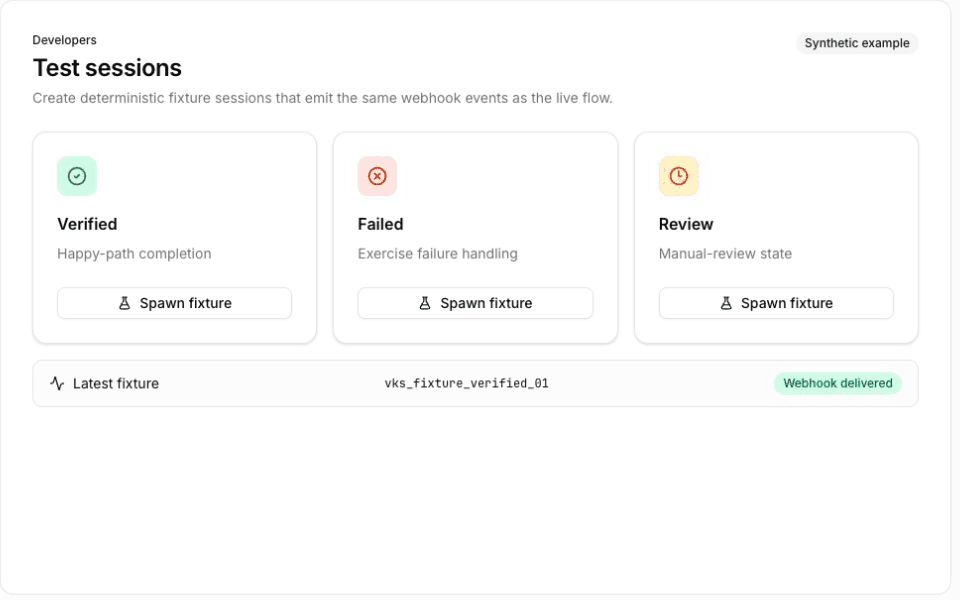
The dashboard's Developers → Test sessions page can create nine deterministic fixture profiles without opening the widget: two verified, four failed, one REQUIRES_INPUT, one cancelled, and one expired. Every fixture creates a session record and emits verification_session.created; the verified, failed, cancelled, and expired profiles also emit their matching terminal session event. This makes the fixtures a fast way to inspect session payloads and exercise those handler branches manually.
The profile labeled Manual review required is a pending-input simulation, not a complete review flow. It leaves the session in REQUIRES_INPUT, creates no review record, and does not emit session_review.flagged. Test review-queue events with a real workflow that routes a session into review.
Use fixtures only in the dedicated sandbox organization. Select a profile, create the session, then open it from the recent list to inspect the session and event records. For automated tests that need to create sessions through your own backend, use skip_verification as described below.
The skip_verification flag
In a sandbox org, pass skip_verification: true when creating a session to skip the entire camera/ID scanning flow. The session transitions straight to verified, fires webhooks, and issues a VP token — all without user interaction.
This is useful for:
- Testing webhook handlers end-to-end
- Validating VP token flows and returning-user logic
- Exercising checkout integrations in CI
- Verifying email binding and OTP behavior
curl -X POST https://api.stile.id/v1/verification_sessions \
  -H "Authorization: Bearer stile_sk_..." \
  -H "Content-Type: application/json" \
  -d '{
    "type": "age",
    "workflow_id": "wf_YOUR_WORKFLOW_ID",
    "email": "test@example.com",
    "skip_verification": true
  }'
const response = await fetch("https://api.stile.id/v1/verification_sessions", {
method: "POST",
headers: {
Authorization: `Bearer ${process.env.STILE_API_KEY}`,
"Content-Type": "application/json",
},
body: JSON.stringify({
type: "age",
workflow_id: "wf_YOUR_WORKFLOW_ID",
email: "test@example.com",
skip_verification: true,
}),
});
const session = await response.json();The response is identical to a real verified session — same shape, same webhook events, same VP token issuance. Whatever you build against it works unchanged against real verifications.
Sandbox only
The skip_verification flag is rejected in a live org — creating a session with
skip_verification: true against a non-sandbox organization returns a 400 with code
parameter_invalid. This is deliberate: there is no way to mint a verified session in a live org
without a real verification.
Local webhook testing
During development your server runs on localhost, which isn't reachable by Stile's webhook infrastructure. Use a tunnel to expose it.
# 1. Start your local server
npm run dev  # listening on port 3000

# 2. In a separate terminal, start ngrok
ngrok http 3000

# 3. Copy the forwarding URL (e.g. https://abc123.ngrok-free.app)
# 4. Register it as a webhook endpoint:
curl -X POST https://api.stile.id/v1/webhook_endpoints \
  -H "Authorization: Bearer stile_sk_..." \
  -H "Content-Type: application/json" \
  -d '{
    "url": "https://abc123.ngrok-free.app/api/webhooks",
    "enabled_events": ["verification_session.verified"]
  }'
# 1. Start your local server
npm run dev # listening on port 3000
# 2. Start the tunnel
cloudflared tunnel --url http://localhost:3000
# 3. Use the generated *.trycloudflare.com URL as your webhook endpointOnce the endpoint is registered, create a session with skip_verification: true to trigger a real, signed verification_session.verified delivery against your local handler — including the Stile-Signature header, so you can test signature verification exactly as it runs in production.
Dashboard shortcut
You can also register webhook endpoints directly in the dashboard instead of using the API.
E2E testing in CI
skip_verification: true is designed for end-to-end suites — it lets you exercise the full integration without camera interactions:
- Session creation and status transitions
- Webhook delivery and signature verification against your real handler
- VP token issuance and returning-user reuse
- Email binding and OTP flows
A typical Playwright/Cypress flow:
- Create a session with
skip_verification: truevia your backend. - Assert your webhook handler marked the order verified.
- Assert your UI unlocked.
Keep an eye on the 500/month sandbox quota if your suite runs on every commit.
Sandbox data hygiene
A few best practices to keep your sandbox organization clean:
- Use unique emails per test run — append a timestamp or UUID (e.g.
test+1712345678@example.com) to avoid collisions with previous runs. - Sandbox sessions expire automatically — the default is 24 hours, but a workflow can configure another session timeout. You don't need to delete abandoned sessions manually.
- Isolate testing in a sandbox org — keep your CI and manual testing in a dedicated sandbox organization, separate from the live org that serves real users.
Going live checklist
When your integration works end-to-end in a sandbox org, work through these steps before pointing it at a live organization.
Point at a live org
Use the stile_sk_… key for your live organization on the server and its stile_pk_… key in the widget. Keys are managed at dashboard.stile.id/api-keys — secret keys are shown once at creation, so store them in your environment, never in code. A live org is billed beyond the free tier (100 verifications/month by default).
Register a webhook endpoint (required)
A live org requires at least one active webhook endpoint before you can create sessions — without one, POST /v1/verification_sessions returns 400 with code webhook_required. Register a public HTTPS URL in the dashboard or via the Webhook Endpoints API, and save the signing secret. See the Webhooks guide for setup and retry behavior.
Verify webhook signatures
Treat the signed webhook — not client-side events — as the source of truth for granting access. Your handler must verify the Stile-Signature header against the raw request body before processing any event. Use the standard-library handler for your stack from Webhook Verification.
Remove skip_verification
Audit your session-creation code paths for skip_verification: true. In a live org the flag is rejected with 400 parameter_invalid, so any leftover sandbox shortcut becomes a hard failure on your first production session. Keep it in test-only configuration that is scoped to the sandbox organization.
Handle 402 and 429 responses
Make sure your error handling covers the billing and rate-limit cases: 402 means test_quota_exceeded in a sandbox org or billing_suspended in a live org; surface these rather than retrying. 429 (rate_limit_exceeded) is retryable: respect the Retry-After header and back off exponentially. Sandbox and live organizations use the same limits (1,000 requests/min for secret keys and 100/min for publishable keys), so validate the retry path before launch. See Error Handling for the full retry policy.