

Integration Guide
Build a production-ready, backend-agnostic integration with server-created sessions, workflows, compliance checks, returning users, mismatch detection, and webhook-gated fulfillment.
This is the production companion to the Quickstart. It covers the decisions that surround the first API call: where policy belongs, how to associate a result with your own transaction, and when verification is strong enough to unlock an action.
All backend examples use the public HTTP API. You can implement the same requests with the standard HTTP client in Node.js, Python, Go, Ruby, PHP, Java, .NET, or any other server platform. No Stile server package is required.
Architecture overview
Every production integration has three trusted boundaries:
- Your browser renders the hosted
<stile-frame>and starts the user experience. - Your server authenticates the user, chooses a published workflow, creates a session, and stores the returned session ID against your own transaction.
- Your webhook handler verifies Stile's signature and atomically applies the result to the matching transaction.
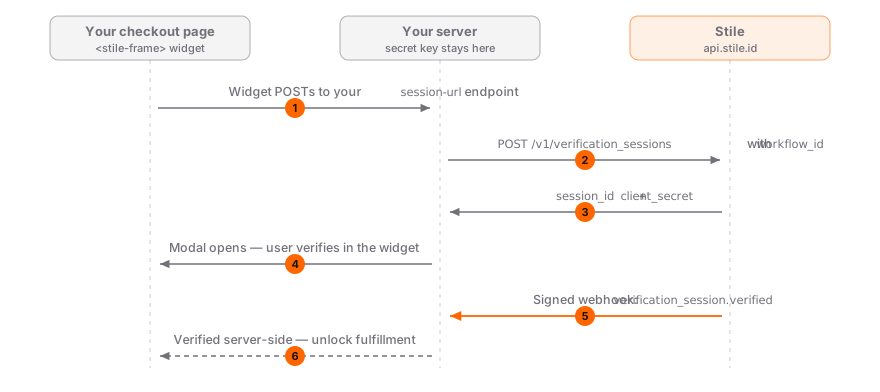
Never trust browser state for fulfillment
stile:verified, redirect parameters, and hidden form values are useful for interface updates,
but they are not proof. Grant access, release an order, or unlock content only from server state
written after a verified webhook.
Recommended session-url flow
The public widget POSTs to an endpoint you control. Your endpoint creates the session and returns only the short-lived fields the widget needs.
<script src="https://js.stile.id/v1/stile.js"></script>

<stile-frame
  mode="modal"
  session-url="/api/start-verification?orderId=order_123"
  workflow-id="wf_YOUR_WORKFLOW_ID"
></stile-frame>
The backend endpoint should perform these operations in order:
- Require your normal authenticated user session.
- Apply a per-user and per-IP rate limit.
- Load the order or action identified by the URL and confirm the user owns it.
- Map that action to an allow-listed, published
workflow_idon the server. POST https://api.stile.id/v1/verification_sessionswith your secret Bearer key and a stableIdempotency-Key.- Set
client_reference_idfrom the server-loaded transaction, not from an arbitrary browser field. - Persist the returned Stile session ID on that transaction.
- Return
{ session_id, client_secret, methods, age_tier }to the widget.
The Quickstart session examples show the exact HTTP request in cURL, Node.js, Python, Go, and PHP.
Keep the secret and policy on your server
Never send STILE_API_KEY to the browser. Treat the widget request body as untrusted context.
Derive identity from your login session, and select workflows from server-owned business rules.
Workflows
Every session requires a published workflow_id. The workflow is the single source of truth for:
- the use case, such as alcohol delivery or account signup;
- target jurisdictions and jurisdiction-specific overrides;
- verification methods and how they compose;
- returning-user preferences;
- session expiry and review behavior.
Do not pass a methods array when you create a workflow-backed session. The API rejects that combination because methods belong to the published workflow.
Create separate workflows for materially different actions. For example, an alcohol checkout and a social account signup usually have different use cases, age tiers, and acceptable methods.
Compliance before session creation
Session creation automatically resolves the workflow's use case against the user's jurisdiction. Use the Compliance API separately when you need product-level decisions before a session exists, such as validating a mixed cart.
curl "https://api.stile.id/v1/compliance/check?use_cases=alcohol_delivery,tobacco_nicotine&jurisdiction=US-CA" \
  --header "Authorization: Bearer $STILE_API_KEY"
The response identifies the most restrictive age tier, allowed methods, and prohibited use cases. Your application decides whether to remove prohibited items, select a different published workflow, or stop checkout.
Do not copy compliance results into session methods
Use compliance results to choose an allow-listed workflow. The workflow still defines the methods used by the session.
Returning users
Pass an authenticated user's email or phone when creating a session. If your workflow allows reuse, Stile can resolve an eligible existing credential instead of asking for a full verification again.
{
  "type": "age",
  "workflow_id": "wf_YOUR_WORKFLOW_ID",
  "email": "authenticated-user@example.com",
  "accept_existing": true,
  "client_reference_id": "order_123"
}
A cached VP token can resolve immediately. Otherwise, Stile may require a one-time code to prove control of the email or phone before reusing an organization-scoped credential. The one-time code proves address ownership, not age or identity.
Credential strength and validity still apply. A 21+ credential can satisfy a 16+ workflow, but a 16+ credential cannot satisfy a 21+ workflow. Expired credentials are not reused.
See Returning Users for the full decision tree and Trust Reuse for consent-based reuse across operators.
Delivery and IP mismatch
If your server knows a delivery jurisdiction, include it when creating the session:
{
  "type": "age",
  "workflow_id": "wf_YOUR_WORKFLOW_ID",
  "delivery_jurisdiction": "US-OR",
  "client_reference_id": "order_123"
}
The response can include ip_jurisdiction and jurisdiction_mismatch. A mismatch is a risk signal, not an automatic block. Decide whether your application should warn the user, request a stronger workflow, route the transaction to review, or block it.
Webhook-gated fulfillment
Use the signed webhook as the source of truth. The safe state transition is:
The browser finishes its flow
Update the interface to show that server confirmation is pending. Do not fulfill yet.
Your server verifies the webhook
Read the exact raw body, verify Stile-Signature, reject stale timestamps, and parse JSON only after verification succeeds.
One transaction applies the result
Claim the unique event.id, match event.data.object.id and client_reference_id to the stored pending transaction, then update its state exactly once.
The browser reads trusted server state
Poll your own backend or use your existing realtime channel. Continue only after your database reflects the webhook-confirmed result.
verify signature against raw request body
event = parse JSON

if event.type == "verification_session.verified":
    session = event.data.object

    begin database transaction
      insert event.id into processed_webhook_events with a unique constraint
      if already present: commit and return 200

      update exactly one pending transaction where:
        transaction.stile_session_id == session.id
        transaction.id == session.client_reference_id
        session.status == "verified"

      if exactly one row was not updated: roll back and return 500
    commit

return 200
Use the Webhook Signature Verification guide for complete Node.js, Python, Go, Ruby, and PHP handlers. Return 400 for invalid signatures. Return 5xx for temporary persistence failures so Stile retries. Return 2xx only after the event is safely persisted or queued.
Error handling and retries
Handle these integration errors explicitly:
| Code | Meaning | Action |
|---|---|---|
webhook_required | A live organization has no enabled webhook endpoint. | Configure and enable an endpoint before creating sessions. |
use_case_prohibited | The workflow's use case is prohibited in the resolved jurisdiction. | Stop the action or select an allowed business path. |
jurisdiction_unresolvable | Stile could not resolve a jurisdiction from the request. | Supply a server-known jurisdiction when your policy permits it. |
accept_existing_rate_limited | Too many returning-user lookup attempts were made for one identifier. | Stop retrying and wait for the limit window to reset. |
test_quota_exceeded | The sandbox organization reached its 500-session monthly cap. | Wait for the next calendar month or use another approved test org. |
For 429, honor Retry-After. Retry network failures and temporary 5xx responses with bounded exponential backoff and jitter. Reuse the same Idempotency-Key for each retry of a session-creation operation.
Data retention and privacy
Stile applies workflow and jurisdiction-specific retention controls to collected PII, document evidence, and biometric data. Treat those settings as implementation controls, not a substitute for your own legal and compliance review.
Store only the Stile identifiers and result fields your application needs. Never log secret API keys, webhook secrets, client_secret, document images, or raw identity payloads.
Production checklist
- The workflow is published and belongs to the intended organization.
- The session endpoint requires authentication, ownership checks, and rate limiting.
- Secret keys, workflow selection, identity, and
client_reference_idstay server-controlled. - Session creation uses a stable
Idempotency-Key, and the returned session ID is persisted. - The browser uses the public CDN
<stile-frame>withsession-url. - The webhook handler reads the raw body and rejects malformed, stale, or mismatched signatures.
- Event claiming and transaction updates happen atomically and are replay-safe.
- Fulfillment depends only on webhook-backed server state.
- Sandbox tests cover retries, invalid signatures, duplicates, ownership failures, and session mismatches.
Next steps
Webhooks Guide
Delivery semantics, retries, signature verification, and local testing.
Error Handling
The full error catalog, error envelope, and retry strategies.
Returning Users
VP tokens, lookup plus OTP, credential validity, and full verification fallback.
Testing
Sandbox mode, deterministic sessions, webhook tests, and the launch checklist.