

Quickstart
Create a production-safe verification flow with a backend session endpoint, the hosted widget, and a signed webhook.
Build the complete production flow: your server creates a session, the hosted widget guides the user through verification, and a signed webhook confirms the result.
Before you start
Create a Stile account, a secret API key (stile_sk_…), and a
workflow. You will publish the workflow in step 1 and create a webhook endpoint—and its one-time
signing secret—in step 4.
How it fits together
Your browser never receives the secret API key, and your application never grants access from a browser event alone:
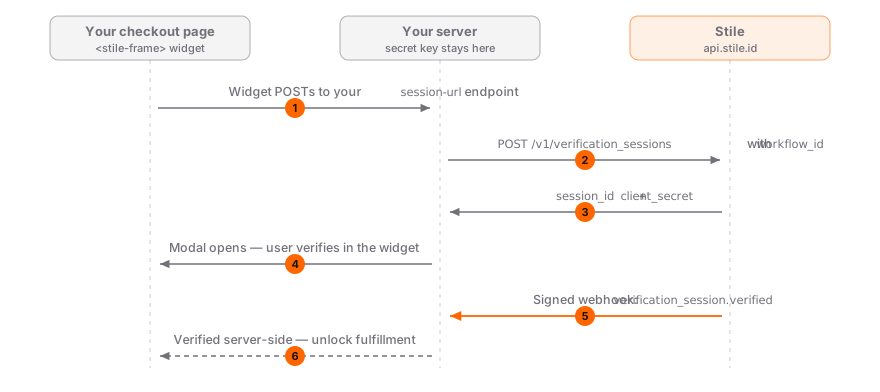
1. Publish a workflow
A workflow defines the use case, target jurisdictions, verification methods, and returning-user preferences for every session that uses it.
Open Workflows, create a workflow for your use case, and select Publish. Copy its wf_… ID.
Add these values to your server environment:
STILE_API_KEY=stile_sk_...
STILE_WORKFLOW_ID=wf_...
Do not prefix any of these variables with NEXT_PUBLIC_ or expose them in client-side code.
2. Create sessions on your server
No Stile server SDK is required. Create an authenticated endpoint in your existing backend, then call the Stile HTTP API with the standard HTTP client for your language.
The examples below all create the same session. Replace the sample values with identity and transaction data loaded on your server.
curl https://api.stile.id/v1/verification_sessions \
  --request POST \
  --header "Authorization: Bearer $STILE_API_KEY" \
  --header "Content-Type: application/json" \
  --header "Idempotency-Key: order:order_123:age-verification" \
  --data '{
    "type": "age",
    "workflow_id": "wf_YOUR_WORKFLOW_ID",
    "email": "customer@example.com",
    "client_reference_id": "order_123"
}'const response = await fetch("https://api.stile.id/v1/verification_sessions", {
method: "POST",
headers: {
Authorization: `Bearer ${process.env.STILE_API_KEY}`,
"Content-Type": "application/json",
"Idempotency-Key": `order:${order.id}:age-verification`,
},
body: JSON.stringify({
type: "age",
workflow_id: process.env.STILE_WORKFLOW_ID,
email: authenticatedUser.email,
client_reference_id: order.id,
}),
});
if (!response.ok) {
throw new Error(`Stile session creation failed: ${response.status}`);
}
const session = await response.json();import json
import os
import urllib.request
body = json.dumps({
"type": "age",
"workflow_id": os.environ["STILE_WORKFLOW_ID"],
"email": authenticated_user.email,
"client_reference_id": order.id,
}).encode("utf-8")
request = urllib.request.Request(
"https://api.stile.id/v1/verification_sessions",
data=body,
method="POST",
headers={
"Authorization": f"Bearer {os.environ['STILE_API_KEY']}",
"Content-Type": "application/json",
"Idempotency-Key": f"order:{order.id}:age-verification",
},
)
with urllib.request.urlopen(request) as response:
session = json.load(response)payload, err := json.Marshal(map[string]string{
"type": "age",
"workflow_id": os.Getenv("STILE_WORKFLOW_ID"),
"email": authenticatedUser.Email,
"client_reference_id": order.ID,
})
if err != nil {
return err
}
req, err := http.NewRequest(
http.MethodPost,
"https://api.stile.id/v1/verification_sessions",
bytes.NewReader(payload),
)
if err != nil {
return err
}
req.Header.Set("Authorization", "Bearer "+os.Getenv("STILE_API_KEY"))
req.Header.Set("Content-Type", "application/json")
req.Header.Set("Idempotency-Key", "order:"+order.ID+":age-verification")
response, err := http.DefaultClient.Do(req)
if err != nil {
return err
}
defer response.Body.Close()
if response.StatusCode < 200 || response.StatusCode >= 300 {
return fmt.Errorf("Stile session creation failed: %s", response.Status)
}
var session map[string]any
if err := json.NewDecoder(response.Body).Decode(&session); err != nil {
return err
}<?php
$payload = json_encode([
"type" => "age",
"workflow_id" => getenv("STILE_WORKFLOW_ID"),
"email" => $authenticatedUser->email,
"client_reference_id" => $order->id,
], JSON_THROW_ON_ERROR);
$request = curl_init("https://api.stile.id/v1/verification_sessions");
curl_setopt_array($request, [
CURLOPT_POST => true,
CURLOPT_POSTFIELDS => $payload,
CURLOPT_RETURNTRANSFER => true,
CURLOPT_HTTPHEADER => [
"Authorization: Bearer " . getenv("STILE_API_KEY"),
"Content-Type: application/json",
"Idempotency-Key: order:" . $order->id . ":age-verification",
],
]);
$body = curl_exec($request);
$status = curl_getinfo($request, CURLINFO_RESPONSE_CODE);
if ($body === false || $status < 200 || $status >= 300) {
throw new RuntimeException("Stile session creation failed with status " . $status);
}
$session = json_decode($body, true, flags: JSON_THROW_ON_ERROR);After the API returns, persist session.id against the user, order, or action being verified. Return only the short-lived widget fields from your endpoint:
{
  "session_id": "vks_abc123",
  "client_secret": "eyJhbGciOiJIUzI1NiJ9...",
  "methods": ["mdl"],
  "age_tier": "min_age_21"
}
Keep policy on the server
Adapt the example's authentication, database model, and rate-limit helpers to your application.
Keep STILE_WORKFLOW_ID on the server; if users can select among several flows, map an
allow-listed product or action to a workflow. Derive identity from the authenticated user, not an
arbitrary browser field. The stable idempotency key makes retries return the original session.
3. Add the hosted widget
Load the widget script and point <stile-frame> at the endpoint you just created:
<script src="https://js.stile.id/v1/stile.js"></script>

<stile-frame
  mode="modal"
  session-url="/api/start-verification?orderId=order_123"
  workflow-id="wf_YOUR_WORKFLOW_ID"
></stile-frame>
Render the real order ID into session-url from your checkout page. The widget POSTs to that exact URL, your server confirms the authenticated user owns the order, and then it returns the session credentials. The workflow-id attribute is included in the JSON request for routing context; your server should validate or ignore it as shown above. Derive identity from the server-side login session instead of accepting an arbitrary email from the browser.
You may listen for stile:verified to update the interface, but never use that browser event to grant access, release an order, or store a verified status.
Sandbox-only browser prototype
A publishable key (stile_pk_…) can create sessions directly from the browser in a sandbox
organization. Live browser-side creation also requires CAPTCHA and is being phased out for
production. Use the session-url flow above for code you intend to ship. The Widget SDK
reference documents every supported mode.
4. Confirm results with a signed webhook
Open Webhooks, add your HTTPS endpoint, subscribe to verification_session.verified, and save the webhook secret as STILE_WEBHOOK_SECRET.
STILE_WEBHOOK_SECRET=whsec_...Verify the Stile-Signature header against the exact raw request body before parsing JSON. The algorithm works in every backend language:
- Parse
tandv1fromStile-Signature: t=...,v1=.... - Reject timestamps more than 300 seconds from the current time.
- Compute lowercase hex
HMAC-SHA256(STILE_WEBHOOK_SECRET, "{t}.{raw_body}"). - Compare the computed value with
v1using a constant-time comparison. - Parse the event only after verification succeeds.
The Webhook Signature Verification guide has standard-library examples for Node.js, Python, Go, Ruby, and PHP, plus the required transactional processing contract.
After verification, process the event with this language-neutral transaction pattern:
if event.type == "verification_session.verified":
    session = event.data.object

    begin database transaction
      insert event.id into processed_webhook_events with a unique constraint
      if event.id already exists: commit and return 200

      update exactly one pending transaction where:
        transaction.stile_session_id == session.id
        transaction.id == session.client_reference_id
        session.status == "verified"

      if exactly one row was not updated: roll back and return 500
    commit

return 200
Return 2xx only after the work is safely persisted or queued. Return 400 for an invalid signature and 5xx for a temporary processing failure so Stile retries. Keep your framework's automatic JSON parser away from this route until after signature verification.
5. Test the complete flow
Ask Stile support to enable sandbox mode on a dedicated testing organization, then run this checklist:
- Load the page and start verification.
- Confirm
POST /api/start-verificationreturnssession_idandclient_secretwithout exposingSTILE_API_KEY. - Confirm an unauthenticated user—or a user who does not own the order—cannot mint a session.
- Retry the session request and confirm the idempotency key returns the same Stile session.
- Complete the hosted flow, or create a deterministic sandbox session with
skip_verification: true. - Confirm your webhook handler accepts a valid signed event and rejects an invalid signature with
400. - Confirm the application changes state only when
event.data.object.idmatches the stored session andclient_reference_idmatches the pending order. - Replay the same event and confirm the database transaction applies the update only once.
Sandbox sessions are unbilled and capped at 500 per calendar month. Live organizations require at least one enabled webhook endpoint before session creation succeeds.
Before granting access
Match the webhook's session ID to the user, order, or action you originally created it for. Verify the event type and session status, then apply the result once. A valid signature proves Stile sent the event; your own record association proves it belongs to this transaction.
Next steps
Production integration
Add compliance checks, returning users, mismatch detection, and webhook-gated fulfillment.
Test safely
Use sandbox sessions, deterministic results, webhook tunnels, and the launch checklist.
Verify webhooks
Verify signatures in five languages, then apply the required transaction checks.
Build with AI
Give a coding agent the docs corpus and a production-safe integration prompt.