

Workflows
A workflow is the dashboard-configured recipe every verification session runs inside — it decides the use case, the methods, the jurisdictions, and the outcome.
Every verification session runs inside a workflow. A workflow is a recipe you author and publish in the dashboard: it carries the use case, the verification methods to offer, the jurisdictions you operate in, and the preferences that shape each check. Your server passes a workflow_id when it creates a session, and Stile resolves everything else from the published workflow — so compliance, method selection, and age tiers are decided server-side, never in your frontend.
Why a workflow, not per-request parameters
Putting the verification recipe in a workflow means you change it in one place — the dashboard —
without shipping code. It's also why POST /v1/verification_sessions requires workflow_id and
rejects a per-request methods array: the published workflow is the single source of truth
for which methods run.
What a workflow carries
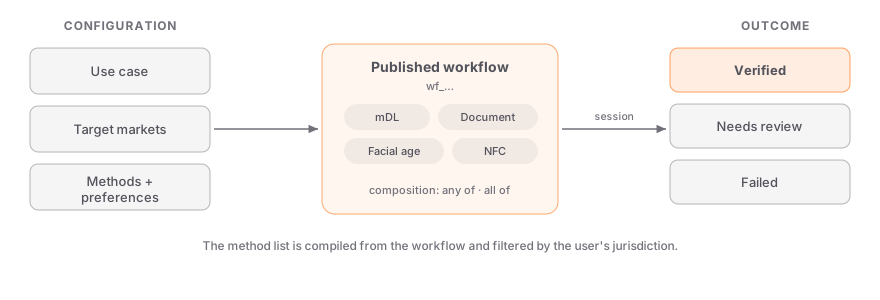
| Element | What it controls |
|---|---|
| Use case | The product or context being gated (e.g. alcohol delivery). Drives the compliance rule and the required age tier. |
| Target jurisdictions | The markets you operate in. The method list is filtered per jurisdiction at session time. |
| Methods | Which verification methods the session may offer. |
| Composition | Whether the user completes one primary method or all of them (see below). |
| Preferences | Tuning such as the liveness strategy and when a face match is required. |
| Outcome | The terminal state — verified, failed, or routed to manual review (with a configurable fail-closed auto-reject window, default 72h). |
The session's methods array is compiled from this configuration and the compliance rule for the user's detected jurisdiction — for example, mDL is dropped automatically in markets that don't recognize digital driver's licenses, even if the workflow lists it.
Two ways to build a workflow
Workflows come in two modes. Most integrations only ever need the first.
The simple workflow editor includes a Market map rail for inspecting how its selected states resolve. The dashboard does not expose a separate Compliance section or the old generic “Preview as” controls. Stile still applies the current jurisdiction rules when each session starts; use the Compliance API when you need to inspect verification-time resolution outside the editor.
A simple workflow starts from the rule-accepted baseline for your use case and target markets, then lets you curate it: add methods, remove methods, and set per-jurisdiction overrides for markets that need a different mix. It's the fastest path to a compliant flow and covers the large majority of use cases.
Per-jurisdiction overrides let one workflow serve many markets — e.g. accept mDL everywhere it's recognized, fall back to document capture where it isn't.
A node-based workflow is a visual graph for flows that need branching. You wire together verification steps, branch nodes that route on conditions (the previous step's result, risk level, age tier, jurisdiction, or your own session metadata), and terminal status nodes (verified, failed, or review).
Reach for this when the path through verification should change based on what happens mid-flow — for example, escalating to a stronger method when a risk signal fires, or routing borderline documents to your own reviewers via the Review outcome (its auto-reject timeout is configured on the node).
Review, document, and liveness controls
- Review outcome — any path can terminate in Review: the session is held (
under_review), your team adjudicates it from the session page, and an undecided review auto-rejects after the window configured on the Review node (default 72 hours, up to 7 days). Decisions firesession_review.*andverification_session.*webhooks; see the manual-review contract. - Accepted document types — on a document-capture step, leave all types unchecked to accept any; when some are checked, the widget's document picker only offers those types and the server rejects off-list documents at verification time.
- Liveness-only workflows — a workflow can consist of just a liveness check ("is this a real, live person" — no ID collected, nothing stored to match against) when the liveness step uses the certified engine. The lower-assurance built-in challenge can't anchor a workflow on its own.
Method composition
In a simple workflow, composition decides how the primary methods relate:
- Any of (default) — the user picks one primary method, and passing it verifies the session. Best for choice and conversion.
- All of — the user must complete every primary method in the flow. Best for high-assurance use cases that stack independent checks.
Supplementary layers — liveness, face match, and passive checks such as IP analysis, device risk, and geolocation — are added on top of the primary chain. In simple workflows, all_of gates primary methods only. In eligible linear node-based workflows, active biometric steps can also gate completion (all_active internally). Passive checks can enrich or branch the flow, but they never gate completion or act as standalone proof methods.
Publishing and versioning
A workflow only takes effect once it's published. Sessions always run the published version, so you can edit a draft freely without affecting live traffic, then publish when you're ready. The workflow_id you pass at session creation always resolves to the current published version.
Test your workflow before going live
Create sessions in a sandbox organization (with skip_verification for end-to-end webhook
testing) before pointing live traffic at the workflow. See Testing & Sandbox.
Using a workflow
Pass the published workflow's ID when you create a session — that's the only required field beyond type:
curl https://api.stile.id/v1/verification_sessions \
  -H "Authorization: Bearer stile_sk_..." \
  -H "Content-Type: application/json" \
  -d '{ "type": "age", "workflow_id": "wf_YOUR_WORKFLOW_ID" }'
const session = await stile.verificationSessions.create({
type: "age",
workflow_id: "wf_YOUR_WORKFLOW_ID",
});The widget takes the same workflow-id attribute, or resolves it through your session-url endpoint — see the Widget SDK.
Next steps
Verification Methods
The full menu of methods a workflow can offer, and how strong each one is.
Quickstart
Publish a workflow and wire up the widget in three steps.
Verification Sessions API
Create, retrieve, and list the sessions a workflow produces.
Compliance API
Inspect the rules a workflow's use case resolves to in a given jurisdiction.