

Widget SDK
The public hosted frame, its session contract, and the private-preview in-page widget APIs.
The public Stile widget is <stile-frame>, a framework-agnostic web component loaded from js.stile.id. The repository also contains an in-page <stile-button> and programmatic JavaScript APIs, but @stile/widget is currently a private preview package rather than a public npm release.
Use the CDN for public integrations today
@stile/widget is marked private in the staging monorepo and is not installable from the public npm
registry. External integrations should use the CDN-hosted <stile-frame>. The button, verify(),
and create() sections below are retained as private-preview reference for approved consumers and
should not be generated into a public integration unless package access has been confirmed.
At a glance
| Surface | Distribution | Isolation | Best for |
|---|---|---|---|
<stile-frame> | Public CDN (~7 KB launcher) | iframe — verification UI runs on Stile's hosted page | External integrations, cross-origin isolation, no build step |
<stile-button> | Private @stile/widget preview | In-page Shadow DOM modal — no iframe | Approved preview consumers; instant-open modal via prefetch |
verify() | Private @stile/widget preview | Shadow DOM modal | Approved preview consumers needing promise-based control |
create() | Private @stile/widget preview | Shadow DOM, mounts into your container | Approved preview consumers building a custom UI |
Installation
<script src="https://js.stile.id/v1/stile.js"></script>The CDN script is a ~7 KB (gzipped) launcher that registers the <stile-frame> web component. The verification UI itself runs inside an iframe on Stile's hosted page, so the heavy dependencies (camera, barcode scanning, face detection) never load in your page.
@stile/widget is not published to public npm. If Stile has granted your organization preview access, follow the package-access instructions supplied with that preview; otherwise use the CDN integration above.
Choose an auth mode
Both components support the same three auth modes. Pick one:
Try it — live demo
The frame below is the production widget UI running in demo mode: click through a document-capture flow that always passes. No camera opens, no API is called, and nothing you do is collected — capture and processing steps are simulated on a timer.
The same UI runs inside <stile-frame> / <stile-button> and on the hosted verify page; only the transport differs. To exercise a real end-to-end flow against your own workflow (real sessions, webhooks, and events), use the Workflow Sandbox or a sandbox organization.
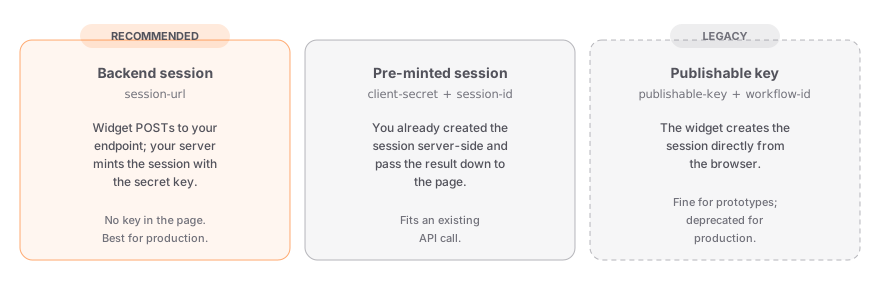
| Mode | Attributes | When to use |
|---|---|---|
| Backend session (recommended) | session-url | Your backend mints the session with your secret key. The widget POSTs to your endpoint and opens the modal with the result. No publishable key needed in the page. |
| Pre-minted session | client-secret + session-id | You already created the session server-side (e.g. as part of an existing API call) and pass the result down to the page. |
| Publishable key (legacy) | publishable-key + workflow-id | The widget creates the session directly from the browser. Fine for prototypes and sandbox testing; being phased out for production — responses carry a Stile-Deprecation header. |
Every mode needs a workflow. Workflows are authored and published in the dashboard and carry the use case, target jurisdictions, verification methods, and preferences — compliance is resolved server-side from the workflow, so you never pass products or age tiers from the client.
The session-url contract
In backend-session mode, the widget sends your endpoint a POST with a JSON body and expects the fields from POST /v1/verification_sessions back:
export async function POST(req: Request) {
  // Widget may send: { workflowId?, email?, jurisdiction? }.
  // Treat those values as hints, not authorization or policy.
  const user = await requireAuthenticatedUser(req);
  const actionId = new URL(req.url).searchParams.get("actionId") ?? "";
  const action = await requireOwnedPendingAction(user.id, actionId);

  const response = await fetch("https://api.stile.id/v1/verification_sessions", {
    method: "POST",
    headers: {
      Authorization: `Bearer ${process.env.STILE_API_KEY}`,
      "Content-Type": "application/json",
      "Idempotency-Key": `action:${action.id}:age-verification`,
    },
    body: JSON.stringify({
      type: "age",
      workflow_id: process.env.STILE_WORKFLOW_ID!,
      email: user.email,
      client_reference_id: action.id,
    }),
  });
  if (!response.ok) throw new Error(`Stile returned ${response.status}`);
  const session = await response.json();

  await saveStileSessionId(action.id, session.id);

  // Widget expects: session_id + client_secret (methods / age_tier
  // let it render the full step rail instead of a generic fallback)
  return Response.json({
    session_id: session.id,
    client_secret: session.client_secret,
    methods: session.methods,
    age_tier: session.age_tier,
  });
}
This example uses /api/start-verification?actionId=... as the session-url; the server validates that the authenticated user owns the pending action before creating anything. Apply your normal rate limit to the route. Keep workflow and jurisdiction policy on your server, derive identity from the login session, persist the returned Stile session ID, and use a stable idempotency key. The Quickstart shows the complete database and webhook transaction.
<stile-button> POSTs to session-url on mount in the background, so the session is usually ready before the user clicks — the modal opens instantly. If the email or workflow changes after prefetch, the stale session is discarded and re-minted at click time.
<stile-frame> — iframe embed
Publicly available through the CDN script; approved private-preview consumers can also import the component from @stile/widget. The verification UI runs on Stile's hosted page inside an iframe — your page only loads the ~7 KB launcher. Choose this when your JS budget is tight, your infosec team requires cross-origin isolation for third-party code, or you want camera permissions granted once to Stile's origin instead of per merchant.
<script src="https://js.stile.id/v1/stile.js"></script>

<!-- "modal" renders a trigger button that opens the iframe in an overlay -->
<stile-frame
  mode="modal"
  session-url="/api/start-verification?actionId=action_123"
  workflow-id="wf_YOUR_WORKFLOW_ID"
></stile-frame>
Attributes
| Parameter | Type | Description |
|---|---|---|
variant | "brand" | "light" | "dark" | Button style for the modal trigger. brand (default) is the orange fill with white text; light is a bordered white surface with the full-colour lockup; dark is the Stile navy fill. All render as a full-width “Verify with stile” payment-style bar. |
session-url | string | Backend-session mode (recommended). URL the frame POSTs to for session creation. See the session-url contract above. |
client-secret | string | Pre-minted-session mode. The session's client secret. Pair with session-id. |
session-id | string | Pre-minted-session mode. The vks_... session ID. Pair with client-secret. |
publishable-key | string | Publishable-key (legacy) mode. Your stile_pk_ key. Pair with workflow-id. |
workflow-id | string | ID of the published workflow (wf_...). Required in session-url and publishable-key modes. |
methods | string | Pre-minted mode only: comma-separated methods from the session creation response, so the iframe renders the workflow's full step rail. |
age-tier | string | Pre-minted mode only: the age_tier from the session creation response. |
email | string | Pre-fills the user's email and powers returning-user lookup. |
jurisdiction | string | Override IP-based jurisdiction detection (e.g. "US-OR"). |
mode | "inline" | "modal"= "inline" | inline embeds the iframe in place; modal renders a trigger button that opens the iframe in a full-screen overlay. |
label | string= "Verify" | Trigger button text (modal mode). |
verified-label | string= "Verified" | Trigger button text after successful verification (modal mode). |
min-height | number= 400 | Initial iframe height in px, before the first resize message. |
required | boolean | When present inside a <form>, blocks form submission until verified. |
form-field-name | string= "stile_session_id" | Name of the hidden input injected into the parent form after verification. |
confirmation-url | string | Your endpoint to poll for server-side confirmation. When set, stile:server-confirmed fires once your webhook has confirmed the session. |
Events
| Event | Detail | Description |
|---|---|---|
stile:verified | { sessionId, vpToken? } | Client-side success signal. Wait for the webhook (or stile:server-confirmed) before granting access. |
stile:review | { sessionId, message } | The session is held for manual review. Keep fulfillment paused; this is not a failure or a verification. |
stile:server-confirmed | { sessionId } | Fired after the poll against your confirmation-url reports the webhook-backed state as verified. |
stile:error | { message: string } | Verification failed. |
stile:cancel | — | User closed the flow. |
When a session is held for review, the modal stays open on a neutral "under
review" screen and polls for the decision (every 5 seconds for the first 90,
then every 30 seconds for up to 15 minutes) — an approval within that window
flips the open tab to verified on its own. If the user closes the modal, the
trigger renders a neutral "In review" card instead of a retry, and no
stile:cancel fires (the flow already settled via stile:review). The
decision always also arrives on your backend via the session_review.* and
verification_session.* webhooks.
<stile-button> — in-page button
Button styles
Both <stile-button> and <stile-frame>'s modal trigger render as a "Verify with stile" bar that fills its container — cap the width the same way you would a Stripe payment button: with a wrapper, or with the --stile-button-max-width custom property (it inherits through the shadow boundary). Height is fixed; width is the responsive axis. Pick the variant that matches your surface — these are the real components:
brand — orange fill, white action, ink lockup (default)light — for light merchant surfacesdark — for dark merchant surfaces<!-- Cap with a wrapper (the Stripe pattern)… -->
<div style="max-width: 420px">
<stile-button session-url="/api/start-verification" variant="dark"></stile-button>
</div>
<!-- …or with the custom property -->
<stile-frame
mode="modal"
session-url="/api/start-verification"
variant="light"
style="--stile-button-max-width: 420px"
></stile-frame>The default brand variant uses white action text on the orange fill — a deliberate payment-bar aesthetic whose text contrast sits below the WCAG AA threshold (the button's accessible name is carried by aria-label, not the visible text). If your accessibility bar requires AA contrast on the trigger's visible label, use the light or dark variant — both pass.
Available in the private @stile/widget preview. It renders the verification UI directly in your page inside a Shadow DOM modal — no iframe. Same three auth modes and the same event names as <stile-frame>.
<stile-button
  session-url="/api/start-verification?actionId=action_123"
  workflow-id="wf_YOUR_WORKFLOW_ID"
  email-selector="#checkout-email"
></stile-button>
Attributes
| Parameter | Type | Description |
|---|---|---|
variant | "brand" | "light" | "dark" | Button style for the modal trigger. brand (default) is the orange fill with white text; light is a bordered white surface with the full-colour lockup; dark is the Stile navy fill. All render as a full-width “Verify with stile” payment-style bar. |
session-url | string | Backend-session mode (recommended). URL the button POSTs to for session creation. Prefetched on mount for an instant click. |
client-secret | string | Pre-minted-session mode. Pair with session-id. |
session-id | string | Pre-minted-session mode. Pair with client-secret. |
publishable-key | string | Publishable-key (legacy) mode. Pair with workflow-id. |
workflow-id | string | ID of the published workflow (wf_...). Required in session-url and publishable-key modes. |
email-selector | string | CSS selector for an email input on the page. The button reads its value automatically. |
email | string | Pass the email directly instead of using a selector. |
jurisdiction | string | Override IP-based jurisdiction detection (e.g. "US-OR"). |
success-url | string | URL to redirect to after successful verification. The session ID is appended as a query parameter (e.g. "/done?session_id=vks_..."). |
cancel-url | string | URL to redirect to if the user cancels verification. |
required | boolean | When present inside a <form>, blocks form submission until verification completes. The button shakes if the user tries to submit early. |
form-field-name | string= "stile_session_id" | Name for the hidden input injected into the parent form after verification. |
confirmation-url | string | Your endpoint to poll for server-side confirmation after the client-side success signal. |
label | string= "Verify" | Button text. |
verified-label | string= "Verified" | Text shown after successful verification. |
disabled | boolean | Disable the button. |
Events
Listen for custom events on the <stile-button> element:
| Event | Detail | Description |
|---|---|---|
stile:verified | VerifyResult | Client-side success. Wait for webhook-backed confirmation before fulfillment. |
stile:review | { sessionId, message } | Held for manual review; keep fulfillment paused. |
stile:server-confirmed | { sessionId } | The merchant confirmation endpoint returned { "status": "verified" }. |
stile:error | { message: string } | Verification failed, including a confirmation endpoint returning { "status": "failed" }. |
stile:cancel | — | User closed the modal. |
const btn = document.querySelector("stile-button");

btn.addEventListener("stile:verified", (e) => {
  console.log("Verified!", e.detail);
  // e.detail.sessionId, etc.
});

btn.addEventListener("stile:error", (e) => {
  console.error("Failed:", e.detail.message);
});

btn.addEventListener("stile:cancel", () => {
  console.log("User cancelled");
});
The confirmation-url contract
Set confirmation-url when you want the component to wait for your server's webhook-backed state. After stile:verified, the widget makes a GET request with the session ID appended as ?sessionId=vks_... and expects JSON:
{ "status": "verified" }Return { "status": "pending" } while the webhook has not been applied, { "status": "verified" } after your database transaction confirms it, or { "status": "failed" } after a terminal failure. The widget begins polling after 2 seconds, backs off to a 60-second interval, and has no hard timeout by default.
export async function GET(request: Request) {
  const user = await requireAuthenticatedUser(request);
  const sessionId = new URL(request.url).searchParams.get("sessionId");

  const order = await db.order.findFirst({
    where: { userId: user.id, stileSessionId: sessionId ?? "" },
    select: { status: true },
  });
  if (!order) return Response.json({ error: "Not found" }, { status: 404 });

  return Response.json({
    status: order.status === "ready_for_fulfillment" ? "verified" : "pending",
  });
}
Authenticate this endpoint and only expose the state of a session owned by the current user. It must read your database state written by the signed webhook—not trust a session ID supplied by the browser as proof.
Zero-JS redirect flow
For the simplest possible integration, use success-url and cancel-url to handle verification results without writing any JavaScript:
<stile-button
  session-url="/api/start-verification"
  workflow-id="wf_YOUR_WORKFLOW_ID"
  success-url="/checkout/complete"
  cancel-url="/cart"
></stile-button>
After verification, the user is redirected to /checkout/complete?session_id=vks_.... Treat that query parameter as untrusted. The destination should look up the matching transaction in your database and wait for the signed webhook to mark it verified. Use GET /v1/verification_sessions/:id only as a server-side reconciliation fallback.
Events (stile:verified, stile:cancel) still fire before the redirect, so you can combine
redirect URLs with JavaScript event listeners if needed.
Form integration
When placed inside a <form>, the button automatically injects hidden inputs after verification:
<form action="/api/place-order" method="POST">
  <input name="email" type="email" />
  <input name="address" type="text" />

  <stile-button
    session-url="/api/start-verification"
    workflow-id="wf_YOUR_WORKFLOW_ID"
    email-selector="[name=email]"
    required
  ></stile-button>

  <button type="submit">Place Order</button>
</form>
After verification, the form will include these hidden fields automatically:
<input type="hidden" name="stile_session_id" value="vks_..." />
<input type="hidden" name="stile_verified" value="true" />
The required attribute prevents form submission until the user completes verification. Use form-field-name to customize the hidden input name if your backend expects a different field. <stile-frame> supports the same form gating.
Hidden fields are not proof
stile_session_id and stile_verified are browser-controlled form values. Use them only to find
a candidate transaction. Before granting access or fulfilling an order, require the signed
webhook-backed state in your database and confirm the stored session belongs to the authenticated
user or order.
verify() — JavaScript API
For approved private-preview integrations, verify() opens a modal, handles the entire flow, and returns a promise.
import { verify } from "@stile/widget";

const result = await verify({
  publishableKey: "stile_pk_...",
  workflowId: "wf_YOUR_WORKFLOW_ID",
  email: "user@example.com",
});

console.log(result.sessionId);| Parameter | Type | Description |
|---|---|---|
publishableKey | string | Your publishable key. The widget creates the session from the browser (legacy mode). |
workflowId | string | ID of the published workflow. Required when publishableKey is set — the workflow carries the use case, jurisdictions, and method preferences. |
clientSecret | string | Pre-created session mode: the client_secret from your backend. Pair with sessionId; publishableKey and workflowId are not needed. |
sessionId | string | Pre-created session mode: the vks_... session ID. Pair with clientSecret. |
methods | string[] | Pre-created session mode: pass the methods array from the session creation response so the widget renders the workflow's full step rail. |
ageTier | string | Pre-created session mode: the age_tier from the session creation response (e.g. "min_age_21"). |
email | string | The user's email address. |
jurisdiction | string | Override the auto-detected jurisdiction. |
returnUrl | string | WIDGET-CREATED sessions only. Where the hosted page returns the user after a redirect flow. Defaults to the current page's origin + path — the query string and fragment are deliberately stripped so ambient tokens are never uploaded. Set this if your return route needs specific parameters. It is copied into the session only while the widget creates one with a publishable key: if you pre-create the session yourself (the recommended clientSecret/sessionId mode), this option has NO effect and you must set `return_url` in your server-side session-creation request instead. |
onPostReviewOutcome | (outcome) => void | Called if the still-open modal later observes a reviewer's decision. Receives { verified, sessionId?, credentialHash?, message? }. Manual review settles the promise immediately (see below), so this callback is the ONLY programmatic signal for the eventual approval or rejection. |
The promise rejects with a VerifyError if the user cancels (error.reason === "cancelled") or if verification fails.
Manual review
If the workflow routes the session to manual review, the promise rejects immediately with error.reason === "review" — the hold is not a failure, so classify it separately from a decline:
import { verify, VerifyError } from "@stile/widget";

try {
  const result = await verify({
    clientSecret,
    sessionId,
    // Fires later, if the modal is still open when a reviewer decides.
    onPostReviewOutcome: (outcome) => {
      // { verified: boolean, sessionId?, credentialHash?, message? }
      updateOrder(outcome.verified ? "verified" : "failed");
    },
  });
  release(result.sessionId);
} catch (error) {
  // `catch` is `unknown` under strict TypeScript — narrow before reading
  // `reason`, and let anything that is not a VerifyError fall through.
  if (!(error instanceof VerifyError)) throw error;
  if (error.reason === "review") {
    // Held for a human. The decision arrives on your webhook endpoint
    // (session_review.approved / .rejected, then the terminal
    // verification_session.* event) — and on onPostReviewOutcome above if
    // the user keeps the modal open.
    markPendingReview();
  } else if (error.reason === "cancelled") {
    markAbandoned();
  } else {
    markFailed();
  }
}
Treat your webhook endpoint as authoritative: the user can close the modal at any point, and onPostReviewOutcome only fires while it is open.
create() — Low-level API
For approved private-preview integrations building fully custom UIs, create() manages the widget lifecycle. Create the session on your backend, then mount the widget with the returned client_secret and session ID:
import { create } from "@stile/widget";

const widget = create({
  clientSecret: session.client_secret, // from your backend
  sessionId: session.id,
  methods: session.methods, // from the same response
  ageTier: session.age_tier,
  onSuccess: (result) => {
    console.log("Verified!", result);
  },
  onError: (error) => {
    console.error("Failed:", error.message);
  },
  onExpired: () => {
    console.log("Session expired");
  },
  onReview: (data) => {
    // Held for manual review — not a failure. `data` may be
    // { sessionId?, message? }; settle your UI on "pending".
    console.log("Held for review:", data?.message);
  },
  // Optional: the workflow's "Accepted document types" allow-list. When
  // non-empty, the document picker only offers these; the server enforces
  // the same list at /document/finish regardless. Hosted-page and
  // <stile-frame> integrations get this automatically from the workflow.
  // The creation response carries the workflow's accepted-document list in
  // metadata (the top-level field exists only on the verify-page context
  // endpoint) — read it from there or the picker will offer types the server
  // rejects at finish.
  allowedDocumentTypes: session.metadata?.allowed_document_types,
});

widget.mount("#verify-container");
// later: widget.destroy()
Framework examples
The web components work natively in any framework:
export function Checkout() {
  return (
    <stile-frame
      mode="modal"
      session-url="/api/start-verification"
      workflow-id="wf_YOUR_WORKFLOW_ID"
    />
  );
}<template>
<stile-frame
  mode="modal"
  session-url="/api/start-verification"
  workflow-id="wf_YOUR_WORKFLOW_ID"
/>
</template><stile-frame
mode="modal"
session-url="/api/start-verification"
workflow-id="wf_YOUR_WORKFLOW_ID"
/><stile-frame
mode="modal"
session-url="/api/start-verification"
workflow-id="wf_YOUR_WORKFLOW_ID"
></stile-frame>Web components are supported in all modern browsers. The elements auto-register when the script loads — no setup required.
Next steps
Quickstart
Go from zero to your first verified session in minutes.
Node.js private preview
Mint sessions behind your session-url endpoint and verify webhooks server-side.
Webhooks
Treat webhook delivery as the source of truth before granting access.
Integration guide
The full end-to-end flow: session creation, widget, webhook, unlock.
Public failure reasons
Document verification declines and failed-session polling expose optional code and
category fields alongside the user-facing message. These fields propagate through
onError, VerifyError, <stile-frame> and <stile-button> error events, and hosted
redirect returns. Existing event names and the reason: "error" discriminator remain
compatible; use category to distinguish an intentional decline from a technical failure.
frame.addEventListener("stile:error", ({ detail }) => {
  statusElement.textContent = detail.message;
  if (detail.code === "document_expired") {
    // Ask the applicant to use a current document in a new verification.
  }
});
Public codes include document_expired, document_unreadable,
document_type_not_supported, selfie_face_mismatch, and document_unverified.
verification_declined is the fallback when a more specific cause is unavailable.
verification_processing_error has category technical_error; decline codes have
category verification_declined. Fields may be absent on older servers or other
error paths. Always retain a message fallback and tolerate new codes.
A decline is not proof of fraud. Public messages omit detector rules, scores, and identity data. A failed session is terminal: a useful reason does not make that same session retryable. Browser events and redirect parameters are informational; confirm outcomes through your backend before granting access.
Terminal failures remain visible inside the verification flow until the applicant
selects Close or dismisses the modal. The error event still fires immediately;
the launch button does not repeat the failure text. Closing that result screen
does not cancel the already-completed session. In hosted redirect flows, the
failure return happens after dismissal so the applicant can read the result first.
Startup, token, and expiry errors also appear inside the flow, rather than replacing
the launch button. Inline integrations show the result within their container.
Recoverable capture errors retain their existing retry controls. verify() keeps
its promise pending for these errors and calls the optional onError callback;
<stile-button> and <stile-frame> emit stile:error with detail.terminal: false
for recoverable errors while allowing a later successful retry. Final failure events
include detail.terminal: true. Closing a recoverable error emits stile:cancel;
closing a terminal result does not. Terminal failures reject the promise immediately and keep the
result visible until dismissal.
For custom create() integrations, provide onClose to dismiss your container.
An onError payload with terminal: true means the widget is displaying the final
result; keep it mounted until dismissal. VerifyError.terminal carries the same
flag for verify() consumers. Hosted redirects include error_terminal=true or
error_terminal=false; handleVerifyReturn() preserves it on VerifyError.terminal
and removes the parameter from the URL. Older redirects without this parameter
leave the flag undefined.
Document camera selection
Document capture prefers a standard rear camera when the browser exposes a recognizable camera label. If multiple cameras are available after permission is granted, the camera selector lets the applicant choose another lens. The selected camera is reused for the front and back of the document during the current flow. Selfie capture continues to use the front camera.
Available lenses and their names depend on the device and browser. A website cannot guarantee the phone's native “1x” lens on every iOS or Android device; unnamed cameras retain the browser's rear-camera default until the applicant chooses one. Camera selection does not apply digital zoom or change document verification requirements.